Adrenox Connect
अपडेट किया गया
वर्तमान वर्शन
1728994472
संसाधन

Adrenox Connect पर अपनी मोबाइल डेटा सीमा पार करने को अलविदा कहें और छोटी स्क्रीन की सीमाओं से मुक्त होकर बड़े डिस्प्ले के लाभों का अनुभव करें। अब, आप अपने कीबोर्ड और माउस का उपयोग करके फुल-स्क्रीन मोड में टॉपर्स क्लैन की शक्ति का अनुभव कर सकते हैं। MEmu Play में वे सभी बेहतरीन सुविधाएँ हैं जिनकी आप अपेक्षा करते हैं: त्वरित इंस्टॉलेशन और आसान सेटअप, सहज नियंत्रण, बैटरी की आवश्यकता नहीं, और कोई डेटा या कॉल समय सीमा नहीं। नया MEmu 9 आपके कंप्यूटर पर Adrenox Connect का उपयोग करने के लिए सबसे अच्छा विकल्प है। हमारा मालिकाना मल्टी-इंस्टेंस मैनेजर एक साथ दो या अधिक खातों को चलाने का समर्थन करता है। इससे भी महत्वपूर्ण बात यह है कि हमारा अनूठा इम्यूलेशन इंजन आपके कंप्यूटर के प्रदर्शन का पूरा उपयोग करता है, जिससे एक सहज और निर्बाध अनुभव मिलता है।
और दिखाएं
डाउनलोड करें Adrenox Connect पीसी पर MEmu एंड्रॉयड एमुलेटर के साथ बड़े पर्दे पर खेलने का आनंद लें। Adrenox Connect is Mahindra's connected SUV solution that keeps you connected to your vehicle.
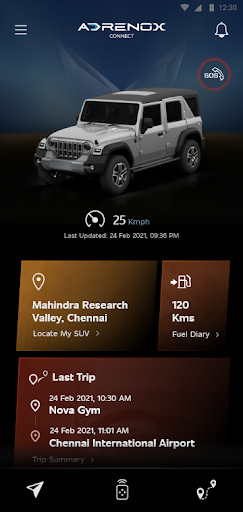
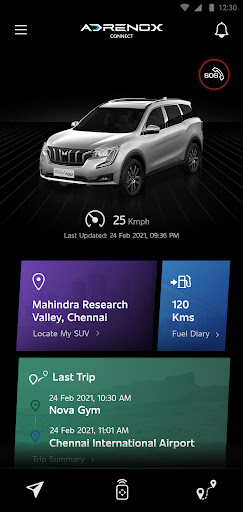
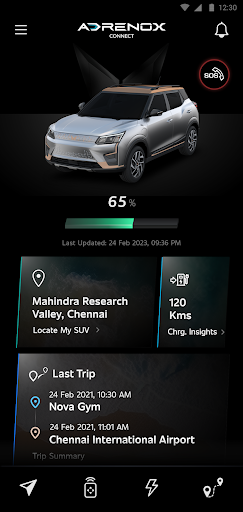
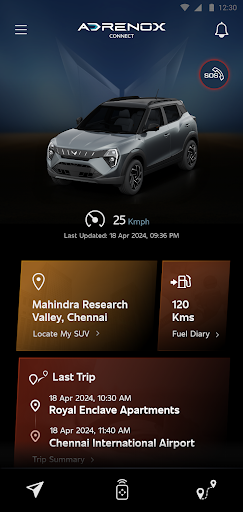
Adrenox Connect is Mahindra's connected SUV solution that keeps you connected to your vehicle.
Adrenox Connect opens a whole new way of experience using your smartphone!
Get ready to dial up the adrenaline with Intelligent technology at your fingertips. Track your vehicle in real-time, lock & unlock it and also turn on the AC remotely and much more – All possible with just a few taps on your smartphone and smartwatch screen.
Alerts
Vehicle Information
Remote Functions
Safety Functions
Location Based Services
Partner Apps
Step to use Wear OS:
1. Download "Adrenox Connect" app in phone & login to app with given credentials
2. Connect Smart watch to phone via "Wear OS" app
3. Open Play Store in Smart Watch & Search for "Adrenox Connect" app
4. Download "Adrenox Connect" app and install in Smart Watch
5. Open "Adrenox Connect" app in smart watch after successful login from mobile app
6. Splash, Home, Read Screen can be viewed on the Smart watch
और दिखाएं

1. MEmu इंस्टॉलर को डाउनलोड करें और इंस्टॉलेशन को पूरा करें

2. MEmu शुरू करें फिर होमपेज पर Google Play खोलें

3. Google Play में Adrenox Connect खोजें
Install
4. Adrenox Connect डाउनलोड कर इंस्टॉल करें
5. इंस्टॉल पूरा होने पर आइकन दबाएं

6. MEmu का उपयोग करके अपने कंप्यूटर पर Adrenox Connect का अनुभव करें
MEmu Play सबसे बेहतरीन मुफ़्त Android एमुलेटर है और 5 करोड़ लोग पहले ही इसके शानदार Android ऐप अनुभव का आनंद ले चुके हैं। MEmu 9 वर्चुअलाइज़ेशन तकनीक आपको अपने PC पर हज़ारों Android ऐप्स, यहाँ तक कि सबसे ज़्यादा ग्राफ़िक्स वाले ऐप्स भी, आसानी से चलाने की सुविधा देती है।
असीमित बैटरी या मोबाइल डेटा के साथ बेहतर ग्राफिक्स के साथ बड़ी स्क्रीन; लंबी अवधि।
कीबोर्ड और माउस या गेमपैड के उत्तम नियंत्रण के लिए संपूर्ण कीमैपिंग का समर्थन करता हैं।
एक ही पीसी पर मल्टी-इंस्टेंस मैनेजर के साथ एक समय में कई गेम खाते या कार्य कर सकते हैं।
Use Adrenox Connect on PC by following steps: