aiScriber: AI Speech To Text
अपडेट किया गया
वर्तमान वर्शन
24.10.160
संसाधन

aiScriber: AI Speech To Text पर अपनी मोबाइल डेटा सीमा पार करने को अलविदा कहें और छोटी स्क्रीन की सीमाओं से मुक्त होकर बड़े डिस्प्ले के लाभों का अनुभव करें। अब, आप अपने कीबोर्ड और माउस का उपयोग करके फुल-स्क्रीन मोड में टॉपर्स क्लैन की शक्ति का अनुभव कर सकते हैं। MEmu Play में वे सभी बेहतरीन सुविधाएँ हैं जिनकी आप अपेक्षा करते हैं: त्वरित इंस्टॉलेशन और आसान सेटअप, सहज नियंत्रण, बैटरी की आवश्यकता नहीं, और कोई डेटा या कॉल समय सीमा नहीं। नया MEmu 9 आपके कंप्यूटर पर aiScriber: AI Speech To Text का उपयोग करने के लिए सबसे अच्छा विकल्प है। हमारा मालिकाना मल्टी-इंस्टेंस मैनेजर एक साथ दो या अधिक खातों को चलाने का समर्थन करता है। इससे भी महत्वपूर्ण बात यह है कि हमारा अनूठा इम्यूलेशन इंजन आपके कंप्यूटर के प्रदर्शन का पूरा उपयोग करता है, जिससे एक सहज और निर्बाध अनुभव मिलता है।
और दिखाएं
MEmu Play के साथ PC पर aiScriber: AI Speech To Text इस्तेमाल करने के शानदार अनुभव का आनंद लें। यह एक शक्तिशाली मुफ़्त Android एमुलेटर है जो आपको डेस्कटॉप वर्ज़न के लिए हज़ारों Android ऐप्स उपलब्ध कराता है। दोस्तों से जुड़ने और अपने काम को और भी बेहतर बनाने का आनंद लें! Advanced speech AI:.
Advanced speech AI:
• AI-powered speech recognition and transcription
• Speech-to-Text uses model adaptation to improve the accuracy of frequently used words, expand the vocabulary available for transcription, and improve transcription from noisy audio.
• Pre-trained models for transcription.
Support for 125 languages and variants:
• Speech-to-Text also offers users more accurate and globe-spanning translation and recognition, the next generation of universal speech models.
• Training on millions of hours of audio and 28 billion sentences of text spanning 100+ languages.
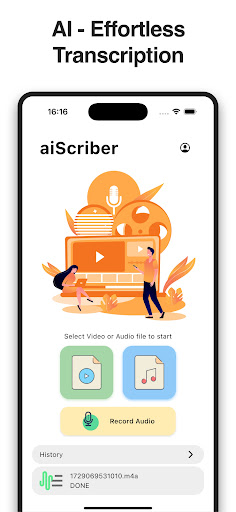
Effortless Transcription, Powerful Results:
• Unleash Format Freedom: Transcribe virtually any video or audio format you throw at it - MP4, AVI, MOV, MKV and the list goes on!
• Audio Made Easy: Handle your most common audio files like MP3, WAV, AAC, FLAC, OPUS, and more with ease.
• Recording: Record your speech and then transcribe it in to text
Get Crystal-Clear Text, Fast:
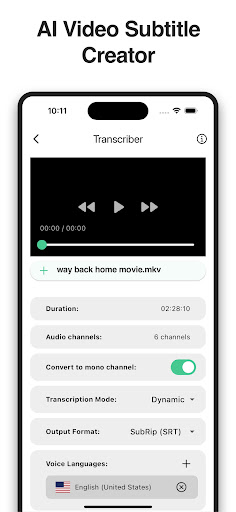
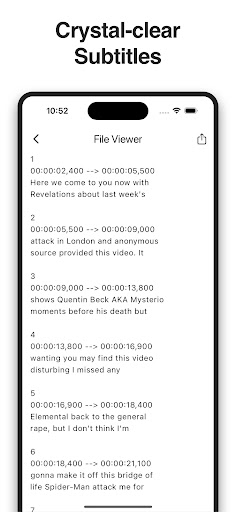
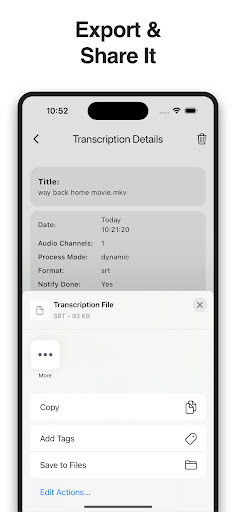
• Industry-Standard Output: Save your transcribed text in the formats everyone loves - SubRip (.srt) and WebVTT (.vtt) - perfect for subtitles or further editing.
Subtitle Creator:
• This magic app uses cutting-edge AI to instantly convert your videos into crystal-clear subtitles. Save your subtitles in the formats everyone loves. Export your subtitles with ease and use them for anything you need!
Simplicity is Key:
• Clean & Intuitive Design: aiScriber boasts an interface so user-friendly, your grandma could use it (and probably will to transcribe those old family videos!).
• Streamlined Workflow: Focus on what matters - getting things done quickly and efficiently.
Download aiScriber today and unlock the future of audio and video transcription!
और दिखाएं

1. MEmu इंस्टॉलर को डाउनलोड करें और इंस्टॉलेशन को पूरा करें

2. MEmu शुरू करें फिर होमपेज पर Google Play खोलें

3. Google Play में aiScriber: AI Speech To Text खोजें
Install
4. aiScriber: AI Speech To Text डाउनलोड कर इंस्टॉल करें
5. इंस्टॉल पूरा होने पर आइकन दबाएं

6. MEmu का उपयोग करके अपने कंप्यूटर पर aiScriber: AI Speech To Text का अनुभव करें
MEmu Play सबसे बेहतरीन मुफ़्त Android एमुलेटर है और 5 करोड़ लोग पहले ही इसके शानदार Android ऐप अनुभव का आनंद ले चुके हैं। MEmu 9 वर्चुअलाइज़ेशन तकनीक आपको अपने PC पर हज़ारों Android ऐप्स, यहाँ तक कि सबसे ज़्यादा ग्राफ़िक्स वाले ऐप्स भी, आसानी से चलाने की सुविधा देती है।
असीमित बैटरी या मोबाइल डेटा के साथ बेहतर ग्राफिक्स के साथ बड़ी स्क्रीन; लंबी अवधि।
कीबोर्ड और माउस या गेमपैड के उत्तम नियंत्रण के लिए संपूर्ण कीमैपिंग का समर्थन करता हैं।
एक ही पीसी पर मल्टी-इंस्टेंस मैनेजर के साथ एक समय में कई गेम खाते या कार्य कर सकते हैं।
Use aiScriber: AI Speech To Text on PC by following steps: