
Anikoto
अपडेट किया गया
वर्तमान वर्शन
1.0.0
संसाधन

Anikoto पर अपनी मोबाइल डेटा सीमा पार करने को अलविदा कहें और छोटी स्क्रीन की सीमाओं से मुक्त होकर बड़े डिस्प्ले के लाभों का अनुभव करें। अब, आप अपने कीबोर्ड और माउस का उपयोग करके फुल-स्क्रीन मोड में टॉपर्स क्लैन की शक्ति का अनुभव कर सकते हैं। MEmu Play में वे सभी बेहतरीन सुविधाएँ हैं जिनकी आप अपेक्षा करते हैं: त्वरित इंस्टॉलेशन और आसान सेटअप, सहज नियंत्रण, बैटरी की आवश्यकता नहीं, और कोई डेटा या कॉल समय सीमा नहीं। नया MEmu 9 आपके कंप्यूटर पर Anikoto का उपयोग करने के लिए सबसे अच्छा विकल्प है। हमारा मालिकाना मल्टी-इंस्टेंस मैनेजर एक साथ दो या अधिक खातों को चलाने का समर्थन करता है। इससे भी महत्वपूर्ण बात यह है कि हमारा अनूठा इम्यूलेशन इंजन आपके कंप्यूटर के प्रदर्शन का पूरा उपयोग करता है, जिससे एक सहज और निर्बाध अनुभव मिलता है।
और दिखाएं
MEmu Play के साथ PC पर Anikoto इस्तेमाल करने के शानदार अनुभव का आनंद लें। यह एक शक्तिशाली मुफ़्त Android एमुलेटर है जो आपको डेस्कटॉप वर्ज़न के लिए हज़ारों Android ऐप्स उपलब्ध कराता है। दोस्तों से जुड़ने और अपने काम को और भी बेहतर बनाने का आनंद लें! Anikoto is an anime discovery app created for fans who want to explore anime titles and learn more about them through structured information and official trailers.
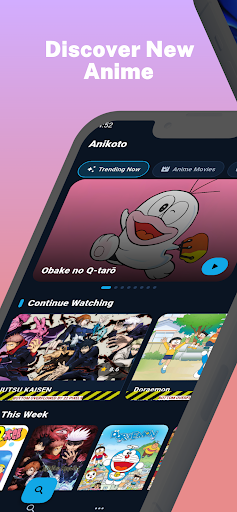
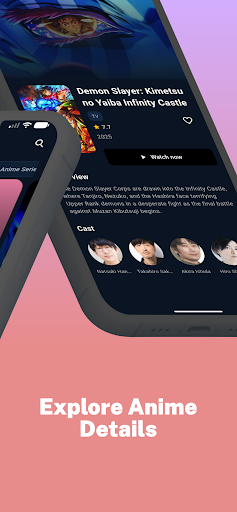
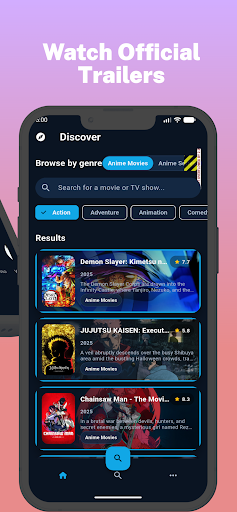
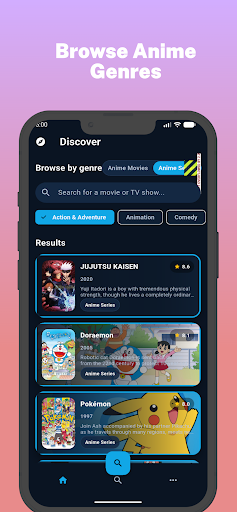
Anikoto is an anime discovery app created for fans who want to explore anime titles and learn more about them through structured information and official trailers.
With Anikoto, you can browse a variety of anime series, read short summaries, and preview stories through trailers. The app offers a smooth and minimal interface that makes it easy to navigate and discover new anime.
Whether you enjoy action-packed adventures, fantasy worlds, or lighthearted comedy anime, Anikoto helps you explore different titles and stay informed about popular and interesting series.
Key Features
Anime Discovery
Browse anime titles across multiple genres and categories.
Anime Details
Access summaries and general information about each anime.
Official Trailers
Watch trailers to preview anime stories and characters.
Search Function
Find anime quickly using the built-in search tool.
User-Friendly Design
Simple and clean interface for easy navigation.
Anikoto is designed to give anime fans a simple way to discover and explore anime content.
Disclaimer
Anikoto does not host, stream, or provide anime episodes.
The application provides anime information and official trailers for informational purposes only.
All trademarks, images, and anime-related content belong to their respective copyright owners.
और दिखाएं

1. MEmu इंस्टॉलर को डाउनलोड करें और इंस्टॉलेशन को पूरा करें

2. MEmu शुरू करें फिर होमपेज पर Google Play खोलें

3. Google Play में Anikoto खोजें
Install
4. Anikoto डाउनलोड कर इंस्टॉल करें
5. इंस्टॉल पूरा होने पर आइकन दबाएं

6. MEmu का उपयोग करके अपने कंप्यूटर पर Anikoto का अनुभव करें
MEmu Play सबसे बेहतरीन मुफ़्त Android एमुलेटर है और 5 करोड़ लोग पहले ही इसके शानदार Android ऐप अनुभव का आनंद ले चुके हैं। MEmu 9 वर्चुअलाइज़ेशन तकनीक आपको अपने PC पर हज़ारों Android ऐप्स, यहाँ तक कि सबसे ज़्यादा ग्राफ़िक्स वाले ऐप्स भी, आसानी से चलाने की सुविधा देती है।
असीमित बैटरी या मोबाइल डेटा के साथ बेहतर ग्राफिक्स के साथ बड़ी स्क्रीन; लंबी अवधि।
कीबोर्ड और माउस या गेमपैड के उत्तम नियंत्रण के लिए संपूर्ण कीमैपिंग का समर्थन करता हैं।
एक ही पीसी पर मल्टी-इंस्टेंस मैनेजर के साथ एक समय में कई गेम खाते या कार्य कर सकते हैं।
Use Anikoto on PC by following steps: