Class 9 All NCERT Solutions
अपडेट किया गया
वर्तमान वर्शन
6.40
संसाधन

Class 9 All NCERT Solutions पर अपनी मोबाइल डेटा सीमा पार करने को अलविदा कहें और छोटी स्क्रीन की सीमाओं से मुक्त होकर बड़े डिस्प्ले के लाभों का अनुभव करें। अब, आप अपने कीबोर्ड और माउस का उपयोग करके फुल-स्क्रीन मोड में टॉपर्स क्लैन की शक्ति का अनुभव कर सकते हैं। MEmu Play में वे सभी बेहतरीन सुविधाएँ हैं जिनकी आप अपेक्षा करते हैं: त्वरित इंस्टॉलेशन और आसान सेटअप, सहज नियंत्रण, बैटरी की आवश्यकता नहीं, और कोई डेटा या कॉल समय सीमा नहीं। नया MEmu 9 आपके कंप्यूटर पर Class 9 All NCERT Solutions का उपयोग करने के लिए सबसे अच्छा विकल्प है। हमारा मालिकाना मल्टी-इंस्टेंस मैनेजर एक साथ दो या अधिक खातों को चलाने का समर्थन करता है। इससे भी महत्वपूर्ण बात यह है कि हमारा अनूठा इम्यूलेशन इंजन आपके कंप्यूटर के प्रदर्शन का पूरा उपयोग करता है, जिससे एक सहज और निर्बाध अनुभव मिलता है।
और दिखाएं
डाउनलोड करें Class 9 All NCERT Solutions पीसी पर MEmu एंड्रॉयड एमुलेटर के साथ बड़े पर्दे पर खेलने का आनंद लें। Get Best Ncert Solutions of Ncert books of Class 9 , Ncert Exemplar Solutions , RD Sharma Solutions , RS Aggarwal Solutions , S chand Solutions .
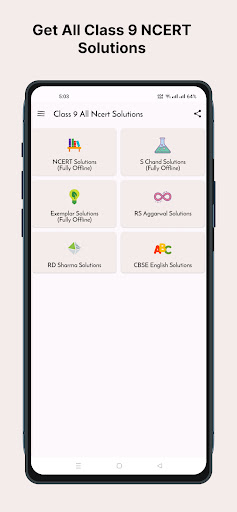
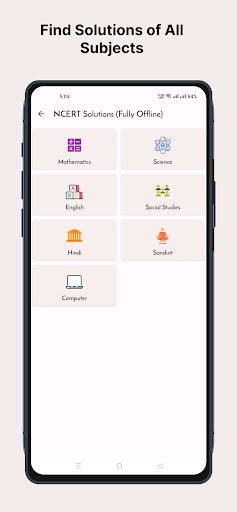
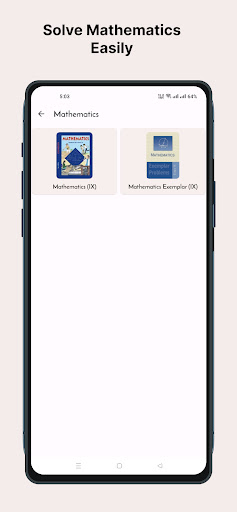
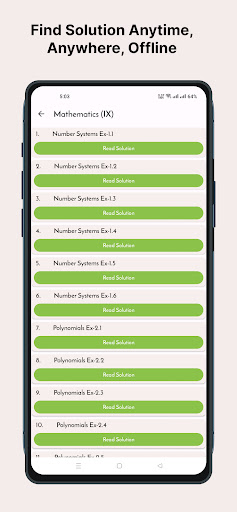
Get Best Ncert Solutions of Ncert books of Class 9 , Ncert Exemplar Solutions , RD Sharma Solutions , RS Aggarwal Solutions , S chand Solutions
Books covered in NCERT Solutions of Class 9 are -
Mathematics :-
1. Mathematics NCERT
2. Maths Exemplar English
English:-
1. Beehive
2. Moments
3. Literature Reader
4. Main Course Book
5. Workbook- Communicative
Science:-
1. Science NCERT
2. Science Exemplar
Hindi:-
1. Kshtij
2. Sparsh
3. Kritika
4. Sanchayan
Social Studies:-
1. Democratic Politics
2. Contemporary India
3. Economics
4. India and the Contemporary World-I
Unique Features of This App:-
* All NCERT Solutions of Class 9
* RS Aggarwal Solutions of Class 9
* RD Sharma Solutions of Class 9
* S Chand Class 9 (Chemistry and Physics) .
* Super Offline Mode : Once Downloaded No Internet Connection Required.
* Very Small Pdf Size and Fast Downloading of all solutions.
* Fully Offline Solutions
* In Built fast pdf Reader for smooth reading.
* Very Easy to use Interface and with category wise solutions.
* Help your friends by sharing screenshot directly.
The Solutions in this app are very helpful in for preparation of exams like:
- School Exams and Tests
- CBSE Board & All State Board Exam
- Doing Homework easily
Source of Information:- https://ncert.nic.in/
Disclaimer : This app is not affiliated with, endorsed by, or sponsored by any government agency or organisation. It does not represent or facilitate services provided by any government entity.
और दिखाएं

1. MEmu इंस्टॉलर को डाउनलोड करें और इंस्टॉलेशन को पूरा करें

2. MEmu शुरू करें फिर होमपेज पर Google Play खोलें

3. Google Play में Class 9 All NCERT Solutions खोजें
Install
4. Class 9 All NCERT Solutions डाउनलोड कर इंस्टॉल करें
5. इंस्टॉल पूरा होने पर आइकन दबाएं

6. MEmu का उपयोग करके अपने कंप्यूटर पर Class 9 All NCERT Solutions का अनुभव करें
MEmu Play सबसे बेहतरीन मुफ़्त Android एमुलेटर है और 5 करोड़ लोग पहले ही इसके शानदार Android ऐप अनुभव का आनंद ले चुके हैं। MEmu 9 वर्चुअलाइज़ेशन तकनीक आपको अपने PC पर हज़ारों Android ऐप्स, यहाँ तक कि सबसे ज़्यादा ग्राफ़िक्स वाले ऐप्स भी, आसानी से चलाने की सुविधा देती है।
असीमित बैटरी या मोबाइल डेटा के साथ बेहतर ग्राफिक्स के साथ बड़ी स्क्रीन; लंबी अवधि।
कीबोर्ड और माउस या गेमपैड के उत्तम नियंत्रण के लिए संपूर्ण कीमैपिंग का समर्थन करता हैं।
एक ही पीसी पर मल्टी-इंस्टेंस मैनेजर के साथ एक समय में कई गेम खाते या कार्य कर सकते हैं।
Use Class 9 All NCERT Solutions on PC by following steps: