RTA Analyzer – Pro AV Tools
अपडेट किया गया
वर्तमान वर्शन
2.0.0
संसाधन

RTA Analyzer – Pro AV Tools पर अपनी मोबाइल डेटा सीमा पार करने को अलविदा कहें और छोटी स्क्रीन की सीमाओं से मुक्त होकर बड़े डिस्प्ले के लाभों का अनुभव करें। अब, आप अपने कीबोर्ड और माउस का उपयोग करके फुल-स्क्रीन मोड में टॉपर्स क्लैन की शक्ति का अनुभव कर सकते हैं। MEmu Play में वे सभी बेहतरीन सुविधाएँ हैं जिनकी आप अपेक्षा करते हैं: त्वरित इंस्टॉलेशन और आसान सेटअप, सहज नियंत्रण, बैटरी की आवश्यकता नहीं, और कोई डेटा या कॉल समय सीमा नहीं। नया MEmu 9 आपके कंप्यूटर पर RTA Analyzer – Pro AV Tools का उपयोग करने के लिए सबसे अच्छा विकल्प है। हमारा मालिकाना मल्टी-इंस्टेंस मैनेजर एक साथ दो या अधिक खातों को चलाने का समर्थन करता है। इससे भी महत्वपूर्ण बात यह है कि हमारा अनूठा इम्यूलेशन इंजन आपके कंप्यूटर के प्रदर्शन का पूरा उपयोग करता है, जिससे एक सहज और निर्बाध अनुभव मिलता है।
और दिखाएं
MEmu Play के साथ PC पर RTA Analyzer – Pro AV Tools इस्तेमाल करने के शानदार अनुभव का आनंद लें। यह एक शक्तिशाली मुफ़्त Android एमुलेटर है जो आपको डेस्कटॉप वर्ज़न के लिए हज़ारों Android ऐप्स उपलब्ध कराता है। दोस्तों से जुड़ने और अपने काम को और भी बेहतर बनाने का आनंद लें! RTA Analyzer 2.
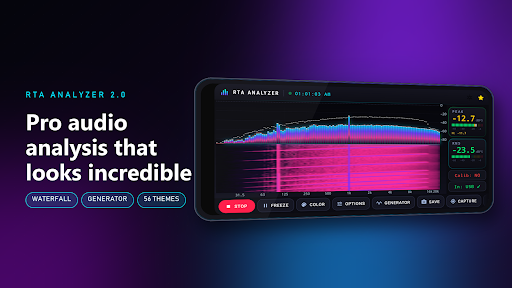
RTA Analyzer 2.0 — the real-time audio analyzer that measures right and looks incredible
Built for sound engineers, AV techs, car-audio installers and home-theater tuners. Point a mic at your system and see exactly what every band is doing — accurately, instantly, and in style.
━━━━━━━━━━━━━━━━━━━━━━━━━━━━
NEW IN 2.0
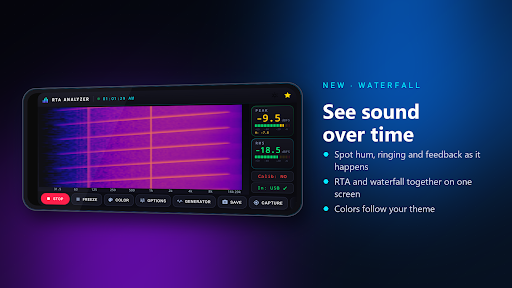
Waterfall spectrogram — see sound over time, full screen or right under the bars. Find hum, ringing and feedback as it happens.
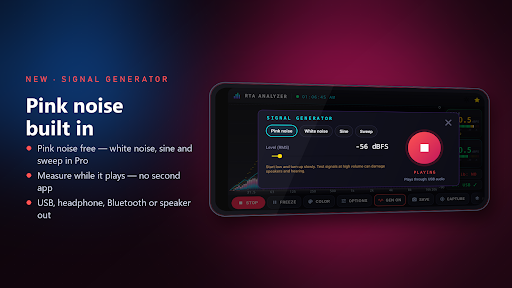
Built-in signal generator — pink noise free; white noise, sine and log sweep in Pro. Measure while it plays: no second app.
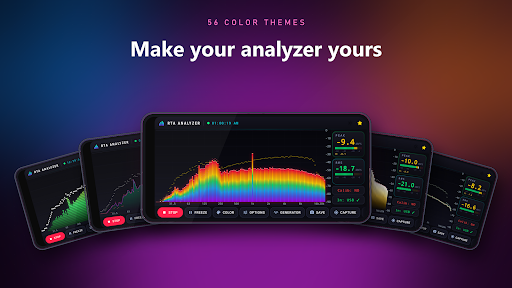
56 color themes, LED-segment bars, color by level or by frequency, and glow.
A redesigned studio look with broadcast-style LED meters.
Try every Pro tool free for an hour by watching one short video — or unlock color themes one at a time.
━━━━━━━━━━━━━━━━━━━━━━━━━━━━
ACCURACY YOU CAN TRUST
A tone reads its true level under every window (Hann, Hamming, Blackman, Flat-Top, Rectangular)
ISO / ANSI band sets anchored on 1 kHz: 31-band 1/3-octave, up to 127 bands at 1/12-octave
A, C and Z weighting (IEC 61672) — display only, so your measurements are never baked with a curve
Peak meter and IEC Fast / Slow RMS, with clip warning
USB measurement mics detected automatically, with the phone's voice processing switched off
Shows which input is live and warns about dropped audio, so you know when to trust a reading
━━━━━━━━━━━━━━━━━━━━━━━━━━━━
FREE
• 31-band 1/3-octave real-time analyzer
• A / C / Z weighting and five window functions
• Peak and RMS meters with clip warning, freeze
• Pink noise generator
• 5 free color themes and 3 solid colors
• Step-by-step tutorial, 9 languages, landscape layout made for stands and tripods
━━━━━━━━━━━━━━━━━━━━━━━━━━━━
PRO — ONE PURCHASE, NO SUBSCRIPTION
16,384-point FFT — four times the frequency resolution
Up to 127 bands at 1/12-octave
Waterfall spectrogram and RTA + waterfall split view
Microphone calibration: import miniDSP UMIK-1 / REW files (.txt, .frd, .cal) or capture pink noise, saved as profiles
Spatial averaging: capture positions around the room and average them in the power domain
Target / house curves and Room Paint
Full generator: white noise, sine and log sweep
Every theme, LED / Lines / Filled modes, color modes and glow
Peak hold and decay, integration time, level overlays
PNG and CSV export
No ads
━━━━━━━━━━━━━━━━━━━━━━━━━━━━
RESPECTS YOUR WORK AND YOUR PRIVACY
• Ads never pop up over a measurement
• Audio is analyzed on your device and never recorded or uploaded
• Measuring works offline
━━━━━━━━━━━━━━━━━━━━━━━━━━━━
PERFECT FOR
Live sound and FOH • Room and PA tuning • Car audio installs • Home theater and studio setup • Finding feedback, hum and rattles • Teaching acoustics
Works with the built-in mic and with USB measurement microphones such as the miniDSP UMIK-1. Phone microphones are not calibrated instruments — for absolute accuracy, use a measurement mic with its calibration file.
Questions or ideas? hello@genartstudios.com
और दिखाएं

1. MEmu इंस्टॉलर को डाउनलोड करें और इंस्टॉलेशन को पूरा करें

2. MEmu शुरू करें फिर होमपेज पर Google Play खोलें

3. Google Play में RTA Analyzer – Pro AV Tools खोजें
Install
4. RTA Analyzer – Pro AV Tools डाउनलोड कर इंस्टॉल करें
5. इंस्टॉल पूरा होने पर आइकन दबाएं

6. MEmu का उपयोग करके अपने कंप्यूटर पर RTA Analyzer – Pro AV Tools का अनुभव करें
MEmu Play सबसे बेहतरीन मुफ़्त Android एमुलेटर है और 5 करोड़ लोग पहले ही इसके शानदार Android ऐप अनुभव का आनंद ले चुके हैं। MEmu 9 वर्चुअलाइज़ेशन तकनीक आपको अपने PC पर हज़ारों Android ऐप्स, यहाँ तक कि सबसे ज़्यादा ग्राफ़िक्स वाले ऐप्स भी, आसानी से चलाने की सुविधा देती है।
असीमित बैटरी या मोबाइल डेटा के साथ बेहतर ग्राफिक्स के साथ बड़ी स्क्रीन; लंबी अवधि।
कीबोर्ड और माउस या गेमपैड के उत्तम नियंत्रण के लिए संपूर्ण कीमैपिंग का समर्थन करता हैं।
एक ही पीसी पर मल्टी-इंस्टेंस मैनेजर के साथ एक समय में कई गेम खाते या कार्य कर सकते हैं।
Use RTA Analyzer – Pro AV Tools on PC by following steps: