Wobot AI – Video Intelligence
अपडेट किया गया
वर्तमान वर्शन
4.9
संसाधन

Wobot AI – Video Intelligence पर अपनी मोबाइल डेटा सीमा पार करने को अलविदा कहें और छोटी स्क्रीन की सीमाओं से मुक्त होकर बड़े डिस्प्ले के लाभों का अनुभव करें। अब, आप अपने कीबोर्ड और माउस का उपयोग करके फुल-स्क्रीन मोड में टॉपर्स क्लैन की शक्ति का अनुभव कर सकते हैं। MEmu Play में वे सभी बेहतरीन सुविधाएँ हैं जिनकी आप अपेक्षा करते हैं: त्वरित इंस्टॉलेशन और आसान सेटअप, सहज नियंत्रण, बैटरी की आवश्यकता नहीं, और कोई डेटा या कॉल समय सीमा नहीं। नया MEmu 9 आपके कंप्यूटर पर Wobot AI – Video Intelligence का उपयोग करने के लिए सबसे अच्छा विकल्प है। हमारा मालिकाना मल्टी-इंस्टेंस मैनेजर एक साथ दो या अधिक खातों को चलाने का समर्थन करता है। इससे भी महत्वपूर्ण बात यह है कि हमारा अनूठा इम्यूलेशन इंजन आपके कंप्यूटर के प्रदर्शन का पूरा उपयोग करता है, जिससे एक सहज और निर्बाध अनुभव मिलता है।
और दिखाएं
डाउनलोड करें Wobot AI – Video Intelligence पीसी पर MEmu एंड्रॉयड एमुलेटर के साथ बड़े पर्दे पर खेलने का आनंद लें। Know what your cameras are seeing on the go!
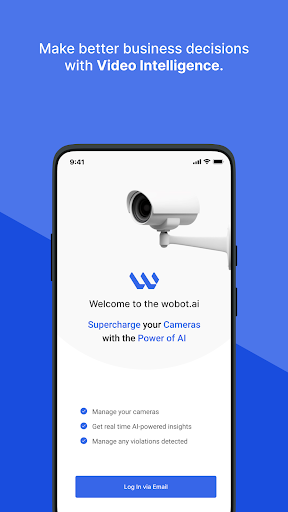
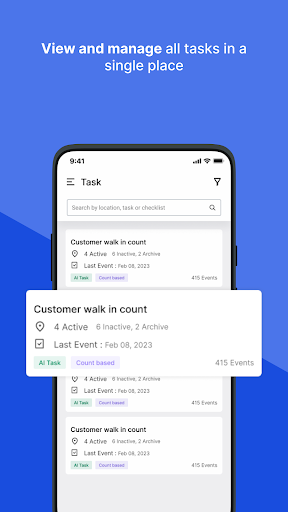
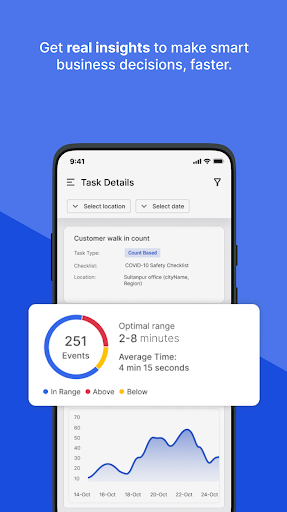
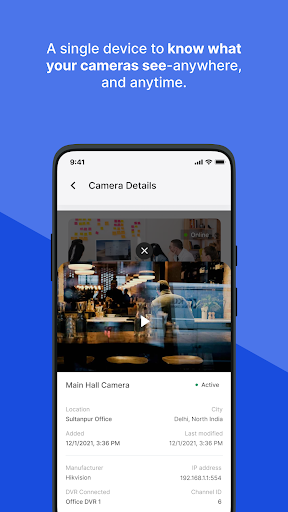
Know what your cameras are seeing on the go!
Did you know your cameras can be the single source to gain intelligent insights? Wobot makes it possible.
Wobot AI connects with your existing cameras and helps you derive AI-based insights and analytics. You can set up various tasks based on your industry and get all their insights automatically in one place.
Wobot AI works across different locations, supports all major camera brands and helps you achieve operational efficiency within your business.
Take a few minutes to install the Wobot AI app on your iOS or Android, and experience Netflix-like streaming of live events while you're munching a pizza. Yes, it's that simple.
With Wobot AI you can:
View and Manage cameras
- A quick and easy way to view all the onboarded cameras, and the tasks running on them.
- Stream live view of events happening at your location.
View Tasks
- Get instant alerts in case of any task violation.
- Every ticket raised has detailed information about the detection, along with an image/video to see the violation visually.
View Events on the Go
- Know what is happening on your cameras.
Wobot AI with all its features is still operable only through the desktop. You can always log in to the Wobot AI dashboard to set up tasks you want to run on your cameras. To manage and add cameras, while also maintaining company-level information.
Make remote monitoring your ally by bringing the power of AI into your smartphone. It will install before your toaster toasts the bread.
Get started now!
और दिखाएं

1. MEmu इंस्टॉलर को डाउनलोड करें और इंस्टॉलेशन को पूरा करें

2. MEmu शुरू करें फिर होमपेज पर Google Play खोलें

3. Google Play में Wobot AI – Video Intelligence खोजें
Install
4. Wobot AI – Video Intelligence डाउनलोड कर इंस्टॉल करें
5. इंस्टॉल पूरा होने पर आइकन दबाएं

6. MEmu का उपयोग करके अपने कंप्यूटर पर Wobot AI – Video Intelligence का अनुभव करें
MEmu Play सबसे बेहतरीन मुफ़्त Android एमुलेटर है और 5 करोड़ लोग पहले ही इसके शानदार Android ऐप अनुभव का आनंद ले चुके हैं। MEmu 9 वर्चुअलाइज़ेशन तकनीक आपको अपने PC पर हज़ारों Android ऐप्स, यहाँ तक कि सबसे ज़्यादा ग्राफ़िक्स वाले ऐप्स भी, आसानी से चलाने की सुविधा देती है।
असीमित बैटरी या मोबाइल डेटा के साथ बेहतर ग्राफिक्स के साथ बड़ी स्क्रीन; लंबी अवधि।
कीबोर्ड और माउस या गेमपैड के उत्तम नियंत्रण के लिए संपूर्ण कीमैपिंग का समर्थन करता हैं।
एक ही पीसी पर मल्टी-इंस्टेंस मैनेजर के साथ एक समय में कई गेम खाते या कार्य कर सकते हैं।
Use Wobot AI – Video Intelligence on PC by following steps: