eRe4u Mobile POS
अपडेट किया गया
वर्तमान वर्शन
2.3.1
संसाधन

eRe4u Mobile POS पर अपनी मोबाइल डेटा सीमा पार करने को अलविदा कहें और छोटी स्क्रीन की सीमाओं से मुक्त होकर बड़े डिस्प्ले के लाभों का अनुभव करें। अब, आप अपने कीबोर्ड और माउस का उपयोग करके फुल-स्क्रीन मोड में टॉपर्स क्लैन की शक्ति का अनुभव कर सकते हैं। MEmu Play में वे सभी बेहतरीन सुविधाएँ हैं जिनकी आप अपेक्षा करते हैं: त्वरित इंस्टॉलेशन और आसान सेटअप, सहज नियंत्रण, बैटरी की आवश्यकता नहीं, और कोई डेटा या कॉल समय सीमा नहीं। नया MEmu 9 आपके कंप्यूटर पर eRe4u Mobile POS का उपयोग करने के लिए सबसे अच्छा विकल्प है। हमारा मालिकाना मल्टी-इंस्टेंस मैनेजर एक साथ दो या अधिक खातों को चलाने का समर्थन करता है। इससे भी महत्वपूर्ण बात यह है कि हमारा अनूठा इम्यूलेशन इंजन आपके कंप्यूटर के प्रदर्शन का पूरा उपयोग करता है, जिससे एक सहज और निर्बाध अनुभव मिलता है।
और दिखाएं
डाउनलोड करें eRe4u Mobile POS पीसी पर MEmu एंड्रॉयड एमुलेटर के साथ बड़े पर्दे पर खेलने का आनंद लें। The "eRe4u Mobile POS" application is a comprehensive solution designed to streamline restaurant billing and Kitchen Order Ticket (KOT) generation.
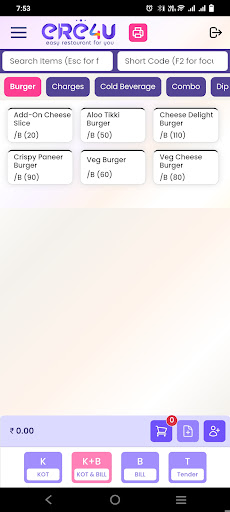
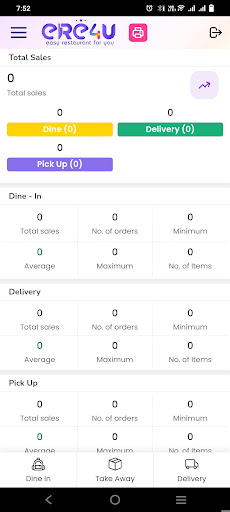
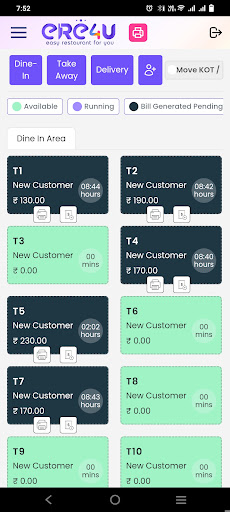

The "eRe4u Mobile POS" application is a comprehensive solution designed to streamline restaurant billing and Kitchen Order Ticket (KOT) generation. It aims to enhance efficiency and improve the overall dining experience for both customers and restaurant staff. Below, I'll describe its key features and functionalities in detail:
1. User-Friendly Interface:
The application boasts a user-friendly interface that is easy for restaurant staff to navigate.
It can be installed on mobile devices like smartphones or tablets, making it highly portable.
2. Order Placement:
Waitstaff can take customer orders directly on the mobile device.
Orders are instantly transmitted to the kitchen staff, reducing order errors and wait times.
3. KOT Generation:
The application generates Kitchen Order Tickets (KOTs) automatically for each order placed.
KOTs include details of the items ordered, any special instructions, and the table number.
Kitchen staff can prioritize orders and prepare them efficiently.
और दिखाएं

1. MEmu इंस्टॉलर को डाउनलोड करें और इंस्टॉलेशन को पूरा करें

2. MEmu शुरू करें फिर होमपेज पर Google Play खोलें

3. Google Play में eRe4u Mobile POS खोजें
Install
4. eRe4u Mobile POS डाउनलोड कर इंस्टॉल करें
5. इंस्टॉल पूरा होने पर आइकन दबाएं

6. MEmu का उपयोग करके अपने कंप्यूटर पर eRe4u Mobile POS का अनुभव करें
MEmu Play सबसे बेहतरीन मुफ़्त Android एमुलेटर है और 5 करोड़ लोग पहले ही इसके शानदार Android ऐप अनुभव का आनंद ले चुके हैं। MEmu 9 वर्चुअलाइज़ेशन तकनीक आपको अपने PC पर हज़ारों Android ऐप्स, यहाँ तक कि सबसे ज़्यादा ग्राफ़िक्स वाले ऐप्स भी, आसानी से चलाने की सुविधा देती है।
असीमित बैटरी या मोबाइल डेटा के साथ बेहतर ग्राफिक्स के साथ बड़ी स्क्रीन; लंबी अवधि।
कीबोर्ड और माउस या गेमपैड के उत्तम नियंत्रण के लिए संपूर्ण कीमैपिंग का समर्थन करता हैं।
एक ही पीसी पर मल्टी-इंस्टेंस मैनेजर के साथ एक समय में कई गेम खाते या कार्य कर सकते हैं।
Use eRe4u Mobile POS on PC by following steps: