
Fantic
अपडेट किया गया
वर्तमान वर्शन
4.2#m-2019-gfcb136425.m-1331-g28d0b1de3.m-626-g1ee4083a
संसाधन

Fantic पर अपनी मोबाइल डेटा सीमा पार करने को अलविदा कहें और छोटी स्क्रीन की सीमाओं से मुक्त होकर बड़े डिस्प्ले के लाभों का अनुभव करें। अब, आप अपने कीबोर्ड और माउस का उपयोग करके फुल-स्क्रीन मोड में टॉपर्स क्लैन की शक्ति का अनुभव कर सकते हैं। MEmu Play में वे सभी बेहतरीन सुविधाएँ हैं जिनकी आप अपेक्षा करते हैं: त्वरित इंस्टॉलेशन और आसान सेटअप, सहज नियंत्रण, बैटरी की आवश्यकता नहीं, और कोई डेटा या कॉल समय सीमा नहीं। नया MEmu 9 आपके कंप्यूटर पर Fantic का उपयोग करने के लिए सबसे अच्छा विकल्प है। हमारा मालिकाना मल्टी-इंस्टेंस मैनेजर एक साथ दो या अधिक खातों को चलाने का समर्थन करता है। इससे भी महत्वपूर्ण बात यह है कि हमारा अनूठा इम्यूलेशन इंजन आपके कंप्यूटर के प्रदर्शन का पूरा उपयोग करता है, जिससे एक सहज और निर्बाध अनुभव मिलता है।
और दिखाएं
डाउनलोड करें Fantic पीसी पर MEmu एंड्रॉयड एमुलेटर के साथ बड़े पर्दे पर खेलने का आनंद लें। The Fantic App is the optimum add-on for Fantic E-Bikes, provided with a Bluetooth add-on Adapter, the Brose (Allround and Remote), the Yamaha (Display C and Interface X) displays or with a TQ HPR-50 Engine.
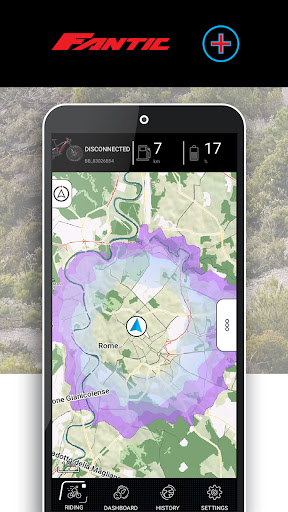
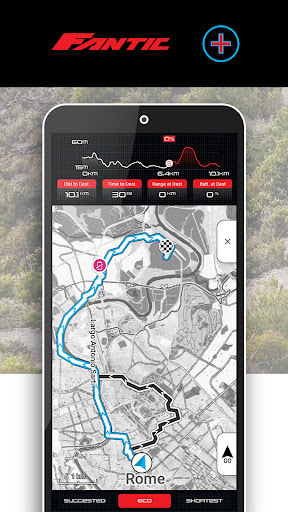
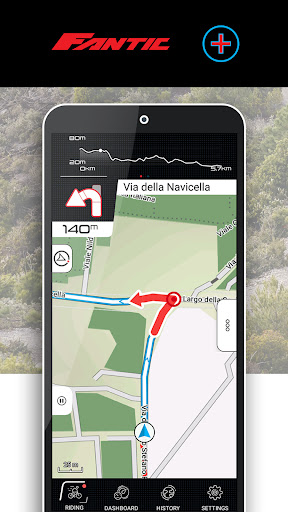
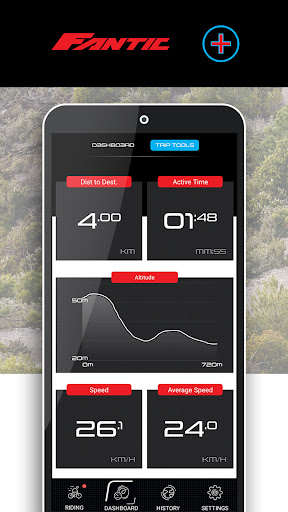
The Fantic App is the optimum add-on for Fantic E-Bikes, provided with a Bluetooth add-on Adapter, the Brose (Allround and Remote), the Yamaha (Display C and Interface X) displays or with a TQ HPR-50 Engine.
Tailored specifically to the Brose, Yamaha and TQ drive systems, the connectivity solution allows a number of additional functions such as navigation to be accessed.
The app functions in overview:
Navigation
- Search for destinations and plan routes, depending on range and elevation profile
- Battery friendly route planning
- Accurate range calculation and display
- Navigate offline using previously downloaded maps
- Search for addresses, navigate to map points, view points of interest nearby
E-Bike Dashboard
- All the most important info about your E-Bike
- Reliable Range calculation
- Assist Level
- Possibility to personalize the Motor Tuning and the Thrust Factors of each single Assist Level (only for Brose and TQ systems)
Tour Manager
- Record the current route, save it
- Retrieve recorded routes
- Create a route plan on the PC (.gpx file) and import it into the app
Information
- View speed, distance covered, travelling time and cadence
- Topographical data such as elevation gain and route profile
- Analyze speed, cadence and altitudes using graphs
To be able to establish the connection between the telephone and the bike, please follow the instructions into the User Manual, at https://fantic.gpstuner.com/user_manual
The list of the supported E-Bikes models can be found at https://fantic.gpstuner.com/supported-bikes
और दिखाएं

1. MEmu इंस्टॉलर को डाउनलोड करें और इंस्टॉलेशन को पूरा करें

2. MEmu शुरू करें फिर होमपेज पर Google Play खोलें

3. Google Play में Fantic खोजें
Install
4. Fantic डाउनलोड कर इंस्टॉल करें
5. इंस्टॉल पूरा होने पर आइकन दबाएं

6. MEmu का उपयोग करके अपने कंप्यूटर पर Fantic का अनुभव करें
MEmu Play सबसे बेहतरीन मुफ़्त Android एमुलेटर है और 5 करोड़ लोग पहले ही इसके शानदार Android ऐप अनुभव का आनंद ले चुके हैं। MEmu 9 वर्चुअलाइज़ेशन तकनीक आपको अपने PC पर हज़ारों Android ऐप्स, यहाँ तक कि सबसे ज़्यादा ग्राफ़िक्स वाले ऐप्स भी, आसानी से चलाने की सुविधा देती है।
असीमित बैटरी या मोबाइल डेटा के साथ बेहतर ग्राफिक्स के साथ बड़ी स्क्रीन; लंबी अवधि।
कीबोर्ड और माउस या गेमपैड के उत्तम नियंत्रण के लिए संपूर्ण कीमैपिंग का समर्थन करता हैं।
एक ही पीसी पर मल्टी-इंस्टेंस मैनेजर के साथ एक समय में कई गेम खाते या कार्य कर सकते हैं।
Use Fantic on PC by following steps: