FE 2.0 Beta
अपडेट किया गया
वर्तमान वर्शन
2026.3.27.65
संसाधन

FE 2.0 Beta पर अपनी मोबाइल डेटा सीमा पार करने को अलविदा कहें और छोटी स्क्रीन की सीमाओं से मुक्त होकर बड़े डिस्प्ले के लाभों का अनुभव करें। अब, आप अपने कीबोर्ड और माउस का उपयोग करके फुल-स्क्रीन मोड में टॉपर्स क्लैन की शक्ति का अनुभव कर सकते हैं। MEmu Play में वे सभी बेहतरीन सुविधाएँ हैं जिनकी आप अपेक्षा करते हैं: त्वरित इंस्टॉलेशन और आसान सेटअप, सहज नियंत्रण, बैटरी की आवश्यकता नहीं, और कोई डेटा या कॉल समय सीमा नहीं। नया MEmu 9 आपके कंप्यूटर पर FE 2.0 Beta का उपयोग करने के लिए सबसे अच्छा विकल्प है। हमारा मालिकाना मल्टी-इंस्टेंस मैनेजर एक साथ दो या अधिक खातों को चलाने का समर्थन करता है। इससे भी महत्वपूर्ण बात यह है कि हमारा अनूठा इम्यूलेशन इंजन आपके कंप्यूटर के प्रदर्शन का पूरा उपयोग करता है, जिससे एक सहज और निर्बाध अनुभव मिलता है।
और दिखाएं
MEmu Play के साथ PC पर FE 2.0 Beta इस्तेमाल करने के शानदार अनुभव का आनंद लें। यह एक शक्तिशाली मुफ़्त Android एमुलेटर है जो आपको डेस्कटॉप वर्ज़न के लिए हज़ारों Android ऐप्स उपलब्ध कराता है। दोस्तों से जुड़ने और अपने काम को और भी बेहतर बनाने का आनंद लें! This is a Beta app for the new FieldEdge Mobile application – as a Beta, it will not contain all the standard features seen in the original FieldEdge app such as Quotes, Part Requests and Expenses, Offline Mode, and credit card swiper support.
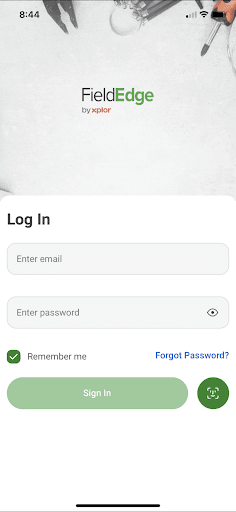
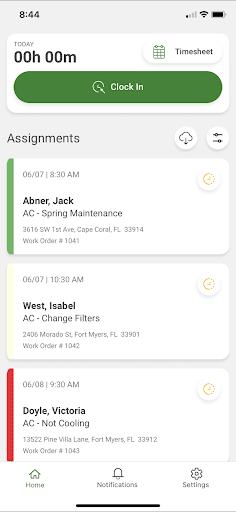
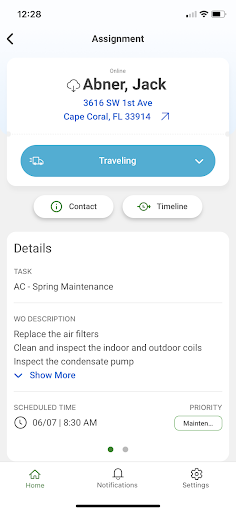
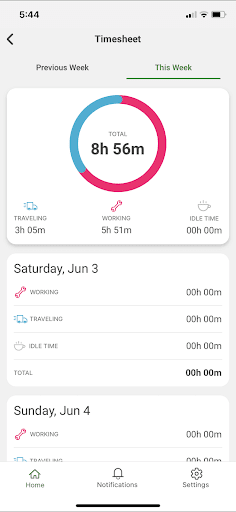
This is a Beta app for the new FieldEdge Mobile application – as a Beta, it will not contain all the standard features seen in the original FieldEdge app such as Quotes, Part Requests and Expenses, Offline Mode, and credit card swiper support. Look for these features in future updates!
The FE 2.0 Beta app connects the office and the field together. It is the perfect app for on-the-go helper technicians with “Basic” licenses to easily see their assignments, work order details, and customer information to quickly track progress on the job. A “Full” license Technician can also access fully reworked pages such as Invoice, Customer and Work Order creation, Price Book, and payments.
(Basic License Features)
MANAGE ASSIGNMENTS
• View active, overdue, and completed assignments
• View work order details
• View work order timeline
• Contact customers by phone, email, or SMS
• Navigate to the customer location
• Send assignment status updates to the office
TRACK TIME
• Clock in and out for the day
• Track time working on the job or traveling
• Review timesheets
STAY NOTIFIED
• Get immediate notification of Assigned, Unassigned, or Reassigned work orders
• Get immediate notification when notes from the office are added to a work order
• Review past notifications in the new Notifications area
(Full License Features in BETA)
CREATE CUSTOMERS AND WORK ORDERS
• Create Customer records and post them to the office on save
• Create work orders and sync to office
PRICE BOOK ACCESS
• Reworked Price Book page allows you access to items in your database
INVOICE CREATION
• Reworked invoice page allows you to build an invoice from the items in your price book, edit descriptions, quantities, and prices
• Full support of tax calculations
PAYMENT PROCESSING
• Take manual cash or check payments
• Process credit card payments via Clearent integration (Swiper and ACH support coming soon)
और दिखाएं

1. MEmu इंस्टॉलर को डाउनलोड करें और इंस्टॉलेशन को पूरा करें

2. MEmu शुरू करें फिर होमपेज पर Google Play खोलें

3. Google Play में FE 2.0 Beta खोजें
Install
4. FE 2.0 Beta डाउनलोड कर इंस्टॉल करें
5. इंस्टॉल पूरा होने पर आइकन दबाएं

6. MEmu का उपयोग करके अपने कंप्यूटर पर FE 2.0 Beta का अनुभव करें
MEmu Play सबसे बेहतरीन मुफ़्त Android एमुलेटर है और 5 करोड़ लोग पहले ही इसके शानदार Android ऐप अनुभव का आनंद ले चुके हैं। MEmu 9 वर्चुअलाइज़ेशन तकनीक आपको अपने PC पर हज़ारों Android ऐप्स, यहाँ तक कि सबसे ज़्यादा ग्राफ़िक्स वाले ऐप्स भी, आसानी से चलाने की सुविधा देती है।
असीमित बैटरी या मोबाइल डेटा के साथ बेहतर ग्राफिक्स के साथ बड़ी स्क्रीन; लंबी अवधि।
कीबोर्ड और माउस या गेमपैड के उत्तम नियंत्रण के लिए संपूर्ण कीमैपिंग का समर्थन करता हैं।
एक ही पीसी पर मल्टी-इंस्टेंस मैनेजर के साथ एक समय में कई गेम खाते या कार्य कर सकते हैं।
Use FE 2.0 Beta on PC by following steps: