FoxManager - Offline Player PC

पीसी पर FoxManager - Offline Player डाउनलोड करें

FoxManager - Offline Player PC

FoxManager - Offline Player

  • अपडेट किया गया

  • वर्तमान वर्शन

    1.1.0

  • संसाधन

    FoxManager - Offline Player PC

पीसी पर FoxManager - Offline Player के विशेषताएं

FoxManager - Offline Player पर अपनी मोबाइल डेटा सीमा पार करने को अलविदा कहें और छोटी स्क्रीन की सीमाओं से मुक्त होकर बड़े डिस्प्ले के लाभों का अनुभव करें। अब, आप अपने कीबोर्ड और माउस का उपयोग करके फुल-स्क्रीन मोड में टॉपर्स क्लैन की शक्ति का अनुभव कर सकते हैं। MEmu Play में वे सभी बेहतरीन सुविधाएँ हैं जिनकी आप अपेक्षा करते हैं: त्वरित इंस्टॉलेशन और आसान सेटअप, सहज नियंत्रण, बैटरी की आवश्यकता नहीं, और कोई डेटा या कॉल समय सीमा नहीं। नया MEmu 9 आपके कंप्यूटर पर FoxManager - Offline Player का उपयोग करने के लिए सबसे अच्छा विकल्प है। हमारा मालिकाना मल्टी-इंस्टेंस मैनेजर एक साथ दो या अधिक खातों को चलाने का समर्थन करता है। इससे भी महत्वपूर्ण बात यह है कि हमारा अनूठा इम्यूलेशन इंजन आपके कंप्यूटर के प्रदर्शन का पूरा उपयोग करता है, जिससे एक सहज और निर्बाध अनुभव मिलता है।

और दिखाएं

FoxManager - Offline Player पीसी का स्क्रीनशॉट और वीडियो

MEmu Play के साथ PC पर FoxManager - Offline Player इस्तेमाल करने के शानदार अनुभव का आनंद लें। यह एक शक्तिशाली मुफ़्त Android एमुलेटर है जो आपको डेस्कटॉप वर्ज़न के लिए हज़ारों Android ऐप्स उपलब्ध कराता है। दोस्तों से जुड़ने और अपने काम को और भी बेहतर बनाने का आनंद लें! FoxManager - Offline Player is a powerful and easy-to-use media organizer and player.
अनुप्रयोग की जानकारी

FoxManager - Offline Player is a powerful and easy-to-use media organizer and player. Effortlessly manage, organize, convert and play all your music and videos in one place.
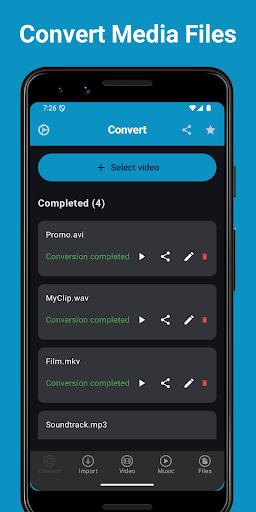
With built-in import tools, you can easily save video, music and other file types directly into the app — including via the integrated web browser. The advanced file manager lets you handle downloaded content like videos, music, and documents with ease.

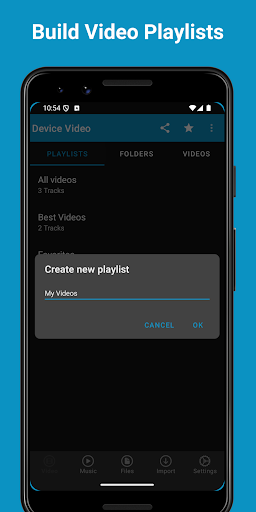
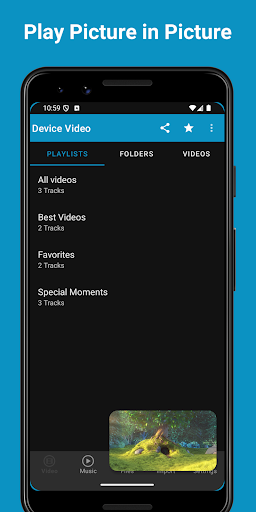
Create custom playlists and folders to organize your video library just the way you like it. Enjoy smooth playback, a powerful PiP (Picture in Picture) feature, simple navigation, and complete control over your media collection — all in one convenient app.

FEATURES


Video Player:

- Create personalized playlists from videos stored on your device.
- Enjoy continuous playback with sequential playlist support.
- Powerful built-in MP4 player packed with advanced features.
- You can play your videos in PiP (Picture in Picture), allowing you to go to other apps while your video is playing.
- Organize and manage collections of your favorite videos.
- View and access all video folders directly from your device.
- Watch your videos anytime — even without an internet connection.
- Play video files seamlessly within the app.
- Supports popular formats including MP4, MKV, WebM, M4A, MP3, and FMP4.
- Easily export your videos to other apps on your device.

Music Player:

- Create playlists and albums from your device’s music library.
- Enjoy seamless playback with tracks played in sequence.
- Advanced offline MP3 player with rich audio features.
- Use repeat and shuffle modes for a personalized experience.
- Listen to your music continuously, even in the background.
- Supports popular audio formats including MP3, AAC, FLAC, MIDI, APE, and WAV.
- Edit and customize track information with the built-in tag editor.

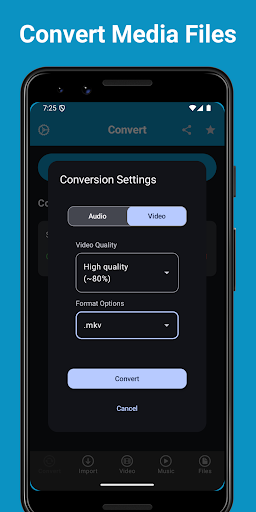
Video and Audio Converter

- Easy and fast conversions: Get your videos and music converted in a flash.
- Supports many media formats:
Audio: MP3, M4A, FLAC, OGG, WMA, WAV.
Video: MP4, MOV, WEBM, AVI, MKV.
- Organize, play and share your converted media.
- Convert media when the app is sent to background.

Web Browser:

- Fast and secure browser packed with powerful features.
- Open unlimited tabs and easily manage your history and bookmarks.
- Customize your browsing experience to suit your preferences.
- Built-in ad blocker to prevent unwanted ads and pop-ups.
- Use Incognito (Private Tabs) mode for anonymous browsing.

Download Manager:

- Download files directly while browsing the web.
- No limits — save as many files as you want.
- Continue downloads seamlessly in the background.
- Optimized for smooth performance and battery efficiency.
- Compatible with all standard download links.
- Supports all file types, including video, audio, documents, and ZIP archives.

Security:

- Protect your media files such as videos and music with a secure passcode lock.
- Choose from PIN, fingerprint, or pattern lock for enhanced privacy and protection.

Visit our website for more information and support -
https://foxfmplayer.web.app

और दिखाएं

पीसी पर FoxManager - Offline Player को कैसे डाउनलोड करें

  • FoxManager - Offline Player PC

    1. MEmu इंस्टॉलर को डाउनलोड करें और इंस्टॉलेशन को पूरा करें

  • FoxManager - Offline Player PC

    2. MEmu शुरू करें फिर होमपेज पर Google Play खोलें

  • FoxManager - Offline Player PC

    3. Google Play में FoxManager - Offline Player खोजें

  • FoxManager - Offline Player PC Install

    4. FoxManager - Offline Player डाउनलोड कर इंस्टॉल करें

  • FoxManager - Offline Player PC

    5. इंस्टॉल पूरा होने पर आइकन दबाएं

  • FoxManager - Offline Player PC
    FoxManager - Offline Player PC FoxManager - Offline Player PC

    6. MEmu का उपयोग करके अपने कंप्यूटर पर FoxManager - Offline Player का अनुभव करें

FoxManager - Offline Player का अनुभव करने के लिए MEmu का उपयोग क्यों करें

MEmu Play सबसे बेहतरीन मुफ़्त Android एमुलेटर है और 5 करोड़ लोग पहले ही इसके शानदार Android ऐप अनुभव का आनंद ले चुके हैं। MEmu 9 वर्चुअलाइज़ेशन तकनीक आपको अपने PC पर हज़ारों Android ऐप्स, यहाँ तक कि सबसे ज़्यादा ग्राफ़िक्स वाले ऐप्स भी, आसानी से चलाने की सुविधा देती है।

  • असीमित बैटरी या मोबाइल डेटा के साथ बेहतर ग्राफिक्स के साथ बड़ी स्क्रीन; लंबी अवधि।

  • कीबोर्ड और माउस या गेमपैड के उत्तम नियंत्रण के लिए संपूर्ण कीमैपिंग का समर्थन करता हैं।

  • एक ही पीसी पर मल्टी-इंस्टेंस मैनेजर के साथ एक समय में कई गेम खाते या कार्य कर सकते हैं।

अपना अनुभव शुरू करने के लिए तैयार हैं?

Hot Topics

FoxManager - Offline Player - FAQs

  • पीसी पर FoxManager - Offline Player का उपयोग कैसे करें?

    Use FoxManager - Offline Player on PC by following steps:

    • Download MEmu, then install and launch it
    • Login to Google Play Store, install the app
    • Enjoy using the app on PC with MEmu
  • पीसी पर FoxManager - Offline Player चलाने के लिए न्यूनतम सिस्टम आवश्यकताएं क्या हैं?
    • Intel or AMD Processor
    • Microsoft Windows 7 and above
    • 2GB of memory
    • 5GB of free disk space
    • Hardware Virtualization Technology