Goodnight - Random Voice Chat
अपडेट किया गया
वर्तमान वर्शन
2
संसाधन

Goodnight - Random Voice Chat पर अपनी मोबाइल डेटा सीमा पार करने को अलविदा कहें और छोटी स्क्रीन की सीमाओं से मुक्त होकर बड़े डिस्प्ले के लाभों का अनुभव करें। अब, आप अपने कीबोर्ड और माउस का उपयोग करके फुल-स्क्रीन मोड में टॉपर्स क्लैन की शक्ति का अनुभव कर सकते हैं। MEmu Play में वे सभी बेहतरीन सुविधाएँ हैं जिनकी आप अपेक्षा करते हैं: त्वरित इंस्टॉलेशन और आसान सेटअप, सहज नियंत्रण, बैटरी की आवश्यकता नहीं, और कोई डेटा या कॉल समय सीमा नहीं। नया MEmu 9 आपके कंप्यूटर पर Goodnight - Random Voice Chat का उपयोग करने के लिए सबसे अच्छा विकल्प है। हमारा मालिकाना मल्टी-इंस्टेंस मैनेजर एक साथ दो या अधिक खातों को चलाने का समर्थन करता है। इससे भी महत्वपूर्ण बात यह है कि हमारा अनूठा इम्यूलेशन इंजन आपके कंप्यूटर के प्रदर्शन का पूरा उपयोग करता है, जिससे एक सहज और निर्बाध अनुभव मिलता है।
और दिखाएं
डाउनलोड करें Goodnight - Random Voice Chat पीसी पर MEmu एंड्रॉयड एमुलेटर के साथ बड़े पर्दे पर खेलने का आनंद लें। Find someone special to say Goodnight!


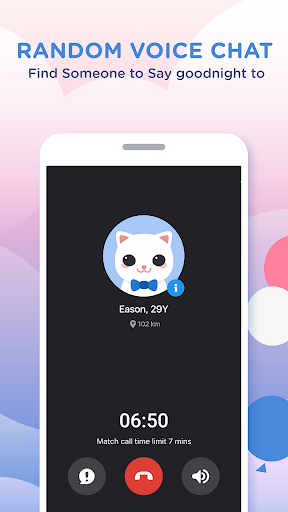
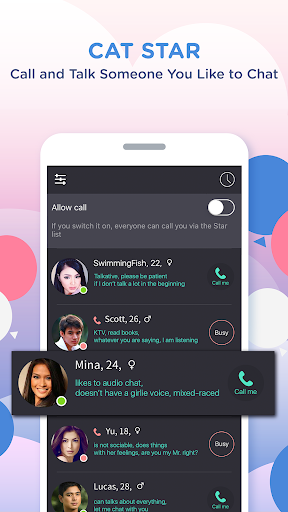
Find someone special to say Goodnight!
Goodnight app is an incredibly simple, fun and exciting voice-chatting app that you can call and chat with someone close to you for free. Whether you want to meet new people close by, make new friends, learn and practice new languages (like Spanish or English) or find your romance, Goodnight is the app you need on your phone.
Every day every night, 24 hours for free.
Once you connect with someone, you can talk up to 7 minutes.
If you enjoy your match, become friends and send messages again another time.
You can then send gifts to each other to keep your friendship or love going.
Awesome features:
• Voice chatting for free with new people around the world.
• Chatting via voice allows you to get to know someone much better and can quickly decide if they are are the right match.
• No picture, no text, just voice. Forget about judging or being judged based on pictures. Just listen and talk.
• Add your interests and the languages you speak so your match can be perfect.
Check out our fan page (https://fb.com/GoodnightApp) and like us to follow our latest news.
---------------------------------------------------------
All packages are auto-renewable subscriptions which mean the subscription will be automatically renewed when it runs out unless you cancel it at least 24 hours before the end of the current subscription period.
Subscription payment will be charged to the Google Play account at confirmation of purchase.
An account will be charged for renewal within 24-hours prior to the end of the current period, and identify the cost of the renewal.
Subscriptions may be managed by the user and auto-renewal may be turned off by going to the user's Account Settings after purchase.
No cancellation of the current subscription is allowed during the active subscription period.
---------------------------------------------------------
Permission detail for Goodnight:
* STORAGE / CAMERA :
Using for taking the photo or selecting the photo from device album.
* MICROPHONE :
Using for the voice call, sending voice message and voice intro recording.
* PHONE :
Using for getting phone call status.
* LOCATION :
Using for accessing user's location while matching.
और दिखाएं

1. MEmu इंस्टॉलर को डाउनलोड करें और इंस्टॉलेशन को पूरा करें

2. MEmu शुरू करें फिर होमपेज पर Google Play खोलें

3. Google Play में Goodnight - Random Voice Chat खोजें
Install
4. Goodnight - Random Voice Chat डाउनलोड कर इंस्टॉल करें
5. इंस्टॉल पूरा होने पर आइकन दबाएं

6. MEmu का उपयोग करके अपने कंप्यूटर पर Goodnight - Random Voice Chat का अनुभव करें
MEmu Play सबसे बेहतरीन मुफ़्त Android एमुलेटर है और 5 करोड़ लोग पहले ही इसके शानदार Android ऐप अनुभव का आनंद ले चुके हैं। MEmu 9 वर्चुअलाइज़ेशन तकनीक आपको अपने PC पर हज़ारों Android ऐप्स, यहाँ तक कि सबसे ज़्यादा ग्राफ़िक्स वाले ऐप्स भी, आसानी से चलाने की सुविधा देती है।
असीमित बैटरी या मोबाइल डेटा के साथ बेहतर ग्राफिक्स के साथ बड़ी स्क्रीन; लंबी अवधि।
कीबोर्ड और माउस या गेमपैड के उत्तम नियंत्रण के लिए संपूर्ण कीमैपिंग का समर्थन करता हैं।
एक ही पीसी पर मल्टी-इंस्टेंस मैनेजर के साथ एक समय में कई गेम खाते या कार्य कर सकते हैं।
Use Goodnight - Random Voice Chat on PC by following steps: