
Hindu Calendar
अपडेट किया गया
वर्तमान वर्शन
8.4.0
संसाधन

Hindu Calendar पर अपनी मोबाइल डेटा सीमा पार करने को अलविदा कहें और छोटी स्क्रीन की सीमाओं से मुक्त होकर बड़े डिस्प्ले के लाभों का अनुभव करें। अब, आप अपने कीबोर्ड और माउस का उपयोग करके फुल-स्क्रीन मोड में टॉपर्स क्लैन की शक्ति का अनुभव कर सकते हैं। MEmu Play में वे सभी बेहतरीन सुविधाएँ हैं जिनकी आप अपेक्षा करते हैं: त्वरित इंस्टॉलेशन और आसान सेटअप, सहज नियंत्रण, बैटरी की आवश्यकता नहीं, और कोई डेटा या कॉल समय सीमा नहीं। नया MEmu 9 आपके कंप्यूटर पर Hindu Calendar का उपयोग करने के लिए सबसे अच्छा विकल्प है। हमारा मालिकाना मल्टी-इंस्टेंस मैनेजर एक साथ दो या अधिक खातों को चलाने का समर्थन करता है। इससे भी महत्वपूर्ण बात यह है कि हमारा अनूठा इम्यूलेशन इंजन आपके कंप्यूटर के प्रदर्शन का पूरा उपयोग करता है, जिससे एक सहज और निर्बाध अनुभव मिलता है।
और दिखाएं
डाउनलोड करें Hindu Calendar पीसी पर MEmu एंड्रॉयड एमुलेटर के साथ बड़े पर्दे पर खेलने का आनंद लें। हिंदू कैलेंडर.
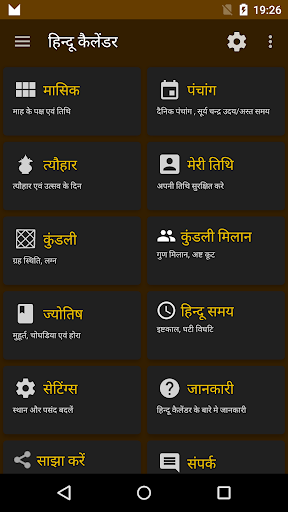
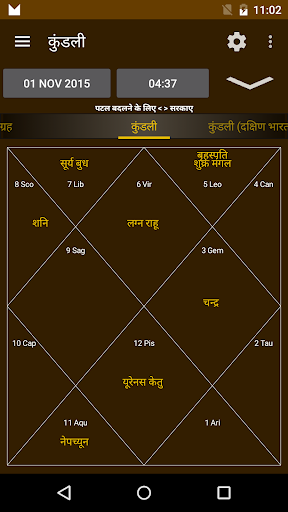
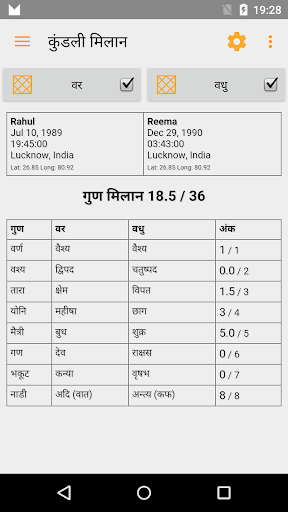
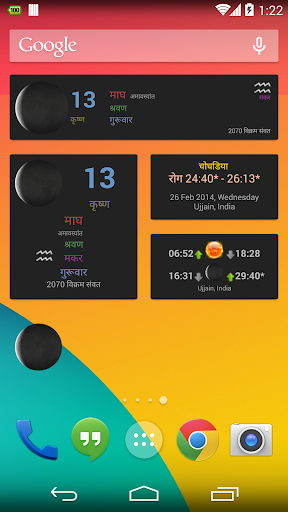
हिंदू कैलेंडर
सभी कैलेंडर, पंचांग, मुहूर्त और कुंडली की जरूरतों के लिए एक पूर्ण ऐप
सब कुछ ऑफ़लाइन भी काम करता है !!
• सैकड़ों वर्षों से पंचांग! कैलेंडर के किसी भी दिन के लिए विवरण। जिसमें तिथि, पक्ष (शुक्ल और कृष्ण), योग, करण, नक्षत्र, वार, संवत्सर (वर्ष), माह (पूर्णिमांत और अमावस्यंत), चंद्रमा की राशि, अयन (दक्षिणायन और उत्तरायण) और ऋतु (ऋतु) शामिल हैं। चुने हुए स्थान के लिए पद, चंद्र उदय और चंद्र अस्त, सूर्योदय और सूर्यास्त।
• किसी भी स्थान और किसी भी तारीख और समय के लिए कुंडली (या कुंडली)। उत्तर भारतीय, दक्षिण भारतीय और पूर्वी भारतीय शैली में। अपनी कुंडलियों को बाद में एक्सेस करने के लिए सहेजें। सयाना (उष्णकटिबंधीय) और निरायण (नाक्षत्र) प्रणाली दोनों में गृह (ग्रह) की स्थिति। (शनि, राहु और केतु सहित)। लाहिड़ी / चित्रपक्ष अयनांश को रमन और कृष्णमूर्ति (पुराना) अयनांश का भी समर्थन प्राप्त है।
• अपनी कुंडली को PDF के रूप में साझा करें। या इसे एक लिंक के रूप में साझा करें।
• कुण्डली मिलान : कुण्डलियों का अष्टकूट गुण मिलान, 36 गुणों में से अंक दर्शाने वाला।
• कुंडली के लिए विंशोत्तरी दशा के साथ-साथ राशि, लग्न राशि, वर्ण, नाड़ी, योनि, गण और दशा का संतुलन।
• अद्वितीय हिंदू घड़ी दिन के आठ पहर (प्रहार) दिखा रही है। पूर्वान्हा, मध्यन्हा, अपर्णा, सायन, प्रदोष, निशिथ, त्रयमा, उषा। आपके स्थान के लिए इष्ट काल (हिंदू समय)। वास्तविक समय घाटी, विघाटी या पाल या काल, विपल या लिप्ट या विकल दिखाता है।
• मुहूर्त: दिन और रात चौघड़िया, राहुकालम, यम घंटाम, गुली कलाम, दुर मुहूर्त और अभिजीत मुहूर्त। आपके चुने हुए स्थान के लिए सभी की गणना की गई।
• संकल्प मंत्र और दिशा यंत्र (कम्पास) पूजा करने में आसानी के लिए हिंदू दिशा दिखा रहा है।
• आकाश का अन्वेषण करें! सहयोगी ऐप इंडियन स्काई मैप का उपयोग करके आकाश में आकाशीय पिंडों, नक्षत्रों, राशियों और गृहों को खोजें।
• चंद्रमा चरण, और चंद्र तिथि दिखाने वाले विजेट, और चंद्र उदय, चंद्र अस्त और सूर्य उदय सूर्य अस्त समय दिखा रहा है।
• एकादशी, चतुर्थी, पूर्णिमा और अमावस्या को उजागर करने वाला मासिक कैलेंडर दृश्य। त्योहार की मासिक सूची दिखाता है। प्रत्येक तिथि के लिए चंद्र चरण भी दिखा रहा है।
• दीवाली (दीपावली) सहित हिंदू त्योहारों और कार्यक्रमों की तारीख का पता लगाएं,
छठ, करवा चौथ, होली, महा शिवरात्रि, रामनवमी, रक्षाबंधन, संक्रांति।
• अपने स्वयं के तीथिस को सहेजें और ट्रैक करें।
• कस्टम स्थान के लिए समर्थन। 3000 से अधिक शहरों में से चुनें, या अपना स्थान चुनें।
• विक्रम संवत, विक्रम संवत कार्तिक और भारतीय राष्ट्रीय कैलेंडर (शक) वर्ष प्रणालियों के विकल्प हैं।
कृपया अपने द्वारा अनुसरण किए जाने वाले महीने के प्रकार, अमावस्यंत और पूर्णिमांत की जांच करें, और इसे सेटिंग्स में तदनुसार सेट करें।
और दिखाएं

1. MEmu इंस्टॉलर को डाउनलोड करें और इंस्टॉलेशन को पूरा करें

2. MEmu शुरू करें फिर होमपेज पर Google Play खोलें

3. Google Play में Hindu Calendar खोजें
Install
4. Hindu Calendar डाउनलोड कर इंस्टॉल करें
5. इंस्टॉल पूरा होने पर आइकन दबाएं

6. MEmu का उपयोग करके अपने कंप्यूटर पर Hindu Calendar का अनुभव करें
MEmu Play सबसे बेहतरीन मुफ़्त Android एमुलेटर है और 5 करोड़ लोग पहले ही इसके शानदार Android ऐप अनुभव का आनंद ले चुके हैं। MEmu 9 वर्चुअलाइज़ेशन तकनीक आपको अपने PC पर हज़ारों Android ऐप्स, यहाँ तक कि सबसे ज़्यादा ग्राफ़िक्स वाले ऐप्स भी, आसानी से चलाने की सुविधा देती है।
असीमित बैटरी या मोबाइल डेटा के साथ बेहतर ग्राफिक्स के साथ बड़ी स्क्रीन; लंबी अवधि।
कीबोर्ड और माउस या गेमपैड के उत्तम नियंत्रण के लिए संपूर्ण कीमैपिंग का समर्थन करता हैं।
एक ही पीसी पर मल्टी-इंस्टेंस मैनेजर के साथ एक समय में कई गेम खाते या कार्य कर सकते हैं।
Use Hindu Calendar on PC by following steps: