
Hotstar
अपडेट किया गया
वर्तमान वर्शन
26.05.11.0
संसाधन

Hotstar पर अपनी मोबाइल डेटा सीमा पार करने को अलविदा कहें और छोटी स्क्रीन की सीमाओं से मुक्त होकर बड़े डिस्प्ले के लाभों का अनुभव करें। अब, आप अपने कीबोर्ड और माउस का उपयोग करके फुल-स्क्रीन मोड में टॉपर्स क्लैन की शक्ति का अनुभव कर सकते हैं। MEmu Play में वे सभी बेहतरीन सुविधाएँ हैं जिनकी आप अपेक्षा करते हैं: त्वरित इंस्टॉलेशन और आसान सेटअप, सहज नियंत्रण, बैटरी की आवश्यकता नहीं, और कोई डेटा या कॉल समय सीमा नहीं। नया MEmu 9 आपके कंप्यूटर पर Hotstar का उपयोग करने के लिए सबसे अच्छा विकल्प है। हमारा मालिकाना मल्टी-इंस्टेंस मैनेजर एक साथ दो या अधिक खातों को चलाने का समर्थन करता है। इससे भी महत्वपूर्ण बात यह है कि हमारा अनूठा इम्यूलेशन इंजन आपके कंप्यूटर के प्रदर्शन का पूरा उपयोग करता है, जिससे एक सहज और निर्बाध अनुभव मिलता है।
और दिखाएं
डाउनलोड करें Hotstar पीसी पर MEmu एंड्रॉयड एमुलेटर के साथ बड़े पर्दे पर खेलने का आनंद लें। Hotstar is your go-to video streaming app for the latest of Indian entertainment, TV shows and movies.
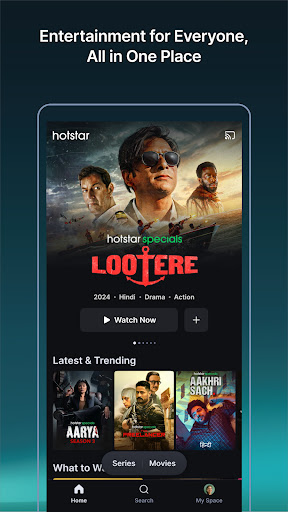
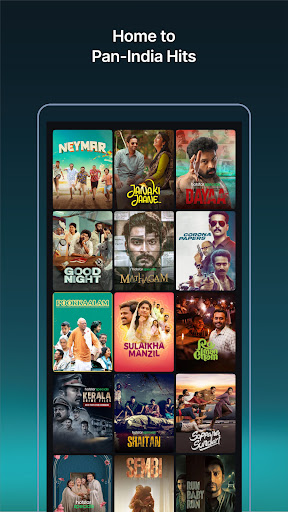
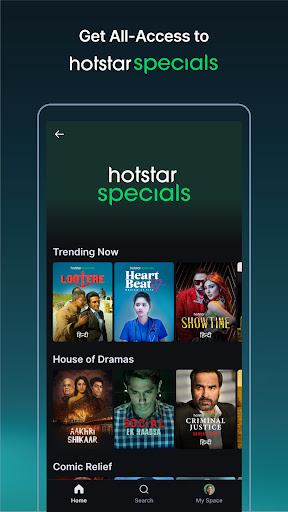
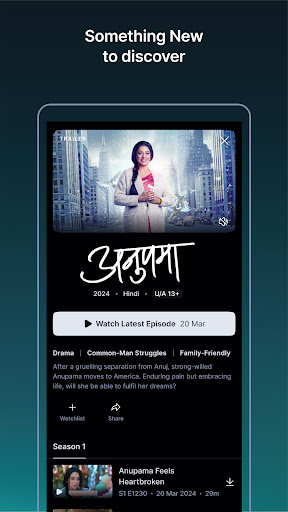
Hotstar is your go-to video streaming app for the latest of Indian entertainment, TV shows and movies. Enjoy unlimited access to your favorite Star India TV shows, exclusive Hotstar Specials from India’s best filmmakers and storytellers and blockbuster movies in 9 Indian languages.
What you’ll love on Hotstar:
Best of Indian Entertainment: Can’t get enough of your daily dose of Indian entertainment? We’ve got you covered! Watch your favorite serials and shows including Yeh Rishta Kya Kehlata Hai, Anupama, Teri Meri Doriyaann, Baakiyalakshmi, Brahmamudi, and more even before India watches them. Shows are available on-demand from these Star India channels:
• Star Plus
• Star Bharat
• Star Maa
• Star Vijay
• Star Jalsha
• Star Pravah
• Star Suvarna
• Asianet
Blockbuster Movies: Our curated movie library includes the latest hits, evergreen favorites, documentaries and critically-acclaimed films across languages.
• Dhurandhar: The Revenge
• Prathichaya
• Vaazha II: Biopic of a Billion Bros
• 12th Fail
• Salaar
• Kerala Crime Files
• Brahmastra
Hotstar Specials: Our EXCLUSIVE slate of BIG, bold and authentic stories from India’s most acclaimed storytellers. Our current titles include:
• Chiraiya
• Batchmates
• Kaattaan
• Lootere
• The Night Manager
• Perilloor Premier League
• Vadhuvu
• Aarya
Privacy policy: https://www.hotstar.com/privacy-policy/ca
Terms of use: https://www.hotstar.com/terms-of-use/ca
Privacy policy: https://www.hotstar.com/privacy-policy/gb
Terms of use: https://www.hotstar.com/terms-of-use/gb
Privacy policy: https://www.hotstar.com/privacy-policy/sg
Terms of use: https:https://www.hotstar.com/terms-of-use/sg
और दिखाएं

1. MEmu इंस्टॉलर को डाउनलोड करें और इंस्टॉलेशन को पूरा करें

2. MEmu शुरू करें फिर होमपेज पर Google Play खोलें

3. Google Play में Hotstar खोजें
Install
4. Hotstar डाउनलोड कर इंस्टॉल करें
5. इंस्टॉल पूरा होने पर आइकन दबाएं

6. MEmu का उपयोग करके अपने कंप्यूटर पर Hotstar का अनुभव करें
MEmu Play सबसे बेहतरीन मुफ़्त Android एमुलेटर है और 5 करोड़ लोग पहले ही इसके शानदार Android ऐप अनुभव का आनंद ले चुके हैं। MEmu 9 वर्चुअलाइज़ेशन तकनीक आपको अपने PC पर हज़ारों Android ऐप्स, यहाँ तक कि सबसे ज़्यादा ग्राफ़िक्स वाले ऐप्स भी, आसानी से चलाने की सुविधा देती है।
असीमित बैटरी या मोबाइल डेटा के साथ बेहतर ग्राफिक्स के साथ बड़ी स्क्रीन; लंबी अवधि।
कीबोर्ड और माउस या गेमपैड के उत्तम नियंत्रण के लिए संपूर्ण कीमैपिंग का समर्थन करता हैं।
एक ही पीसी पर मल्टी-इंस्टेंस मैनेजर के साथ एक समय में कई गेम खाते या कार्य कर सकते हैं।
Use Hotstar on PC by following steps: