
Iota Kappa Lambda
अपडेट किया गया
वर्तमान वर्शन
1.9
संसाधन

Iota Kappa Lambda पर अपनी मोबाइल डेटा सीमा पार करने को अलविदा कहें और छोटी स्क्रीन की सीमाओं से मुक्त होकर बड़े डिस्प्ले के लाभों का अनुभव करें। अब, आप अपने कीबोर्ड और माउस का उपयोग करके फुल-स्क्रीन मोड में टॉपर्स क्लैन की शक्ति का अनुभव कर सकते हैं। MEmu Play में वे सभी बेहतरीन सुविधाएँ हैं जिनकी आप अपेक्षा करते हैं: त्वरित इंस्टॉलेशन और आसान सेटअप, सहज नियंत्रण, बैटरी की आवश्यकता नहीं, और कोई डेटा या कॉल समय सीमा नहीं। नया MEmu 9 आपके कंप्यूटर पर Iota Kappa Lambda का उपयोग करने के लिए सबसे अच्छा विकल्प है। हमारा मालिकाना मल्टी-इंस्टेंस मैनेजर एक साथ दो या अधिक खातों को चलाने का समर्थन करता है। इससे भी महत्वपूर्ण बात यह है कि हमारा अनूठा इम्यूलेशन इंजन आपके कंप्यूटर के प्रदर्शन का पूरा उपयोग करता है, जिससे एक सहज और निर्बाध अनुभव मिलता है।
और दिखाएं
MEmu Play के साथ PC पर Iota Kappa Lambda इस्तेमाल करने के शानदार अनुभव का आनंद लें। यह एक शक्तिशाली मुफ़्त Android एमुलेटर है जो आपको डेस्कटॉप वर्ज़न के लिए हज़ारों Android ऐप्स उपलब्ध कराता है। दोस्तों से जुड़ने और अपने काम को और भी बेहतर बनाने का आनंद लें! This official Iota Kappa Lambda Chapter App is for members of the chapter.
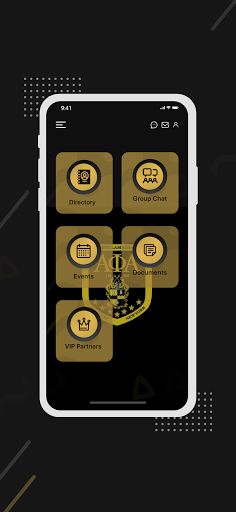
This official Iota Kappa Lambda Chapter App is for members of the chapter
to find out about our events, chat with Chapter members, View Chapter Documents, View Chapter Directory, and much more. The ability to effectively communicate with Chapter members will help us continue to develop leaders, promote brotherhood and academic excellence, while providing service and advocacy for our community. The App also allows guest to view many features of the app in the GuestView. Guest can also receive push notifications of Chapter and Community events. As a Guest you can also contact the Brothers, with any questions, or comments.
Syracuse appeared very early in Alpha history. Shortly after the decision was made to organize a fraternity, information came to Alpha Chapter that students at Syracuse University were interested in membership. The members of Alpha Chapter decided in a meeting on April 9, 1907 that admitting Syracuse University students was inappropriate at that time. This was however, one of the first appearances of the idea of expanding the newly formed fraternity. Although not emphasized in history, the three men at Syracuse may be noted as the impetus for possible expansion and growth of Alpha Phi Alpha Fraternity
Under the guidance of Jewel Nathaniel Allison Murray, Brother Roscoe C. Giles, L.E. Graves and Fran V. Plummer, Iota Chapter was eventually established at Syracuse University on March 28, 1910. Iota became the ninth chapter of the rapidly expanding fraternity. The chapter members of Iota included Brothers Walter J. Bacon, Daniel W. Edwards, Clarence S. Janifer, M. Water Claire, J. Vernon Herring and Noble R. Pyrtle. These men represent the beginnings and seed of both present day, Delta Zeta and Iota Kappa Lambda Chapters in Syracuse.
In 1969 the alumni members felt it appropriate to establish their own chapter. On April 22, 1969 Iota Kappa Lambda, the 511th Chapter of Alpha Phi Alpha was founded.
और दिखाएं

1. MEmu इंस्टॉलर को डाउनलोड करें और इंस्टॉलेशन को पूरा करें

2. MEmu शुरू करें फिर होमपेज पर Google Play खोलें

3. Google Play में Iota Kappa Lambda खोजें
Install
4. Iota Kappa Lambda डाउनलोड कर इंस्टॉल करें
5. इंस्टॉल पूरा होने पर आइकन दबाएं

6. MEmu का उपयोग करके अपने कंप्यूटर पर Iota Kappa Lambda का अनुभव करें
MEmu Play सबसे बेहतरीन मुफ़्त Android एमुलेटर है और 5 करोड़ लोग पहले ही इसके शानदार Android ऐप अनुभव का आनंद ले चुके हैं। MEmu 9 वर्चुअलाइज़ेशन तकनीक आपको अपने PC पर हज़ारों Android ऐप्स, यहाँ तक कि सबसे ज़्यादा ग्राफ़िक्स वाले ऐप्स भी, आसानी से चलाने की सुविधा देती है।
असीमित बैटरी या मोबाइल डेटा के साथ बेहतर ग्राफिक्स के साथ बड़ी स्क्रीन; लंबी अवधि।
कीबोर्ड और माउस या गेमपैड के उत्तम नियंत्रण के लिए संपूर्ण कीमैपिंग का समर्थन करता हैं।
एक ही पीसी पर मल्टी-इंस्टेंस मैनेजर के साथ एक समय में कई गेम खाते या कार्य कर सकते हैं।
Use Iota Kappa Lambda on PC by following steps: