Kamplast Ka Tohfa
अपडेट किया गया
वर्तमान वर्शन
0.0.9
संसाधन

Kamplast Ka Tohfa पर अपनी मोबाइल डेटा सीमा पार करने को अलविदा कहें और छोटी स्क्रीन की सीमाओं से मुक्त होकर बड़े डिस्प्ले के लाभों का अनुभव करें। अब, आप अपने कीबोर्ड और माउस का उपयोग करके फुल-स्क्रीन मोड में टॉपर्स क्लैन की शक्ति का अनुभव कर सकते हैं। MEmu Play में वे सभी बेहतरीन सुविधाएँ हैं जिनकी आप अपेक्षा करते हैं: त्वरित इंस्टॉलेशन और आसान सेटअप, सहज नियंत्रण, बैटरी की आवश्यकता नहीं, और कोई डेटा या कॉल समय सीमा नहीं। नया MEmu 9 आपके कंप्यूटर पर Kamplast Ka Tohfa का उपयोग करने के लिए सबसे अच्छा विकल्प है। हमारा मालिकाना मल्टी-इंस्टेंस मैनेजर एक साथ दो या अधिक खातों को चलाने का समर्थन करता है। इससे भी महत्वपूर्ण बात यह है कि हमारा अनूठा इम्यूलेशन इंजन आपके कंप्यूटर के प्रदर्शन का पूरा उपयोग करता है, जिससे एक सहज और निर्बाध अनुभव मिलता है।
और दिखाएं
MEmu Play के साथ PC पर Kamplast Ka Tohfa इस्तेमाल करने के शानदार अनुभव का आनंद लें। यह एक शक्तिशाली मुफ़्त Android एमुलेटर है जो आपको डेस्कटॉप वर्ज़न के लिए हज़ारों Android ऐप्स उपलब्ध कराता है। दोस्तों से जुड़ने और अपने काम को और भी बेहतर बनाने का आनंद लें! App’s functionality : .
App’s functionality :
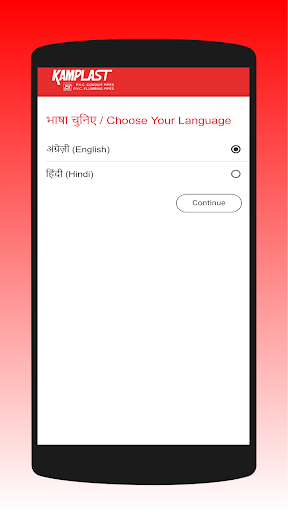
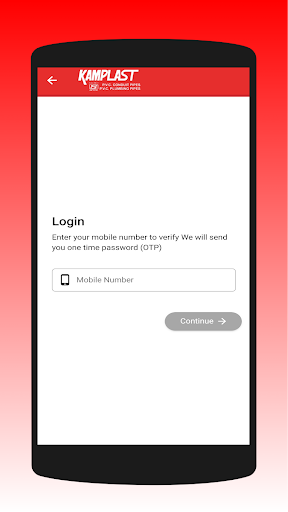
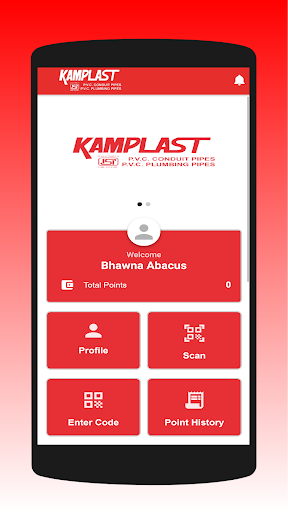
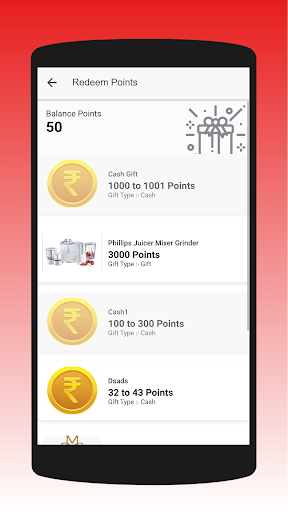
This application is based on rewards basis application In which user scan the QR code and earning points . Those points user send the redeem point which user are eligible for this gift and which request send through User approved on the backend .And any user querry to support via email or contact us.
Welcome to KAMPLAST
Durga Enterprises was established in the year 1999. We, 'Durga Enterprises' have placed ourselves as one of the prominent manufacturer, supplier and exporter of a comprehensive assortment of Pipes, Pipe Fittings, Sports Equipments and Outdoor Sports Equipments. Our range includes Conduit Pipe and Pressure Pipes, Sports Equipments, Sports Hurdles, Free Kick Man, PVC Goal Post, PVC Ladder Strips, Training Equipments, PVC Agility Hurdles, All in one Agility Hurdles, Adjustable Agility Hurdles, Collapsible Agility Hurdles, Elastic Hurdles, Four in One Hurdles, Speed Hurdles and other items. All our equipment is designed in compliance with predefined industry parameters and hence, is expansively admired for its light weight and consistent performance.
We follow stringent quality inspection procedures at each and every phase of our process that ensures a trouble free and faultless fabrication process. Only the highest quality factor inputs are used in the fabrication processes. These are procured from authentic and dependable sources in the industry. Our high end fabrication facility empowers us to manufacture large scale orders with accuracy, within the least possible time schedules. Our ability to design highly modulated products and conduct healthy business dealings, further strengthens our customer relationships.
और दिखाएं

1. MEmu इंस्टॉलर को डाउनलोड करें और इंस्टॉलेशन को पूरा करें

2. MEmu शुरू करें फिर होमपेज पर Google Play खोलें

3. Google Play में Kamplast Ka Tohfa खोजें
Install
4. Kamplast Ka Tohfa डाउनलोड कर इंस्टॉल करें
5. इंस्टॉल पूरा होने पर आइकन दबाएं

6. MEmu का उपयोग करके अपने कंप्यूटर पर Kamplast Ka Tohfa का अनुभव करें
MEmu Play सबसे बेहतरीन मुफ़्त Android एमुलेटर है और 5 करोड़ लोग पहले ही इसके शानदार Android ऐप अनुभव का आनंद ले चुके हैं। MEmu 9 वर्चुअलाइज़ेशन तकनीक आपको अपने PC पर हज़ारों Android ऐप्स, यहाँ तक कि सबसे ज़्यादा ग्राफ़िक्स वाले ऐप्स भी, आसानी से चलाने की सुविधा देती है।
असीमित बैटरी या मोबाइल डेटा के साथ बेहतर ग्राफिक्स के साथ बड़ी स्क्रीन; लंबी अवधि।
कीबोर्ड और माउस या गेमपैड के उत्तम नियंत्रण के लिए संपूर्ण कीमैपिंग का समर्थन करता हैं।
एक ही पीसी पर मल्टी-इंस्टेंस मैनेजर के साथ एक समय में कई गेम खाते या कार्य कर सकते हैं।
Use Kamplast Ka Tohfa on PC by following steps: