
Livpure Smart
अपडेट किया गया
वर्तमान वर्शन
4.2.9
संसाधन

Livpure Smart पर अपनी मोबाइल डेटा सीमा पार करने को अलविदा कहें और छोटी स्क्रीन की सीमाओं से मुक्त होकर बड़े डिस्प्ले के लाभों का अनुभव करें। अब, आप अपने कीबोर्ड और माउस का उपयोग करके फुल-स्क्रीन मोड में टॉपर्स क्लैन की शक्ति का अनुभव कर सकते हैं। MEmu Play में वे सभी बेहतरीन सुविधाएँ हैं जिनकी आप अपेक्षा करते हैं: त्वरित इंस्टॉलेशन और आसान सेटअप, सहज नियंत्रण, बैटरी की आवश्यकता नहीं, और कोई डेटा या कॉल समय सीमा नहीं। नया MEmu 9 आपके कंप्यूटर पर Livpure Smart का उपयोग करने के लिए सबसे अच्छा विकल्प है। हमारा मालिकाना मल्टी-इंस्टेंस मैनेजर एक साथ दो या अधिक खातों को चलाने का समर्थन करता है। इससे भी महत्वपूर्ण बात यह है कि हमारा अनूठा इम्यूलेशन इंजन आपके कंप्यूटर के प्रदर्शन का पूरा उपयोग करता है, जिससे एक सहज और निर्बाध अनुभव मिलता है।
और दिखाएं
डाउनलोड करें Livpure Smart पीसी पर MEmu एंड्रॉयड एमुलेटर के साथ बड़े पर्दे पर खेलने का आनंद लें। Get the best-in-class water purifiers delivered, installed, and maintained for you at your home.
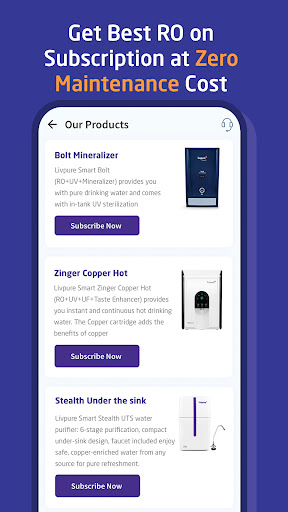
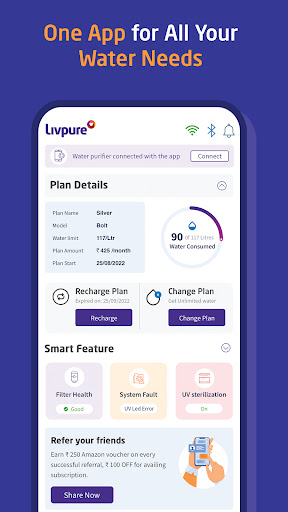
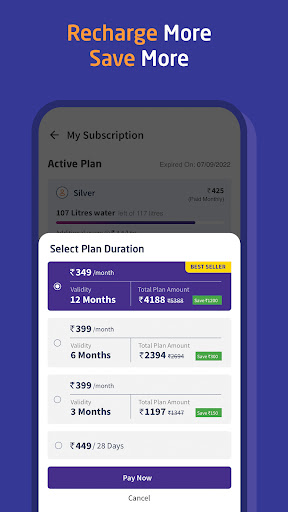
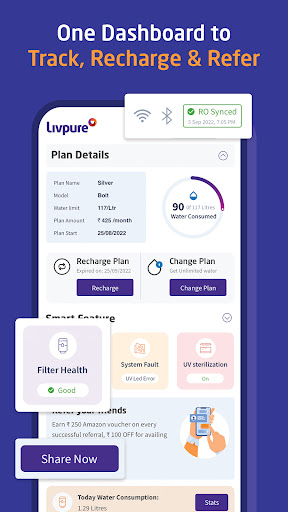
Get the best-in-class water purifiers delivered, installed, and maintained for you at your home. Trusted by over 1.5Mn+ users. Our IoT-enabled water purifier, seamlessly integrated with the Livpure Smart mobile app, ensures continuous access to safe drinking water.
Key features of the Livpure Smart app:
→ Quick Recharge
Effortlessly recharge your Livpure Smart directly from the app in a matter of seconds.
→ Subscription Plan Flexibility
Upgrade your Livpure Smart subscription plan hassle-free, choose the one that suits you best.
→ Convenient Top-ups
Top up your Livpure Smart with additional liters of water as per your requirements.
→ Issue Reporting and Ticket Tracking
Report problems, leave comments, and track the status of your service tickets. Our support team is prompt in resolving issues.
→ Proactive Maintenance
Enjoy worry-free usage with our proactive and complimentary maintenance checks.
→ Refer and Earn
Refer your friends to the goodness of pure water and earn unlimited extra!
→ Easy Subscription
New to Livpure Smart? Provide your details through the app or website and our team will get in touch with you.
Curious to learn more about us? Visit www.livpuresmart.com. Elevate your water purification experience with Livpure Smart!
और दिखाएं

1. MEmu इंस्टॉलर को डाउनलोड करें और इंस्टॉलेशन को पूरा करें

2. MEmu शुरू करें फिर होमपेज पर Google Play खोलें

3. Google Play में Livpure Smart खोजें
Install
4. Livpure Smart डाउनलोड कर इंस्टॉल करें
5. इंस्टॉल पूरा होने पर आइकन दबाएं

6. MEmu का उपयोग करके अपने कंप्यूटर पर Livpure Smart का अनुभव करें
MEmu Play सबसे बेहतरीन मुफ़्त Android एमुलेटर है और 5 करोड़ लोग पहले ही इसके शानदार Android ऐप अनुभव का आनंद ले चुके हैं। MEmu 9 वर्चुअलाइज़ेशन तकनीक आपको अपने PC पर हज़ारों Android ऐप्स, यहाँ तक कि सबसे ज़्यादा ग्राफ़िक्स वाले ऐप्स भी, आसानी से चलाने की सुविधा देती है।
असीमित बैटरी या मोबाइल डेटा के साथ बेहतर ग्राफिक्स के साथ बड़ी स्क्रीन; लंबी अवधि।
कीबोर्ड और माउस या गेमपैड के उत्तम नियंत्रण के लिए संपूर्ण कीमैपिंग का समर्थन करता हैं।
एक ही पीसी पर मल्टी-इंस्टेंस मैनेजर के साथ एक समय में कई गेम खाते या कार्य कर सकते हैं।
Use Livpure Smart on PC by following steps: