My Roster My Shift Plan
अपडेट किया गया
वर्तमान वर्शन
संसाधन

My Roster My Shift Plan पर अपनी मोबाइल डेटा सीमा पार करने को अलविदा कहें और छोटी स्क्रीन की सीमाओं से मुक्त होकर बड़े डिस्प्ले के लाभों का अनुभव करें। अब, आप अपने कीबोर्ड और माउस का उपयोग करके फुल-स्क्रीन मोड में टॉपर्स क्लैन की शक्ति का अनुभव कर सकते हैं। MEmu Play में वे सभी बेहतरीन सुविधाएँ हैं जिनकी आप अपेक्षा करते हैं: त्वरित इंस्टॉलेशन और आसान सेटअप, सहज नियंत्रण, बैटरी की आवश्यकता नहीं, और कोई डेटा या कॉल समय सीमा नहीं। नया MEmu 9 आपके कंप्यूटर पर My Roster My Shift Plan का उपयोग करने के लिए सबसे अच्छा विकल्प है। हमारा मालिकाना मल्टी-इंस्टेंस मैनेजर एक साथ दो या अधिक खातों को चलाने का समर्थन करता है। इससे भी महत्वपूर्ण बात यह है कि हमारा अनूठा इम्यूलेशन इंजन आपके कंप्यूटर के प्रदर्शन का पूरा उपयोग करता है, जिससे एक सहज और निर्बाध अनुभव मिलता है।
और दिखाएं
MEmu Play के साथ PC पर My Roster My Shift Plan इस्तेमाल करने के शानदार अनुभव का आनंद लें। यह एक शक्तिशाली मुफ़्त Android एमुलेटर है जो आपको डेस्कटॉप वर्ज़न के लिए हज़ारों Android ऐप्स उपलब्ध कराता है। दोस्तों से जुड़ने और अपने काम को और भी बेहतर बनाने का आनंद लें! Are you also annoyed from your service plan / roster / shift plan / working sheet in form of notes and tables?
Are you also annoyed from your service plan / roster / shift plan / working sheet in form of notes and tables?
With MyRoster you can manage your service plan easaly.
From now you have your service plan always on your site.
The app is intiutiv use and therefore available without lengthy explanations.
functions:
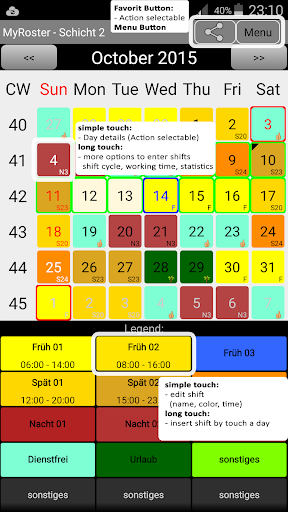
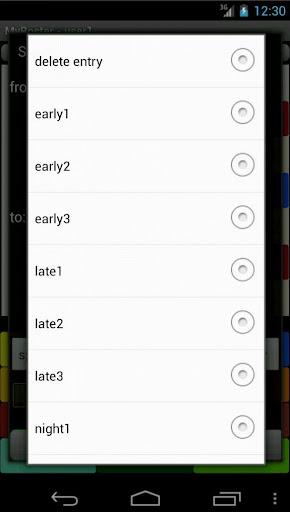
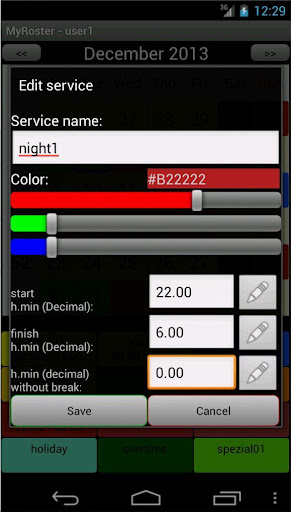
- Any number of different services can be created / edited.
- These services can then be assigned to the individual days.
- Each service has its own color ( changeable) in the Overview
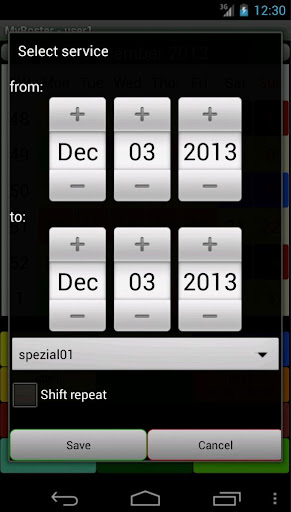
- It may be a service for several days to be entered at a time. e.g. 2 weeks holiday
- There are 4 different widgets that allow you to plan your service always have in view
- By clicking on the upper area of the widget to open the app. Below it is updated.
- Comment on any day
- By clicking you can jump to another month on month.
- Timekeeping possible. ( long click on the day / submenu)
- Entering fixed times for each service
- Enter the actual presence per day
- Analysis for week and month ( nominal hours , plan - hours , actual hours)
- Landscape support
- The roster (displayed month), either as a text list (E -mail) ,
as a csv file (Excel) or an image (screenshot) will be sent.
It should have the " WRITE EXTERNAL STORAGE" / " write access to SD memory " is necessary.
- Languages: German, English, French, Spanish, Dutch
- Expansion of functions via My roster unlock app ( Paid ):
- Export as iCalendar
- Several service plans (User)
- Year Overview
- Evaluation / Statistics: sum of the respective services for Month / Year / Time.
- Shortcuts (4 letters) to each layer can be displayed in the overview.
- Comparison function for two rosters
- Widget 4x4 with comparison display
- Layer rhythms can be entered , weekly or daily repetitions
- Possibility to input of shift cycles. eg: F, F, S , S, N , N,... Long click on a day ( submenu)
- Backup and recovery Herstellunges function
- Backup to your Dropbox (Internet permission required)
- Evaluation of overtime for the total time
- Holidays are shown on request ( Germany , Austria , the Netherlands, Australia, UK ) ( outlined in red )
- School holidays are upon request (only Germany ) displayed ( green border )
- The service plan can be automatically registered upon request in the calendar. (available from Android 4.0 ( ICE_CREAM_SANDWICH ) )
Here the permission " READ_CALENDAR / WRITE_CALENDAR " is necessary.
small HOWTO free to give the roster on the Google calendar.
http://www.fruecht.eu/?s=mdhg # content
- A reminder time for calendar entry can be added automatically.
Memory is not made through My roster app on the calendar.
Version History:
http://www.fruecht.eu/?s=mdv#inhalt
HowTo:
http://www.fruecht.eu/?s=mdh#inhalt
FAQ:
http://www.fruecht.eu/?s=mdf#inhalt
और दिखाएं

1. MEmu इंस्टॉलर को डाउनलोड करें और इंस्टॉलेशन को पूरा करें

2. MEmu शुरू करें फिर होमपेज पर Google Play खोलें

3. Google Play में My Roster My Shift Plan खोजें
Install
4. My Roster My Shift Plan डाउनलोड कर इंस्टॉल करें
5. इंस्टॉल पूरा होने पर आइकन दबाएं

6. MEmu का उपयोग करके अपने कंप्यूटर पर My Roster My Shift Plan का अनुभव करें
MEmu Play सबसे बेहतरीन मुफ़्त Android एमुलेटर है और 5 करोड़ लोग पहले ही इसके शानदार Android ऐप अनुभव का आनंद ले चुके हैं। MEmu 9 वर्चुअलाइज़ेशन तकनीक आपको अपने PC पर हज़ारों Android ऐप्स, यहाँ तक कि सबसे ज़्यादा ग्राफ़िक्स वाले ऐप्स भी, आसानी से चलाने की सुविधा देती है।
असीमित बैटरी या मोबाइल डेटा के साथ बेहतर ग्राफिक्स के साथ बड़ी स्क्रीन; लंबी अवधि।
कीबोर्ड और माउस या गेमपैड के उत्तम नियंत्रण के लिए संपूर्ण कीमैपिंग का समर्थन करता हैं।
एक ही पीसी पर मल्टी-इंस्टेंस मैनेजर के साथ एक समय में कई गेम खाते या कार्य कर सकते हैं।
Use My Roster My Shift Plan on PC by following steps: