OKReel
अपडेट किया गया
वर्तमान वर्शन
2.7.1
संसाधन

OKReel पर अपनी मोबाइल डेटा सीमा पार करने को अलविदा कहें और छोटी स्क्रीन की सीमाओं से मुक्त होकर बड़े डिस्प्ले के लाभों का अनुभव करें। अब, आप अपने कीबोर्ड और माउस का उपयोग करके फुल-स्क्रीन मोड में टॉपर्स क्लैन की शक्ति का अनुभव कर सकते हैं। MEmu Play में वे सभी बेहतरीन सुविधाएँ हैं जिनकी आप अपेक्षा करते हैं: त्वरित इंस्टॉलेशन और आसान सेटअप, सहज नियंत्रण, बैटरी की आवश्यकता नहीं, और कोई डेटा या कॉल समय सीमा नहीं। नया MEmu 9 आपके कंप्यूटर पर OKReel का उपयोग करने के लिए सबसे अच्छा विकल्प है। हमारा मालिकाना मल्टी-इंस्टेंस मैनेजर एक साथ दो या अधिक खातों को चलाने का समर्थन करता है। इससे भी महत्वपूर्ण बात यह है कि हमारा अनूठा इम्यूलेशन इंजन आपके कंप्यूटर के प्रदर्शन का पूरा उपयोग करता है, जिससे एक सहज और निर्बाध अनुभव मिलता है।
और दिखाएं
MEmu Play के साथ PC पर OKReel इस्तेमाल करने के शानदार अनुभव का आनंद लें। यह एक शक्तिशाली मुफ़्त Android एमुलेटर है जो आपको डेस्कटॉप वर्ज़न के लिए हज़ारों Android ऐप्स उपलब्ध कराता है। दोस्तों से जुड़ने और अपने काम को और भी बेहतर बनाने का आनंद लें! OKReel is a cutting-edge mobile application dedicated to bringing you the best in short‑drama entertainment.
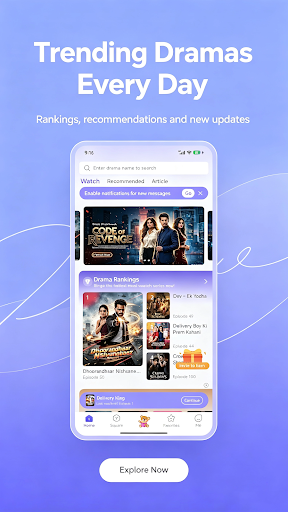
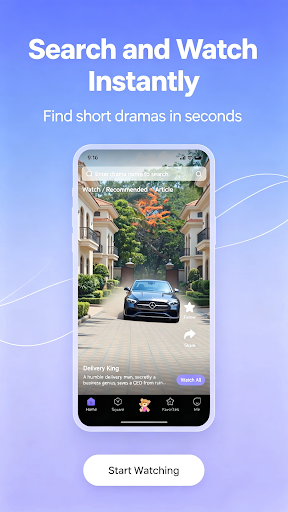
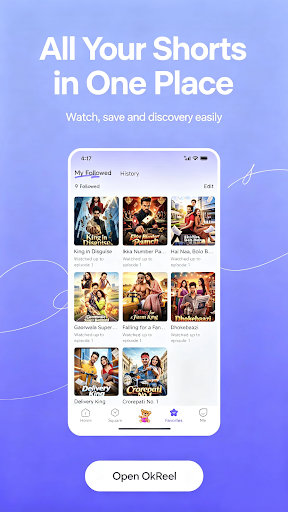
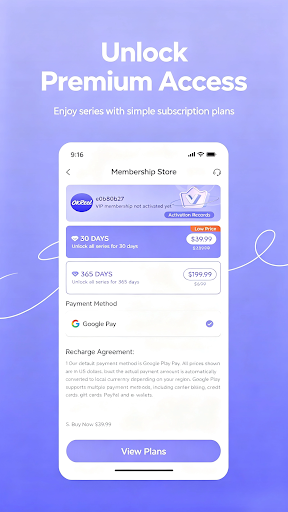
OKReel is a cutting-edge mobile application dedicated to bringing you the best in short‑drama entertainment. Designed for modern viewers who value both quality and brevity, our platform hosts thousands of episodes from emerging creators and established studios. Whether you crave heart‑fluttering romance, edge‑of‑your‑seat thrillers, laugh‑out‑loud comedies, mind‑bending sci‑fi, or touching slice‑of‑life stories, our diverse catalog caters to every mood and taste.
We update our library daily, with new series premiering every morning. You will never run out of fresh content. Each episode runs just a few minutes, delivering a complete narrative arc – perfect for coffee breaks, daily commutes, or short moments of relaxation. We carefully curate every drama to ensure compelling plots, strong character development, and satisfying endings.
Despite its powerful features, OKReel remains incredibly easy to use. Offline caching allows you to download episodes over Wi‑Fi and watch them later without consuming mobile data. The smart resume feature remembers your exact playback position, so you can switch between devices seamlessly. You can rotate your screen to landscape for a cinematic feel or stick to portrait for one‑handed operation – the choice is yours.
Our user interface is clean, clutter‑free, and optimised for speed. Swipe to browse through categories, tap to start playing, and adjust volume or brightness with a single gesture. The intelligent recommendation engine learns from your viewing history and preferences, suggesting similar titles you are likely to enjoy. You can also create a personal watchlist to save dramas for later viewing.
We take your privacy seriously. OKReel requests only the essential permissions needed for core functionality and does not share your personal data with any third parties. Advertisements are non‑intrusive and clearly marked, never interrupting your viewing experience. For an ad‑free environment, we offer a premium subscription that also unlocks early access to exclusive series and special features.
On the technical side, our player supports adaptive bitrate streaming, automatically adjusting video quality based on your network speed to minimise buffering. You can manually select resolution from 360p up to 1080p to balance quality and data usage. The app itself is lightweight, takes minimal storage space, and performs smoothly on a wide range of Android devices.
We believe in building a community around short‑form storytelling. You can rate and review shows, share your favourite episodes with friends, and send us feedback directly. We listen to our users and release regular updates with bug fixes, performance enhancements, and new features inspired by your suggestions.
OKReel is more than just an app – it is a fresh way to experience storytelling in your daily life. Download today and start your free trial. With thousands of episodes at your fingertips, every spare moment becomes an opportunity to escape into a fascinating world. Welcome to OKReel – where great stories fit your life.
और दिखाएं

1. MEmu इंस्टॉलर को डाउनलोड करें और इंस्टॉलेशन को पूरा करें

2. MEmu शुरू करें फिर होमपेज पर Google Play खोलें

3. Google Play में OKReel खोजें
Install
4. OKReel डाउनलोड कर इंस्टॉल करें
5. इंस्टॉल पूरा होने पर आइकन दबाएं

6. MEmu का उपयोग करके अपने कंप्यूटर पर OKReel का अनुभव करें
MEmu Play सबसे बेहतरीन मुफ़्त Android एमुलेटर है और 5 करोड़ लोग पहले ही इसके शानदार Android ऐप अनुभव का आनंद ले चुके हैं। MEmu 9 वर्चुअलाइज़ेशन तकनीक आपको अपने PC पर हज़ारों Android ऐप्स, यहाँ तक कि सबसे ज़्यादा ग्राफ़िक्स वाले ऐप्स भी, आसानी से चलाने की सुविधा देती है।
असीमित बैटरी या मोबाइल डेटा के साथ बेहतर ग्राफिक्स के साथ बड़ी स्क्रीन; लंबी अवधि।
कीबोर्ड और माउस या गेमपैड के उत्तम नियंत्रण के लिए संपूर्ण कीमैपिंग का समर्थन करता हैं।
एक ही पीसी पर मल्टी-इंस्टेंस मैनेजर के साथ एक समय में कई गेम खाते या कार्य कर सकते हैं।
Use OKReel on PC by following steps: