PhotoVerse AI Photo Editor
अपडेट किया गया
वर्तमान वर्शन
1.55
संसाधन

PhotoVerse AI Photo Editor पर अपनी मोबाइल डेटा सीमा पार करने को अलविदा कहें और छोटी स्क्रीन की सीमाओं से मुक्त होकर बड़े डिस्प्ले के लाभों का अनुभव करें। अब, आप अपने कीबोर्ड और माउस का उपयोग करके फुल-स्क्रीन मोड में टॉपर्स क्लैन की शक्ति का अनुभव कर सकते हैं। MEmu Play में वे सभी बेहतरीन सुविधाएँ हैं जिनकी आप अपेक्षा करते हैं: त्वरित इंस्टॉलेशन और आसान सेटअप, सहज नियंत्रण, बैटरी की आवश्यकता नहीं, और कोई डेटा या कॉल समय सीमा नहीं। नया MEmu 9 आपके कंप्यूटर पर PhotoVerse AI Photo Editor का उपयोग करने के लिए सबसे अच्छा विकल्प है। हमारा मालिकाना मल्टी-इंस्टेंस मैनेजर एक साथ दो या अधिक खातों को चलाने का समर्थन करता है। इससे भी महत्वपूर्ण बात यह है कि हमारा अनूठा इम्यूलेशन इंजन आपके कंप्यूटर के प्रदर्शन का पूरा उपयोग करता है, जिससे एक सहज और निर्बाध अनुभव मिलता है।
और दिखाएं
MEmu Play के साथ PC पर PhotoVerse AI Photo Editor इस्तेमाल करने के शानदार अनुभव का आनंद लें। यह एक शक्तिशाली मुफ़्त Android एमुलेटर है जो आपको डेस्कटॉप वर्ज़न के लिए हज़ारों Android ऐप्स उपलब्ध कराता है। दोस्तों से जुड़ने और अपने काम को और भी बेहतर बनाने का आनंद लें! PhotoVerse AI – Create More with Every Photo.
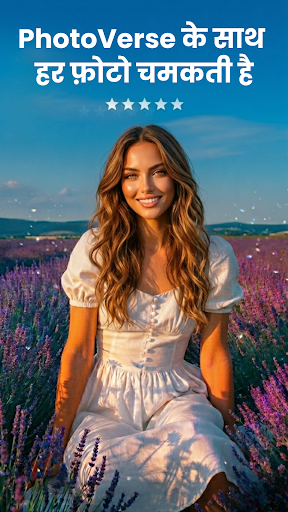
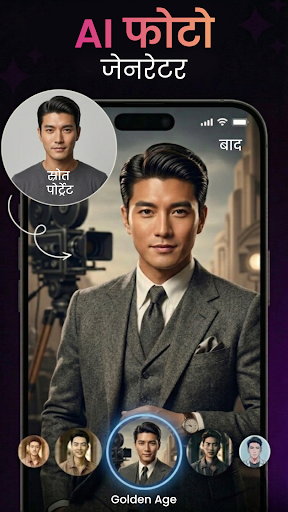
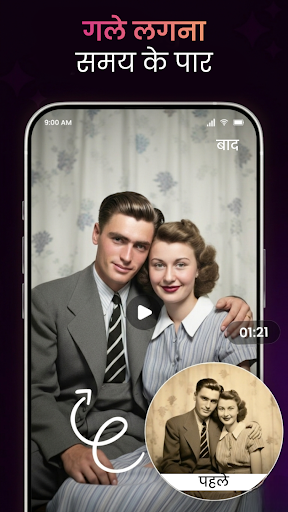
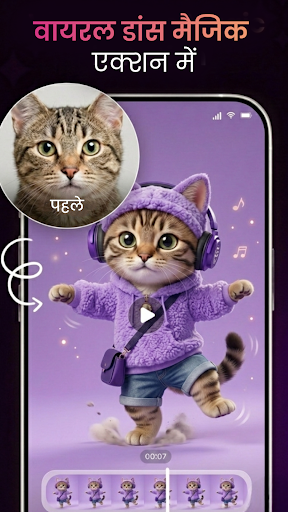
PhotoVerse AI – Create More with Every Photo
Every photo tells a story and with PhotoVerse AI, you can turn simple moments into eye-catching photos and videos in just a few taps.
PhotoVerse AI is your friendly, all-in-one photo editor, AI photo generator, and AI video creator, designed for everyday users who want beautiful results without complicated tools. Whether you’re editing selfies, making collages, or creating content for social media, PhotoVerse AI makes creativity easy and fun.
Create Stunning AI Photos
Give your photos a fresh, artistic look using AI-powered photo effects. PhotoVerse AI helps you transform portraits, images, and designs with smart AI tools that feel simple but deliver impressive results.
No design skills needed - just choose a style, apply, and enjoy the transformation.
Turn Photos into AI Videos
Bring your images to life with the new AI video generator. Convert photos into short, dynamic videos with smooth motion, visual effects, and creative transitions.
Perfect for reels, stories, short clips, and sharing moments that feel more alive.
Clean Backgrounds, Better Focus
Remove backgrounds instantly with the AI background remover. Highlight people, objects or products and replace backgrounds effortlessly for clean, professional looking photos.
Great for profile pictures, product images, and creative edits.
Explore Creative Effects & Styles
- Add personality to your photos with a variety of visual effects:
- Double exposure and AI blending for artistic compositions
- Trendy drip art styles for bold designs
- Neon glow and spiral effects for modern portraits
- Smoke, overlay, and lighting effects to set the mood
- Every effect is easy to apply and customizable to match your style.
Make Collages & Frames That Stand Out
Create beautiful collages with up to 9 photos using flexible layouts, backgrounds, fonts, and stickers. Choose from stylish frames including friendship, anniversary, fashion, calendar, and PIP designs - perfect for any occasion.
Design Eye-Catching Profile Pictures
Create standout profile photos with AI filters, borders, and effects made for social media. Express yourself with a look that feels unique and personal.
Why Users Love PhotoVerse AI
- Simple and friendly interface
- Powerful AI photo editor & AI video maker in one app
- Fast performance with high-quality results
- Regular updates with new creative features
- Ideal for social media, stories, reels and everyday photo editing
Let PhotoVerse AI help you turn everyday photos into something special - creative, expressive, and easy to share.
और दिखाएं

1. MEmu इंस्टॉलर को डाउनलोड करें और इंस्टॉलेशन को पूरा करें

2. MEmu शुरू करें फिर होमपेज पर Google Play खोलें

3. Google Play में PhotoVerse AI Photo Editor खोजें
Install
4. PhotoVerse AI Photo Editor डाउनलोड कर इंस्टॉल करें
5. इंस्टॉल पूरा होने पर आइकन दबाएं

6. MEmu का उपयोग करके अपने कंप्यूटर पर PhotoVerse AI Photo Editor का अनुभव करें
MEmu Play सबसे बेहतरीन मुफ़्त Android एमुलेटर है और 5 करोड़ लोग पहले ही इसके शानदार Android ऐप अनुभव का आनंद ले चुके हैं। MEmu 9 वर्चुअलाइज़ेशन तकनीक आपको अपने PC पर हज़ारों Android ऐप्स, यहाँ तक कि सबसे ज़्यादा ग्राफ़िक्स वाले ऐप्स भी, आसानी से चलाने की सुविधा देती है।
असीमित बैटरी या मोबाइल डेटा के साथ बेहतर ग्राफिक्स के साथ बड़ी स्क्रीन; लंबी अवधि।
कीबोर्ड और माउस या गेमपैड के उत्तम नियंत्रण के लिए संपूर्ण कीमैपिंग का समर्थन करता हैं।
एक ही पीसी पर मल्टी-इंस्टेंस मैनेजर के साथ एक समय में कई गेम खाते या कार्य कर सकते हैं।
Use PhotoVerse AI Photo Editor on PC by following steps: