PlainApp: File & Web Access
अपडेट किया गया
वर्तमान वर्शन
1.3.6
संसाधन

PlainApp: File & Web Access पर अपनी मोबाइल डेटा सीमा पार करने को अलविदा कहें और छोटी स्क्रीन की सीमाओं से मुक्त होकर बड़े डिस्प्ले के लाभों का अनुभव करें। अब, आप अपने कीबोर्ड और माउस का उपयोग करके फुल-स्क्रीन मोड में टॉपर्स क्लैन की शक्ति का अनुभव कर सकते हैं। MEmu Play में वे सभी बेहतरीन सुविधाएँ हैं जिनकी आप अपेक्षा करते हैं: त्वरित इंस्टॉलेशन और आसान सेटअप, सहज नियंत्रण, बैटरी की आवश्यकता नहीं, और कोई डेटा या कॉल समय सीमा नहीं। नया MEmu 9 आपके कंप्यूटर पर PlainApp: File & Web Access का उपयोग करने के लिए सबसे अच्छा विकल्प है। हमारा मालिकाना मल्टी-इंस्टेंस मैनेजर एक साथ दो या अधिक खातों को चलाने का समर्थन करता है। इससे भी महत्वपूर्ण बात यह है कि हमारा अनूठा इम्यूलेशन इंजन आपके कंप्यूटर के प्रदर्शन का पूरा उपयोग करता है, जिससे एक सहज और निर्बाध अनुभव मिलता है।
और दिखाएं
डाउनलोड करें PlainApp: File & Web Access पीसी पर MEmu एंड्रॉयड एमुलेटर के साथ बड़े पर्दे पर खेलने का आनंद लें। PlainApp is an open-source application that allows you to manage your phone through a web browser.
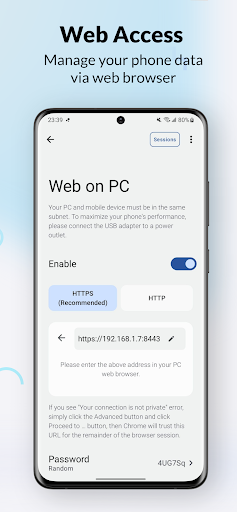
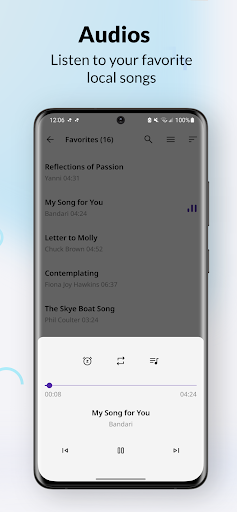
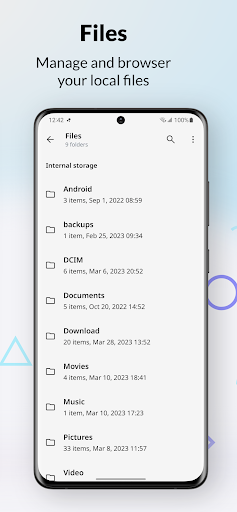
PlainApp is an open-source application that allows you to manage your phone through a web browser. Access files, videos, music, contacts, and more from your desktop using a secure, easy to use web interface!
Features
- Privacy oriented: We take your privacy seriously and use TLS + AES-GCM-256 encryption to ensure your data is secure.
- No cloud services or third-party data storage: All data is kept on your device, so you have complete control over your information.
- No Firebase Cloud Messaging/Analytics: We don't track your activity or use your data for advertising purposes. We only collect crash logs through Firebase Crashlytics.
- User-friendly: PlainApp has a modern, customizable interface with multi-language support, light/dark theme options, and e-ink screen compatibility.
- Desktop management: You can manage your phone from your desktop by visiting a self-hosted webpage wirelessly.
- Contacts management: You can manage these features on the self-hosted webpage as well.
- File management: Manage files, images, videos, and audios on the self-hosted webpage.
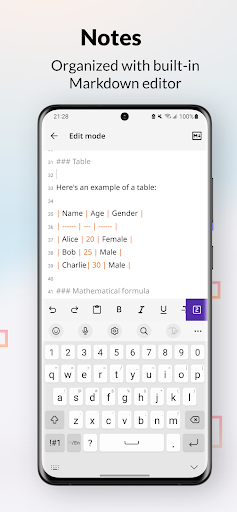
- Note-taking: Use PlainApp to manage your notes with a built-in Markdown editor.
- RSS reader: Read articles in a clean UI.
- TV casting: Cast your videos, images, and audios to your TV.
- Video and audio playback: Play videos and audios in the app and on the webpage.
- Backup and export: Backup and export your app data for safekeeping.
- Screen mirror: Mirror your phone on webpage.
- Tools: Sound meter.
And more features are planned for the future.
PlainApp's minimalist design is intentional, so you can focus on what matters most: your valuable data.
Github: https://github.com/ismartcoding/plain-app
Reddit: https://www.reddit.com/r/plainapp
Video: https://www.youtube.com/watch?v=TjRhC8pSQ6Q
और दिखाएं

1. MEmu इंस्टॉलर को डाउनलोड करें और इंस्टॉलेशन को पूरा करें

2. MEmu शुरू करें फिर होमपेज पर Google Play खोलें

3. Google Play में PlainApp: File & Web Access खोजें
Install
4. PlainApp: File & Web Access डाउनलोड कर इंस्टॉल करें
5. इंस्टॉल पूरा होने पर आइकन दबाएं

6. MEmu का उपयोग करके अपने कंप्यूटर पर PlainApp: File & Web Access का अनुभव करें
MEmu Play सबसे बेहतरीन मुफ़्त Android एमुलेटर है और 5 करोड़ लोग पहले ही इसके शानदार Android ऐप अनुभव का आनंद ले चुके हैं। MEmu 9 वर्चुअलाइज़ेशन तकनीक आपको अपने PC पर हज़ारों Android ऐप्स, यहाँ तक कि सबसे ज़्यादा ग्राफ़िक्स वाले ऐप्स भी, आसानी से चलाने की सुविधा देती है।
असीमित बैटरी या मोबाइल डेटा के साथ बेहतर ग्राफिक्स के साथ बड़ी स्क्रीन; लंबी अवधि।
कीबोर्ड और माउस या गेमपैड के उत्तम नियंत्रण के लिए संपूर्ण कीमैपिंग का समर्थन करता हैं।
एक ही पीसी पर मल्टी-इंस्टेंस मैनेजर के साथ एक समय में कई गेम खाते या कार्य कर सकते हैं।
Use PlainApp: File & Web Access on PC by following steps: