
Postegro - Any Profile Viewer
अपडेट किया गया
वर्तमान वर्शन
1.30
संसाधन

Postegro - Any Profile Viewer पर अपनी मोबाइल डेटा सीमा पार करने को अलविदा कहें और छोटी स्क्रीन की सीमाओं से मुक्त होकर बड़े डिस्प्ले के लाभों का अनुभव करें। अब, आप अपने कीबोर्ड और माउस का उपयोग करके फुल-स्क्रीन मोड में टॉपर्स क्लैन की शक्ति का अनुभव कर सकते हैं। MEmu Play में वे सभी बेहतरीन सुविधाएँ हैं जिनकी आप अपेक्षा करते हैं: त्वरित इंस्टॉलेशन और आसान सेटअप, सहज नियंत्रण, बैटरी की आवश्यकता नहीं, और कोई डेटा या कॉल समय सीमा नहीं। नया MEmu 9 आपके कंप्यूटर पर Postegro - Any Profile Viewer का उपयोग करने के लिए सबसे अच्छा विकल्प है। हमारा मालिकाना मल्टी-इंस्टेंस मैनेजर एक साथ दो या अधिक खातों को चलाने का समर्थन करता है। इससे भी महत्वपूर्ण बात यह है कि हमारा अनूठा इम्यूलेशन इंजन आपके कंप्यूटर के प्रदर्शन का पूरा उपयोग करता है, जिससे एक सहज और निर्बाध अनुभव मिलता है।
और दिखाएं
डाउनलोड करें Postegro - Any Profile Viewer पीसी पर MEmu एंड्रॉयड एमुलेटर के साथ बड़े पर्दे पर खेलने का आनंद लें। With Postegro you can view and download any Instagram DP and to watch it in Full HD.
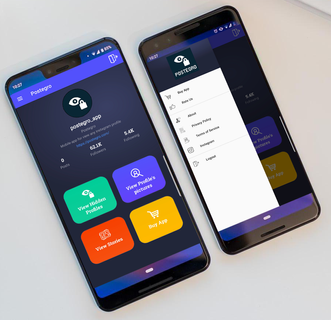
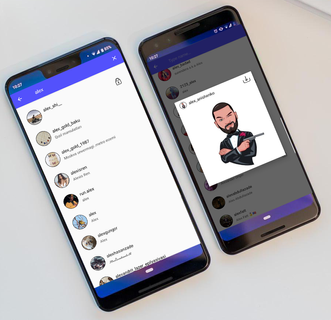
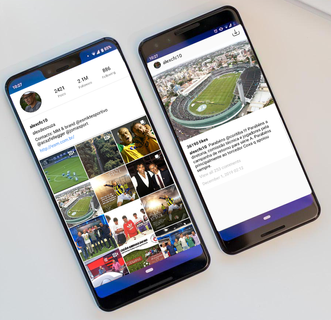
With Postegro you can view and download any Instagram DP and to watch it in Full HD. Simply enter a username of any user, search and zoom the profile picture! No sign in required.You can now save Instagram DP in to the gallery. Just tap to the save icon. If do you want to see any profile picture, photos and videos of any Instagram user or Instagram post with full HD picture? Let download Postegro - Any Profile Viewer for view full profile photos and you can save it in your device.Postegro is wonderful profile analyzing tool. Tapping on each entry inside the list and it will give you the opportunity to see more details. Features:+ Search any Instagram user with input username to view profile picture.+ Suggesting instagram name related, and show the follow number.+ Display full username of instagram user for you, you can copy that.+ Save and zoom photos on full HD.+ Save high quality photos and videos from instagram posts.+ To see followed profiles.+ To see by whom followed profiles.+ Profile photo enlargement+ You can view all your wanted profiles. DISCLAIMER•You need an Instagram account to use this app! •This app is not affiliated with Instagram.If you have any trouble or want to ask question regarding the app, please send an email to our team. We will be more than happy to helpEmail : [email protected]
और दिखाएं

1. MEmu इंस्टॉलर को डाउनलोड करें और इंस्टॉलेशन को पूरा करें

2. MEmu शुरू करें फिर होमपेज पर Google Play खोलें

3. Google Play में Postegro - Any Profile Viewer खोजें
Install
4. Postegro - Any Profile Viewer डाउनलोड कर इंस्टॉल करें
5. इंस्टॉल पूरा होने पर आइकन दबाएं

6. MEmu का उपयोग करके अपने कंप्यूटर पर Postegro - Any Profile Viewer का अनुभव करें
MEmu Play सबसे बेहतरीन मुफ़्त Android एमुलेटर है और 5 करोड़ लोग पहले ही इसके शानदार Android ऐप अनुभव का आनंद ले चुके हैं। MEmu 9 वर्चुअलाइज़ेशन तकनीक आपको अपने PC पर हज़ारों Android ऐप्स, यहाँ तक कि सबसे ज़्यादा ग्राफ़िक्स वाले ऐप्स भी, आसानी से चलाने की सुविधा देती है।
असीमित बैटरी या मोबाइल डेटा के साथ बेहतर ग्राफिक्स के साथ बड़ी स्क्रीन; लंबी अवधि।
कीबोर्ड और माउस या गेमपैड के उत्तम नियंत्रण के लिए संपूर्ण कीमैपिंग का समर्थन करता हैं।
एक ही पीसी पर मल्टी-इंस्टेंस मैनेजर के साथ एक समय में कई गेम खाते या कार्य कर सकते हैं।
Use Postegro - Any Profile Viewer on PC by following steps: