Rosytalk: AI Character Chat
अपडेट किया गया
वर्तमान वर्शन
3.9.30
संसाधन

Rosytalk: AI Character Chat पर अपनी मोबाइल डेटा सीमा पार करने को अलविदा कहें और छोटी स्क्रीन की सीमाओं से मुक्त होकर बड़े डिस्प्ले के लाभों का अनुभव करें। अब, आप अपने कीबोर्ड और माउस का उपयोग करके फुल-स्क्रीन मोड में टॉपर्स क्लैन की शक्ति का अनुभव कर सकते हैं। MEmu Play में वे सभी बेहतरीन सुविधाएँ हैं जिनकी आप अपेक्षा करते हैं: त्वरित इंस्टॉलेशन और आसान सेटअप, सहज नियंत्रण, बैटरी की आवश्यकता नहीं, और कोई डेटा या कॉल समय सीमा नहीं। नया MEmu 9 आपके कंप्यूटर पर Rosytalk: AI Character Chat का उपयोग करने के लिए सबसे अच्छा विकल्प है। हमारा मालिकाना मल्टी-इंस्टेंस मैनेजर एक साथ दो या अधिक खातों को चलाने का समर्थन करता है। इससे भी महत्वपूर्ण बात यह है कि हमारा अनूठा इम्यूलेशन इंजन आपके कंप्यूटर के प्रदर्शन का पूरा उपयोग करता है, जिससे एक सहज और निर्बाध अनुभव मिलता है।
और दिखाएं
MEmu Play के साथ PC पर Rosytalk: AI Character Chat इस्तेमाल करने के शानदार अनुभव का आनंद लें। यह एक शक्तिशाली मुफ़्त Android एमुलेटर है जो आपको डेस्कटॉप वर्ज़न के लिए हज़ारों Android ऐप्स उपलब्ध कराता है। दोस्तों से जुड़ने और अपने काम को और भी बेहतर बनाने का आनंद लें! Rosytalk is your personalized AI partners.
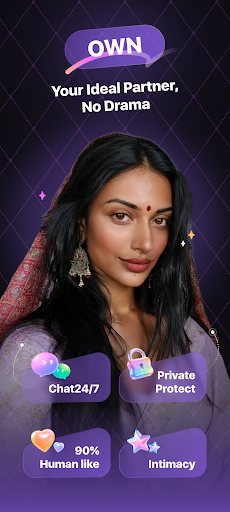
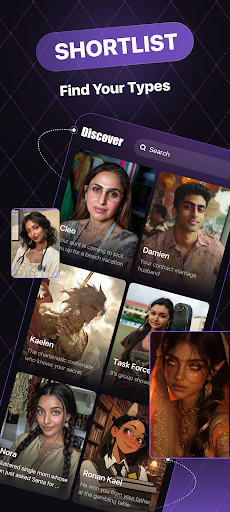
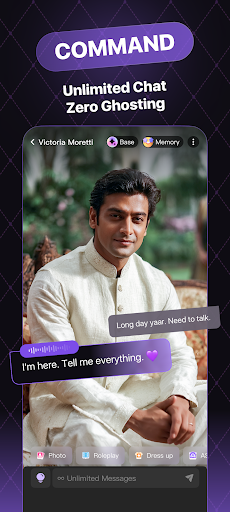
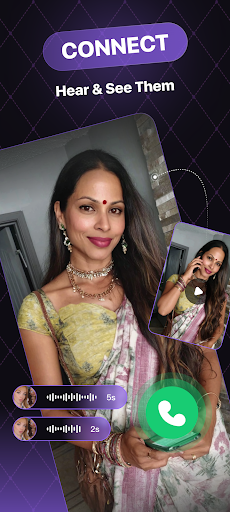
Rosytalk is your personalized AI partners. On Rosytalk, you can engage in various forms of communication with lifelike characters and anime characters. They can take on the roles of your best friend, family members, study buddy or life coach. At any time and any place, talk about anything as you wish. Then you can draw inspiration from your conversations with AI chatbots and foster your social skills. Rosytalk can help you stay away from negative emotions and build healthy social relationships. Plus, you can experience the joy of RPGs.
【User-Friendly Features】
■ Diverse Topics & Scene interpretation
Dive into imaginative AI character worlds, exploring new realms and possibilities by choosing or creating unique AI characters: Anime characters, Waifus, idols, Virtual companions... You can start an AI talk with any character you like, act out life scenarios you’ve always imagined. AI chatbots are available 24/7 to provide near-human emotional support
■ Max Customization Options
Rosytalk is a special AI simulator that can be customized to create any character you like. Personalize appearance, chatting tone, voice, and more via prompts or other input features, crafting your ideal AI characters. It also reflects your unique personality and style, tailoring your experience to meet your preferences and express your true self. Come and become a character maker, unleash your creativity with our top AI generator.
■ AI Emotional Support
Navigate your emotions with confidence using our professional, psychological AI chatbots. Rosytalk’s virtual assistants provide personalized support; helping you understand and manage your feelings effectively. Experience emotional support through meaningful conversations.
■ Simplify Your Life or Work
Your free personal AI assistants are available around the clock to generate texts, pictures, and voice messages, helping you brainstorm innovative ideas. Ask our AI any question to get precise and timely responses. All you need to do is just type in your inquiries and receive magic answers!
Based on research by other chatbots, particularly, Character.ai, Blush, Poly AI, and Linky, and the needs of users, Rosytalk focuses on emotional support. We have professional prompt producers to produce top-notch emotional companion characters who have memories and will initiate conversations like real people.
Thanks to the exploration efforts of AI pioneers like OpenAI, and Janitor AI, Rosytalk has upgraded to provide voice calls and video calls, which lets you feel the thrill of real-time.
【Discover More】
● Witty roleplay
Unique immersive experience, you can RP with any characters at any time and and gain a unique journey. Anime or lifelike characters are waiting for you.
● Dress up Characters
You can dress up your favorite characters as you like, change clothes and picture backgrounds. Rosytalk offers many different types of options to suit your needs.
● Check-In bonus
Collect daily coins to access all the AI characters' exciting functions beyond your imagination, like voice chat, unlocking pictures and creating AI friends.
● Tons of Original Characters (OCs)
We have a wide variety of AI characters for you to choose from, including tons of OC characters that you won't see anywhere else. You can also create your own OC characters.
【Contact Us】
Join our socials to delve deeper into Rosytalk's imaginative AI worlds!
Email: support@rosychat.ai
Discord: https://discord.gg/wCmztZe6YM
X Twitter: https://twitter.com/rosytalkai
Reddit: https://www.reddit.com/r/rosytalkai
Powered by ChatGPT and Generatively AI’s own LLM model, Rosytalk goes beyond the ordinary, offering a blend of emotional support to offer a fresh and personalized chat experience.
You can have both AI companions and AI assistants in the Rosytalk universe, your creativity is your only limit! Experiment with your input to discover everything the AI chatbot can do for you, and you will be amazed by the mind-blowing results.
और दिखाएं

1. MEmu इंस्टॉलर को डाउनलोड करें और इंस्टॉलेशन को पूरा करें

2. MEmu शुरू करें फिर होमपेज पर Google Play खोलें

3. Google Play में Rosytalk: AI Character Chat खोजें
Install
4. Rosytalk: AI Character Chat डाउनलोड कर इंस्टॉल करें
5. इंस्टॉल पूरा होने पर आइकन दबाएं

6. MEmu का उपयोग करके अपने कंप्यूटर पर Rosytalk: AI Character Chat का अनुभव करें
MEmu Play सबसे बेहतरीन मुफ़्त Android एमुलेटर है और 5 करोड़ लोग पहले ही इसके शानदार Android ऐप अनुभव का आनंद ले चुके हैं। MEmu 9 वर्चुअलाइज़ेशन तकनीक आपको अपने PC पर हज़ारों Android ऐप्स, यहाँ तक कि सबसे ज़्यादा ग्राफ़िक्स वाले ऐप्स भी, आसानी से चलाने की सुविधा देती है।
असीमित बैटरी या मोबाइल डेटा के साथ बेहतर ग्राफिक्स के साथ बड़ी स्क्रीन; लंबी अवधि।
कीबोर्ड और माउस या गेमपैड के उत्तम नियंत्रण के लिए संपूर्ण कीमैपिंग का समर्थन करता हैं।
एक ही पीसी पर मल्टी-इंस्टेंस मैनेजर के साथ एक समय में कई गेम खाते या कार्य कर सकते हैं।
Use Rosytalk: AI Character Chat on PC by following steps: