
Swamini Vato Study
अपडेट किया गया
वर्तमान वर्शन
1.1.1
संसाधन

Swamini Vato Study पर अपनी मोबाइल डेटा सीमा पार करने को अलविदा कहें और छोटी स्क्रीन की सीमाओं से मुक्त होकर बड़े डिस्प्ले के लाभों का अनुभव करें। अब, आप अपने कीबोर्ड और माउस का उपयोग करके फुल-स्क्रीन मोड में टॉपर्स क्लैन की शक्ति का अनुभव कर सकते हैं। MEmu Play में वे सभी बेहतरीन सुविधाएँ हैं जिनकी आप अपेक्षा करते हैं: त्वरित इंस्टॉलेशन और आसान सेटअप, सहज नियंत्रण, बैटरी की आवश्यकता नहीं, और कोई डेटा या कॉल समय सीमा नहीं। नया MEmu 9 आपके कंप्यूटर पर Swamini Vato Study का उपयोग करने के लिए सबसे अच्छा विकल्प है। हमारा मालिकाना मल्टी-इंस्टेंस मैनेजर एक साथ दो या अधिक खातों को चलाने का समर्थन करता है। इससे भी महत्वपूर्ण बात यह है कि हमारा अनूठा इम्यूलेशन इंजन आपके कंप्यूटर के प्रदर्शन का पूरा उपयोग करता है, जिससे एक सहज और निर्बाध अनुभव मिलता है।
और दिखाएं
डाउनलोड करें Swamini Vato Study पीसी पर MEmu एंड्रॉयड एमुलेटर के साथ बड़े पर्दे पर खेलने का आनंद लें। Swamini Vato, Mul Aksharmurti Gunatitanand Swami’s divine discourses, is an ocean of knowledge for spiritual seekers all over the world.

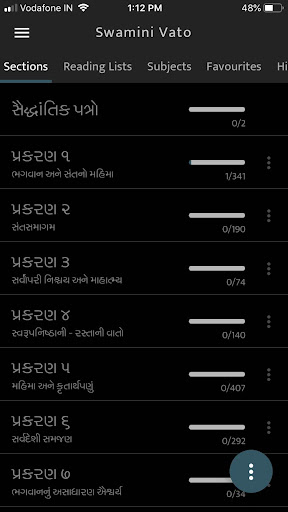
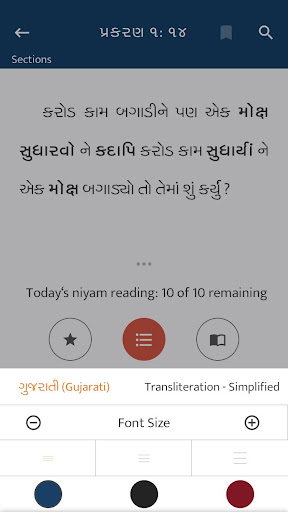
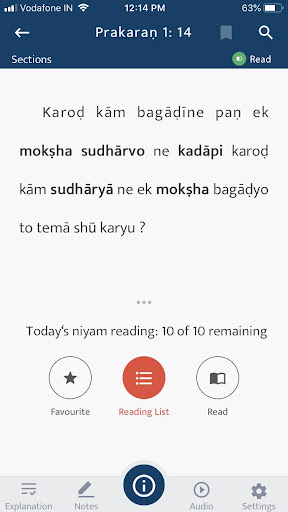
Swamini Vato, Mul Aksharmurti Gunatitanand Swami’s divine discourses, is an ocean of knowledge for spiritual seekers all over the world. This scripture, filled with teachings based on the eternal Vedic Akshar Purushottam Siddhant, is read regularly by thousands of devotees seeking worldly advice and spiritual wisdom.
With the inspiration and guidance of Param Pujya Mahant Swami Maharaj, and over 25,000 hours of effort by the learned sadhus and experienced volunteers of BAPS, Swamini Vato is being made available in ‘app’ format – delivering the same spiritual wisdom in a modern accessible medium.
Through short-and-simple definitions and easy-to-understand explanations, this app provides a study platform for spiritual seekers looking to better understand the subtleties of Gunatitanand Swami’s talks and apply his teachings to their lives. Utilising current technology, this app meets the needs of today’s spiritual generation by giving them access to ancient wisdom in a modern format – making the study of Swamini Vato a truly enjoyable experience.
The ‘Swamini Vato Study App’ contains easy-to-use features such as:
Simple definitions of vernacular and colloquial words
Clear explanations of phrases and analogies
Compilation of quotations by Bhagwan Swaminarayan and the Guru Parampara, clarifying subtle concepts in Swami’s talks
Interesting introductions to various people, places and scriptures
Historical accounts, Puranic incidents and moral stories referred to in Swami’s talks
Additional information through maps and images
- Other helpful options include:
- English translation and transliteration to complement the Gujarati text
- Audio feature to enhance the reading experience
- Recommended reading lists
- Subject-wise reading option
- Note-taking function
- Search option
और दिखाएं

1. MEmu इंस्टॉलर को डाउनलोड करें और इंस्टॉलेशन को पूरा करें

2. MEmu शुरू करें फिर होमपेज पर Google Play खोलें

3. Google Play में Swamini Vato Study खोजें
Install
4. Swamini Vato Study डाउनलोड कर इंस्टॉल करें
5. इंस्टॉल पूरा होने पर आइकन दबाएं

6. MEmu का उपयोग करके अपने कंप्यूटर पर Swamini Vato Study का अनुभव करें
MEmu Play सबसे बेहतरीन मुफ़्त Android एमुलेटर है और 5 करोड़ लोग पहले ही इसके शानदार Android ऐप अनुभव का आनंद ले चुके हैं। MEmu 9 वर्चुअलाइज़ेशन तकनीक आपको अपने PC पर हज़ारों Android ऐप्स, यहाँ तक कि सबसे ज़्यादा ग्राफ़िक्स वाले ऐप्स भी, आसानी से चलाने की सुविधा देती है।
असीमित बैटरी या मोबाइल डेटा के साथ बेहतर ग्राफिक्स के साथ बड़ी स्क्रीन; लंबी अवधि।
कीबोर्ड और माउस या गेमपैड के उत्तम नियंत्रण के लिए संपूर्ण कीमैपिंग का समर्थन करता हैं।
एक ही पीसी पर मल्टी-इंस्टेंस मैनेजर के साथ एक समय में कई गेम खाते या कार्य कर सकते हैं।
Use Swamini Vato Study on PC by following steps: