terneo
अपडेट किया गया
वर्तमान वर्शन
4.4.7
संसाधन

terneo पर अपनी मोबाइल डेटा सीमा पार करने को अलविदा कहें और छोटी स्क्रीन की सीमाओं से मुक्त होकर बड़े डिस्प्ले के लाभों का अनुभव करें। अब, आप अपने कीबोर्ड और माउस का उपयोग करके फुल-स्क्रीन मोड में टॉपर्स क्लैन की शक्ति का अनुभव कर सकते हैं। MEmu Play में वे सभी बेहतरीन सुविधाएँ हैं जिनकी आप अपेक्षा करते हैं: त्वरित इंस्टॉलेशन और आसान सेटअप, सहज नियंत्रण, बैटरी की आवश्यकता नहीं, और कोई डेटा या कॉल समय सीमा नहीं। नया MEmu 9 आपके कंप्यूटर पर terneo का उपयोग करने के लिए सबसे अच्छा विकल्प है। हमारा मालिकाना मल्टी-इंस्टेंस मैनेजर एक साथ दो या अधिक खातों को चलाने का समर्थन करता है। इससे भी महत्वपूर्ण बात यह है कि हमारा अनूठा इम्यूलेशन इंजन आपके कंप्यूटर के प्रदर्शन का पूरा उपयोग करता है, जिससे एक सहज और निर्बाध अनुभव मिलता है।
और दिखाएं
डाउनलोड करें terneo पीसी पर MEmu एंड्रॉयड एमुलेटर के साथ बड़े पर्दे पर खेलने का आनंद लें। Operate your Wi-Fi heating controller terneo ™, wherever you are — in bed, aboard or at the other end of the world.
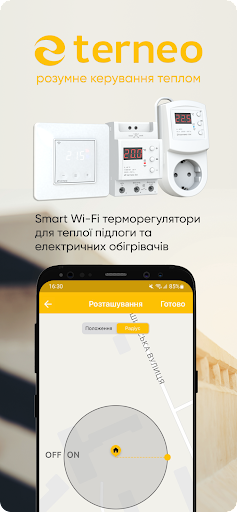

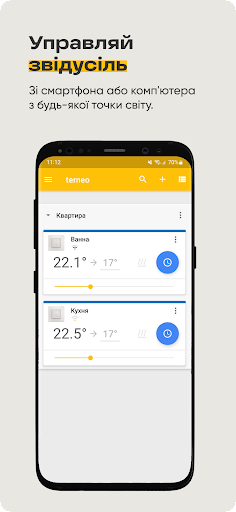
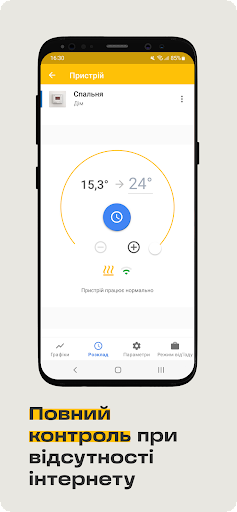
Operate your Wi-Fi heating controller terneo ™, wherever you are — in bed, aboard or at the other end of the world. Use your daily time-schedule to save electricity. Achieve impeccable comfort within doors thanks to wide settings!
OPERATE ALL WI-FI HEATING CONTROLLERS TERNEO ™ WITHIN ONE APPLICATION. You can add any quantity of devices to your account. Even if they are in different rooms. Even if they are in different houses. You do not want to customize each heating controller separately? Just copy settings from one heating controller to another.
IMPLEMENTATION OF HEATING ACCORDING TO YOUR SCHEDULE. You can add up to 16 temperature intervals for each day.
STATISTICS OF HEATING DYNAMICS per day, week, month or year. Analyze past heating data and optimize the heating schedule in future.
DEPARTURE. Schedule start of heating at date of your return from vacation. During your absence, the heating controller terneo will maintain set economy temperature.
INTUITIVE INTERFACE. Period of service of the device in saving mode is highlighted green, and time of maintaining a comfortable temperature is highlighted yellow and orange.
और दिखाएं

1. MEmu इंस्टॉलर को डाउनलोड करें और इंस्टॉलेशन को पूरा करें

2. MEmu शुरू करें फिर होमपेज पर Google Play खोलें

3. Google Play में terneo खोजें
Install
4. terneo डाउनलोड कर इंस्टॉल करें
5. इंस्टॉल पूरा होने पर आइकन दबाएं

6. MEmu का उपयोग करके अपने कंप्यूटर पर terneo का अनुभव करें
MEmu Play सबसे बेहतरीन मुफ़्त Android एमुलेटर है और 5 करोड़ लोग पहले ही इसके शानदार Android ऐप अनुभव का आनंद ले चुके हैं। MEmu 9 वर्चुअलाइज़ेशन तकनीक आपको अपने PC पर हज़ारों Android ऐप्स, यहाँ तक कि सबसे ज़्यादा ग्राफ़िक्स वाले ऐप्स भी, आसानी से चलाने की सुविधा देती है।
असीमित बैटरी या मोबाइल डेटा के साथ बेहतर ग्राफिक्स के साथ बड़ी स्क्रीन; लंबी अवधि।
कीबोर्ड और माउस या गेमपैड के उत्तम नियंत्रण के लिए संपूर्ण कीमैपिंग का समर्थन करता हैं।
एक ही पीसी पर मल्टी-इंस्टेंस मैनेजर के साथ एक समय में कई गेम खाते या कार्य कर सकते हैं।
Use terneo on PC by following steps: