VinFast
अपडेट किया गया
वर्तमान वर्शन
1.6.30
संसाधन

VinFast पर अपनी मोबाइल डेटा सीमा पार करने को अलविदा कहें और छोटी स्क्रीन की सीमाओं से मुक्त होकर बड़े डिस्प्ले के लाभों का अनुभव करें। अब, आप अपने कीबोर्ड और माउस का उपयोग करके फुल-स्क्रीन मोड में टॉपर्स क्लैन की शक्ति का अनुभव कर सकते हैं। MEmu Play में वे सभी बेहतरीन सुविधाएँ हैं जिनकी आप अपेक्षा करते हैं: त्वरित इंस्टॉलेशन और आसान सेटअप, सहज नियंत्रण, बैटरी की आवश्यकता नहीं, और कोई डेटा या कॉल समय सीमा नहीं। नया MEmu 9 आपके कंप्यूटर पर VinFast का उपयोग करने के लिए सबसे अच्छा विकल्प है। हमारा मालिकाना मल्टी-इंस्टेंस मैनेजर एक साथ दो या अधिक खातों को चलाने का समर्थन करता है। इससे भी महत्वपूर्ण बात यह है कि हमारा अनूठा इम्यूलेशन इंजन आपके कंप्यूटर के प्रदर्शन का पूरा उपयोग करता है, जिससे एक सहज और निर्बाध अनुभव मिलता है।
और दिखाएं
डाउनलोड करें VinFast पीसी पर MEmu एंड्रॉयड एमुलेटर के साथ बड़े पर्दे पर खेलने का आनंद लें। Just open the VinFast app and be connected with your car.
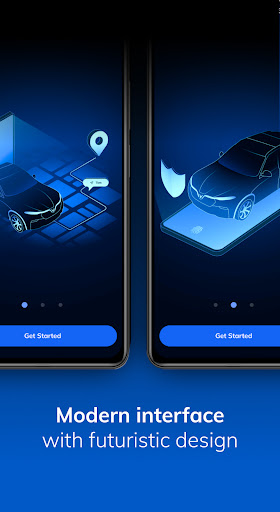
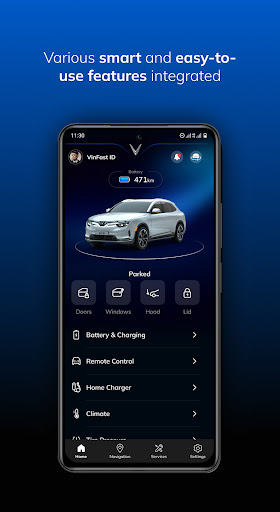
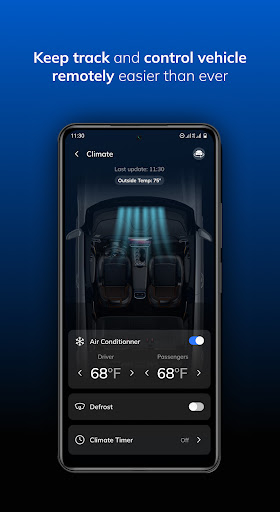
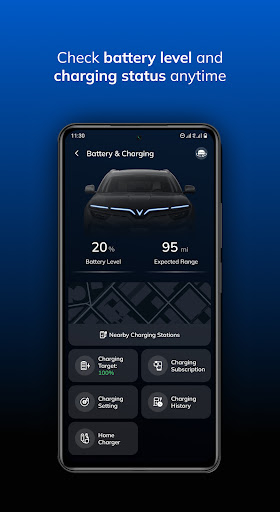
Just open the VinFast app and be connected with your car.
With a design based on the habits and needs of users, the VinFast app provides a series of smart features
that let you easily connect with your car to enjoy a more convenient experience with VinFast.
- Real-time vehicle tracking, quick navigation support
- Conveniently book multiple services online
- Transaction history details
VinFast also develops different categories of smart features specifically for its VinFast electric vehicle
models:
- Receive theft alert
- Remote vehicle access when the vehicle is lent to friends and family
- Keep track and control vehicle remotely
- Check battery level and charging status anytime
- Charging station search and navigation
- Automatic problem detection and roadside assistance
*Accessibility of some features may vary by model.
More than an application, VinFast will be a companion for drivers on their daily journey.
Download VinFast App now with straightforward account registration and login instructions. Even if you
don't own a VinFast car, you can still use the app to explore our features.
For more information, please visit our website vinfastauto.us
We are constantly improving this app to create the best experience, and we always listen to your feedback!
We hope to see you on the VinFast journey!
और दिखाएं

1. MEmu इंस्टॉलर को डाउनलोड करें और इंस्टॉलेशन को पूरा करें

2. MEmu शुरू करें फिर होमपेज पर Google Play खोलें

3. Google Play में VinFast खोजें
Install
4. VinFast डाउनलोड कर इंस्टॉल करें
5. इंस्टॉल पूरा होने पर आइकन दबाएं

6. MEmu का उपयोग करके अपने कंप्यूटर पर VinFast का अनुभव करें
MEmu Play सबसे बेहतरीन मुफ़्त Android एमुलेटर है और 5 करोड़ लोग पहले ही इसके शानदार Android ऐप अनुभव का आनंद ले चुके हैं। MEmu 9 वर्चुअलाइज़ेशन तकनीक आपको अपने PC पर हज़ारों Android ऐप्स, यहाँ तक कि सबसे ज़्यादा ग्राफ़िक्स वाले ऐप्स भी, आसानी से चलाने की सुविधा देती है।
असीमित बैटरी या मोबाइल डेटा के साथ बेहतर ग्राफिक्स के साथ बड़ी स्क्रीन; लंबी अवधि।
कीबोर्ड और माउस या गेमपैड के उत्तम नियंत्रण के लिए संपूर्ण कीमैपिंग का समर्थन करता हैं।
एक ही पीसी पर मल्टी-इंस्टेंस मैनेजर के साथ एक समय में कई गेम खाते या कार्य कर सकते हैं।
Use VinFast on PC by following steps: