xPortal: Crypto & DeFi Wallet
अपडेट किया गया
वर्तमान वर्शन
2.34.1
संसाधन

xPortal: Crypto & DeFi Wallet पर अपनी मोबाइल डेटा सीमा पार करने को अलविदा कहें और छोटी स्क्रीन की सीमाओं से मुक्त होकर बड़े डिस्प्ले के लाभों का अनुभव करें। अब, आप अपने कीबोर्ड और माउस का उपयोग करके फुल-स्क्रीन मोड में टॉपर्स क्लैन की शक्ति का अनुभव कर सकते हैं। MEmu Play में वे सभी बेहतरीन सुविधाएँ हैं जिनकी आप अपेक्षा करते हैं: त्वरित इंस्टॉलेशन और आसान सेटअप, सहज नियंत्रण, बैटरी की आवश्यकता नहीं, और कोई डेटा या कॉल समय सीमा नहीं। नया MEmu 9 आपके कंप्यूटर पर xPortal: Crypto & DeFi Wallet का उपयोग करने के लिए सबसे अच्छा विकल्प है। हमारा मालिकाना मल्टी-इंस्टेंस मैनेजर एक साथ दो या अधिक खातों को चलाने का समर्थन करता है। इससे भी महत्वपूर्ण बात यह है कि हमारा अनूठा इम्यूलेशन इंजन आपके कंप्यूटर के प्रदर्शन का पूरा उपयोग करता है, जिससे एक सहज और निर्बाध अनुभव मिलता है।
और दिखाएं
डाउनलोड करें xPortal: Crypto & DeFi Wallet पीसी पर MEmu एंड्रॉयड एमुलेटर के साथ बड़े पर्दे पर खेलने का आनंद लें। Discover the ultimate Web3 financial super app with our all-in-one crypto wallet and NFT wallet.
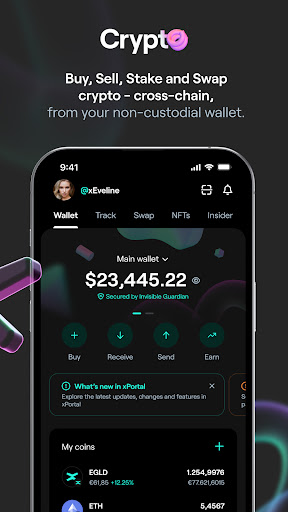
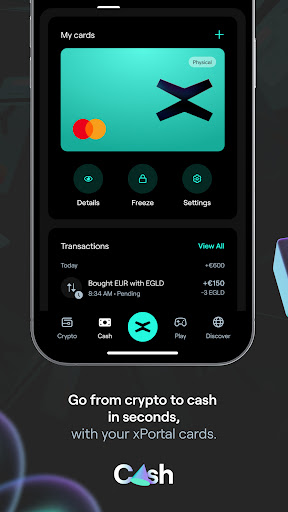
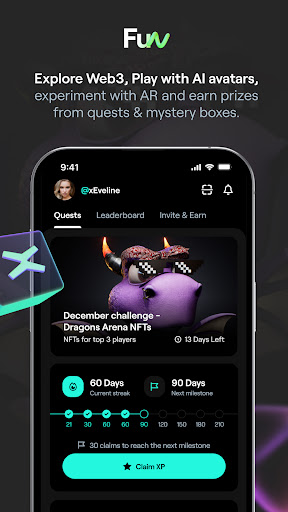
Discover the ultimate Web3 financial super app with our all-in-one crypto wallet and NFT wallet. Seamlessly buy, exchange and manage your Bitcoin, Ethereum, Solana, USDT, and other cryptocurrency in a secure DeFi wallet designed for both beginners and experts. Dive into DeFi and grow your portfolio by staking crypto in a secure and decentralized non custodial wallet.
We Make Crypto Safe and Easy for Everyone
Got your crypto in a crypto exchange platform like Binance, Bybit, Gate io, Kraken, Bingx, among others?
Secure your assets by transferring them to your custom non custodial wallet. Access the decentralized finance (DeFi) and sleep easy knowing your crypto is safe and in your control!
+80 Tokens Available, with More on the Way!
Since xPortal is a multi blockchain wallet, we have plenty of cryptocurrency you can invest in:
Top Blockchain Tokens :
Bitcoin (BTC), Ethereum (ETH), Solana (SOL), Binance (BNB), MultiversX (EGLD), Polygon (MATIC).
Top Meme Tokens:
Dogecoin (Doge), Shiba Inu (SHIB), Pepe coin
Top Stablecoins:
USDT and USDC
AND MANY MORE!
New assets are being added constantly following the latest crypto narratives, including AI crypto, Decentralized Finance (DeFi tokens), Meme tokens, Gaming tokens, and more!
You can also find all our offered cryptocurrency on Coinmarketcap and Coingecko if you want to dive deeper. Consider crypto staking or simply hold it in our secure USDT wallet until you're ready to make your move!
Unlock Investing Power
Crypto to fiat was never easier. Buy, sell, stake, and exchange crypto across different blockchains in our web3 wallet. Invest in crypto, grow your decentralized portfolio on your crypto wallet and get ahead of the future of finance!
Non Custodial Wallet: Your Wallet, Your Cryptocurrency
A non custodial wallet is a type of crypto wallet where you have full control over your private keys and funds, meaning only you can access and manage your assets without relying on a third party.
You pick the cryptocurrency, we bring the non custodial wallet secured with on-chain 2FA. Our web3 wallet is decentralized, safe and essentially unhackable.
Keep your cryptocurrency safe, and remember not your keys, not your crypto!
Have Fun Exploring Web3 Dapps
Discover an ecosystem of dapps to explore Web3 while having fun with interactive quests. Earn prizes from mystery boxes and engage with out-of-this-world AR experiences together with your friends.
It wouldn’t be the ultimate financial super-app without a touch of AI. AI crypto is more relevant than ever. We're here to empower you with AI, making crypto smarter and easier to navigate.
Are you into NFTs as well? Explore the latest NFT collections and store them securely in our NFT wallet!
Trusted by Giants and +1.6M Users
Featured on Coinmarketcap, Coingecko, Forbes, Yahoo Finance, Coindesk, Cointelegraph, Decrypt, The Block, and Dappradar.
Investing in the future of finance has never been easier!
Join our community by downloading the app!
Our Philosophy
xPortal is on its way to becoming the only financial super app you’ll ever need — a limitless playground for decentralized finance (DeFi), where money meets freedom and crypto meets you.
Join over 1.6 million Web3 users in our crypto wallet!
For feedback and assistance, drop us a note at support@xportal.com or reach us via in-app chat.
और दिखाएं

1. MEmu इंस्टॉलर को डाउनलोड करें और इंस्टॉलेशन को पूरा करें

2. MEmu शुरू करें फिर होमपेज पर Google Play खोलें

3. Google Play में xPortal: Crypto & DeFi Wallet खोजें
Install
4. xPortal: Crypto & DeFi Wallet डाउनलोड कर इंस्टॉल करें
5. इंस्टॉल पूरा होने पर आइकन दबाएं

6. MEmu का उपयोग करके अपने कंप्यूटर पर xPortal: Crypto & DeFi Wallet का अनुभव करें
MEmu Play सबसे बेहतरीन मुफ़्त Android एमुलेटर है और 5 करोड़ लोग पहले ही इसके शानदार Android ऐप अनुभव का आनंद ले चुके हैं। MEmu 9 वर्चुअलाइज़ेशन तकनीक आपको अपने PC पर हज़ारों Android ऐप्स, यहाँ तक कि सबसे ज़्यादा ग्राफ़िक्स वाले ऐप्स भी, आसानी से चलाने की सुविधा देती है।
असीमित बैटरी या मोबाइल डेटा के साथ बेहतर ग्राफिक्स के साथ बड़ी स्क्रीन; लंबी अवधि।
कीबोर्ड और माउस या गेमपैड के उत्तम नियंत्रण के लिए संपूर्ण कीमैपिंग का समर्थन करता हैं।
एक ही पीसी पर मल्टी-इंस्टेंस मैनेजर के साथ एक समय में कई गेम खाते या कार्य कर सकते हैं।
Use xPortal: Crypto & DeFi Wallet on PC by following steps: