Countryballs at War
Diupdate
Versi Saat Ini
0.7
Ditawarkan Oleh

Dengan sepenuh kebulatan hati Anda dalam memainkan Countryballs at War, tangan Anda tak seharusnya hanya terbatas pada layar kecil handphone Anda.Bermainlah layaknya seorang profesional dan dapatkan kendali penuh dalam permainan Anda dengan papan ketik dan tetikus.MEmu menawarkan seluruh hal yang Anda harapkan.Unduh dan mainkan Countryballs at War pada PC. Bermainlah selama yang Anda inginkan, tanpa keterbatasan dari baterai, data seluler dan panggilan yang mengganggu.MEmu 9 baru merupakan pilihan terbaik untuk memainkan Countryballs at War pada PC. Dipersiapkan bersama teknologi ahli kami, sistem pemetaan kunci preset yang canggih menjadikan Countryballs at War sebagai permainan PC sejati.Manajer banyak hal dari MEmu memungkinkan Anda untuk memainkan 2 atau banyak akun pada perangkat yang sama.Dan yang terpenting, mesin emulasi eksklusif kami bisa melepaskan potensi penuh PC Anda, membuat segalanya berjalan lancar.
Tampilkan Lebih banyak
Unduh Countryballs at War di PC dengan Emulator Android MEmu. Nikmati permainan pada layar yang besar. Countryballs at War is a Grand Strategy Game with turn mechanics and real-time combats involved.
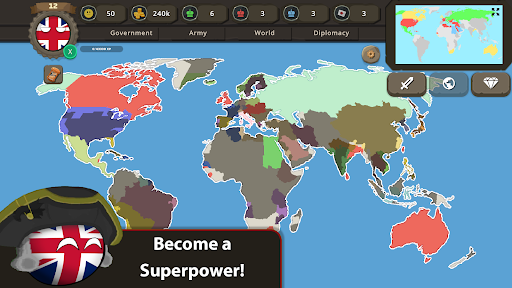
Countryballs at War is a Grand Strategy Game with turn mechanics and real-time combats involved. Your aim is to make your country a world superpower by building strong armies, controlling tax rates, increasing the happiness of your people, and upgrading your country.
In Countryballs at War, you can declare war, send ally requests, sign peace treaties, offer peace to enemies, and puppet weakened countries. You should choose your allies carefully because enemies will always try to capture your territories and destroy you. If you fail to rule your country, there will be rebellions in your country, and with rebellions, you will mostly lose half of your territories and armies.
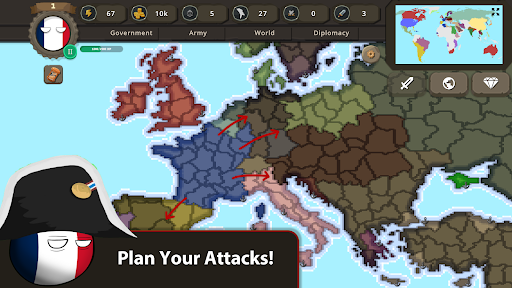
You will start each game with attack and diplomacy points. Each time you attack a territory, it will consume one attack point. Likewise, each time you use diplomacy actions, it will consume one diplomacy point. After you end a turn, these points will reset. You can upgrade these points' limits in Academies!
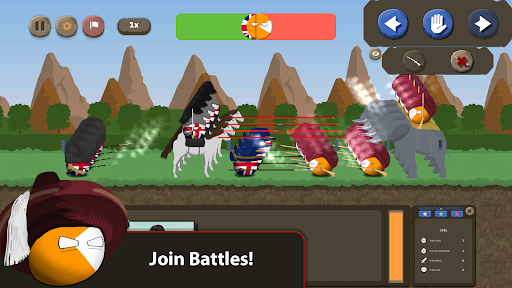
In combats, your aim is to cross your enemies' borders by sending your units to the battlefield. Enemies will not accept that to happen that easily. So, you should call your allies to battle and you should build strong armies!
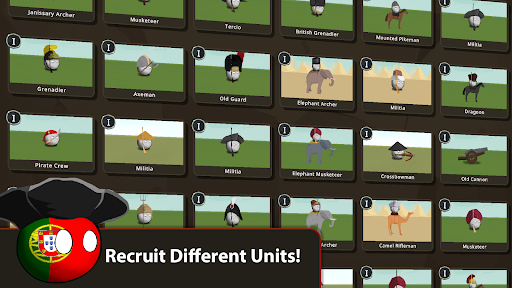
To build a strong army, you should unlock units from 'Barracks' and 'Artillery Depot' and upgrade them when you reach enough resources. There are tons of units that are 'unique' to each country and more will be coming soon with the next updates.
There are world events in Countryballs at War such as the 'Pirate Invasion'. Pirates will often invade territories with seaports, so you have to be careful!
Lastly, all countryballs are available to play, but some of them are locked. To unlock them you should find them! They are hidden in some areas. You can get some hints by clicking the 'Get Hint!' button in the game.
If you enjoyed playing Countryballs at War, please consider giving it 5 stars. It will really support me and the development of the game!
I will try to update the game frequently. If you have any questions or problems, don't hesitate to mention them in reviews. Or, you can send me an e-mail.
For more updates and discussions, you can join our discord server:
Link: https://discord.gg/Fx2D6MQZkC
Have fun playing Countryballs at War!
Map Music: Gates of Glory by Alexander Nakarada (www.serpentsoundstudios.com)
Licensed under Creative Commons: By Attribution 4.0 License
http://creativecommons.org/licenses/by/4.0/
Tampilkan Lebih banyak

1. Unduh dan instal MEmu APP

2. Menjalankan MEmu lalu buka Google Play di halaman

3. Cari Countryballs at War di Google Play
Install
4. Unduh dan instal Countryballs at War
5. Setelah insatl APP selesai,klik ikon untuk mulai

6. Nikmati bermain Countryballs at War di PC dengan MEmu
MEmu App Player adalah emulator Android gratis terbaik dan 50 Juta orang sudah menikmati pengalaman luar biasa dalam bermain gim Android. Teknologi virtualisasi MEmu memberi kekuasaan untuk memainkan ribuan gim Android dengan lancar di PC anda, bahkan gim dengan grafis yang paling tinggi.
Layar lebih besar dengan grafis yang lebih baik; durasi panjang, tanpa batasan baterai atau data seluler.
Didukung penuh oleh Pemetaan tombol yang lengkap untuk keakuratan kontrol keyboard dan mouse maupun gamepad.
Membuka beberapa akun game atau tugas di waktu yang sama hanya pada satu PC, dengan Multi-Instance manager.
Play Countryballs at War on PC by following steps: