VANDALEAK - Sprays & Graffiti
Diupdate
Versi Saat Ini
2.12
Ditawarkan Oleh

Dengan sepenuh kebulatan hati Anda dalam memainkan VANDALEAK - Sprays & Graffiti, tangan Anda tak seharusnya hanya terbatas pada layar kecil handphone Anda.Bermainlah layaknya seorang profesional dan dapatkan kendali penuh dalam permainan Anda dengan papan ketik dan tetikus.MEmu menawarkan seluruh hal yang Anda harapkan.Unduh dan mainkan VANDALEAK - Sprays & Graffiti pada PC. Bermainlah selama yang Anda inginkan, tanpa keterbatasan dari baterai, data seluler dan panggilan yang mengganggu.MEmu 9 baru merupakan pilihan terbaik untuk memainkan VANDALEAK - Sprays & Graffiti pada PC. Dipersiapkan bersama teknologi ahli kami, sistem pemetaan kunci preset yang canggih menjadikan VANDALEAK - Sprays & Graffiti sebagai permainan PC sejati.Manajer banyak hal dari MEmu memungkinkan Anda untuk memainkan 2 atau banyak akun pada perangkat yang sama.Dan yang terpenting, mesin emulasi eksklusif kami bisa melepaskan potensi penuh PC Anda, membuat segalanya berjalan lancar.
Tampilkan Lebih banyak
Unduh VANDALEAK - Sprays & Graffiti di PC dengan Emulator Android MEmu. Nikmati permainan pada layar yang besar. BURST YOUR CREATIVITY IN THE DIGITAL WORLD.
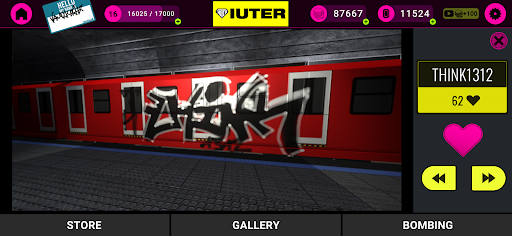
BURST YOUR CREATIVITY IN THE DIGITAL WORLD
VANDALEAK is the one and only place where a digital vandal can live the indoor graffiti writing experience. Cruising you through the ABC of the art, this app integrates various functions and areas in one single platform.
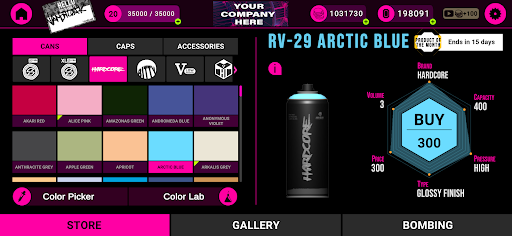
PRODUCT Area, kickstarts from precise and accurate color detection function via photos or manually creating a particular shade. Once the color is detected it automatically leads you to three closest types of spray paint from nearly 1000 options.
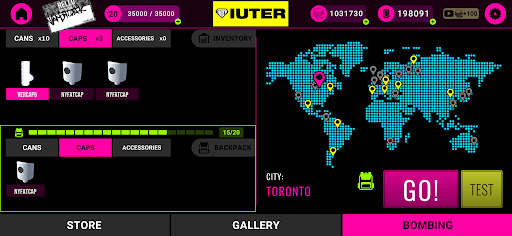
BOMBING Area, gear up your backpack selecting items from your inventory. Action!
After choosing the spray and cap of choice paint up that real life looking trains. Adjust the thickness and opacity of your spray with a single slider, for a first hand spray can feeling! Finish up by taking a pic!
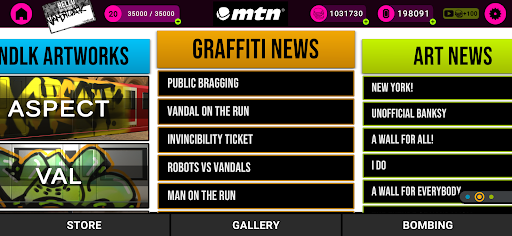
HOME, is where the VNDLK team keeps you updated with graffiti related news and tools of the game!
Your graffiti pictures from the BOMBING Area can be uploaded on the Blog and other VNDLK writers can “heart” your graff!
VANDALEAK features:
- RGB based color picker function (detection via photos or manually)
- 3D train models to paint on
- Multiple spray brands with unique technical characteristics
- Hundreds of colors to choose from
- Revolutionary function: Just like real life! Spray thickness/ opacity/ distance adjuster
- Social area to “like” other players' works
- News/Blog function to be up-to-date with graffiti and supply trends
VANDALEAK ENCOURAGES DIGITAL CREATIVITY!
We would love to hear your comments and thoughts so we can make the game better!
Please drop us line at hello@vandaleak.com
Tampilkan Lebih banyak

1. Unduh dan instal MEmu APP

2. Menjalankan MEmu lalu buka Google Play di halaman

3. Cari VANDALEAK - Sprays & Graffiti di Google Play
Install
4. Unduh dan instal VANDALEAK - Sprays & Graffiti
5. Setelah insatl APP selesai,klik ikon untuk mulai

6. Nikmati bermain VANDALEAK - Sprays & Graffiti di PC dengan MEmu
MEmu App Player adalah emulator Android gratis terbaik dan 50 Juta orang sudah menikmati pengalaman luar biasa dalam bermain gim Android. Teknologi virtualisasi MEmu memberi kekuasaan untuk memainkan ribuan gim Android dengan lancar di PC anda, bahkan gim dengan grafis yang paling tinggi.
Layar lebih besar dengan grafis yang lebih baik; durasi panjang, tanpa batasan baterai atau data seluler.
Didukung penuh oleh Pemetaan tombol yang lengkap untuk keakuratan kontrol keyboard dan mouse maupun gamepad.
Membuka beberapa akun game atau tugas di waktu yang sama hanya pada satu PC, dengan Multi-Instance manager.
Play VANDALEAK - Sprays & Graffiti on PC by following steps: