Ampere
Diupdate
Versi Saat Ini
v4.17
Ditawarkan Oleh

Hentilah khawatir tentang biaya berlebihan saat menggunakan Ampere di ponsel Anda, bebaskan diri Anda dari layar kecil dan nikmati menggunakan aplikasi pada tampilan yang lebih besar. Mulai sekarang, dapatkan pengalaman full-screen di aplikasi Anda dengan keyboard dan mouse. MEmu menyediakan semua fitur mengejutkan yang Anda harapkan: cepat menginstal dan mudah menggunakan, kontrol intuitif, tidak ada lagi batasan baterai, data seluler dan panggilan yang mengganggu. MEmu 9 yang baru adalah pilihan terbaik untuk menggunakan Ampere di komputer Anda. Bersandi dengan absorpsi kami, manajer multi-instance memungkinkan pembukaan 2 akun atau lebih pada saat yang bersamaan. Dan yang paling penting, mesin emulasi eksklusif kami dapat melepaskan potensi penuh PC Anda, menjadikan semuanya lancar dan menyenangkan.
Tampilkan Lebih banyak
Unduh Ampere di PC dengan Emulator Android MEmu. Nikmati permainan pada layar yang besar. Did you ever felt, that one Charger/USB cable set charges your device really fast and the other not?
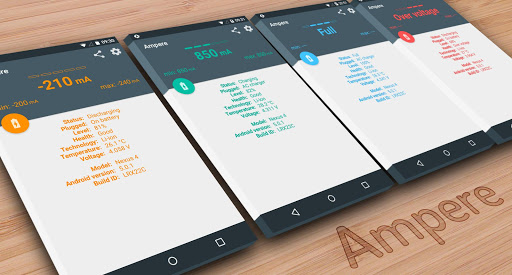
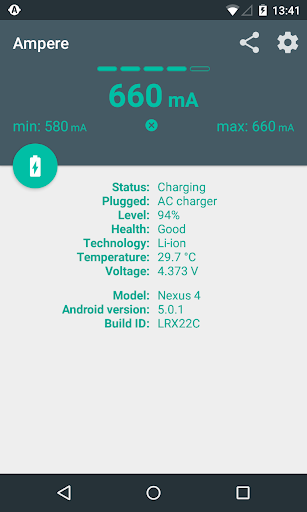
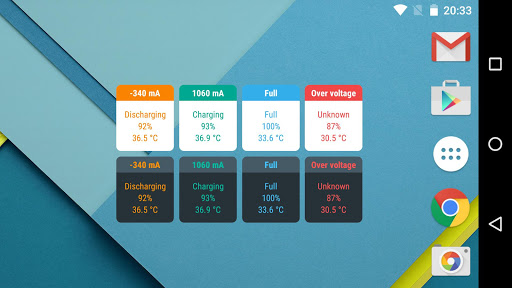
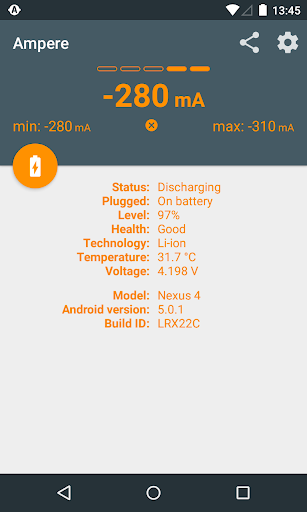
Did you ever felt, that one Charger/USB cable set charges your device really fast and the other not? Now, you can prove this with Ampere.
Measure the charging and discharging current of your battery.
PRO features:
- Widgets
- Notification
- Alerts on device
- Alerts on Android Wear
Not every device is supported because there are devices which lacks an appropriate measurement chip (or the interface) and they can not be supported at all. Please read the list of not supported phones at the end of the description.
The app is not meant to be mA accurate. It is only good for evaluate which Charger/USB cable combo is working the best for you on the same device.
----
Please read also the FAQ: http://goo.gl/R8XgXX
----
Start the app and wait ca. 10 seconds ("measuring" is on the display). After this time, the charging or discharging current will be shown.
The current depends on many things:
- Charger (USB/AC/Wireless)
- USB cable
- Phone type
- Current tasks running
- Display brightness
- WiFi state
- GPS state
Please don't use the readings on this app as concrete science. However, the readings are good enough to relatively measure how various chargers and USB cables fair on the same device.
If the app shows 0mA all the time, please use the settings option "Old measurement method". You can force the app with it to use the old measurement interface, if the Lollipop device has at least one.
Unfortunately some Samsung devices don't give correct (measured) values (e.g.: S5), just the maximum possible charging current with the actual USB cable/charger configuration. This is a firmware problem.
----
Background info: The app measures the charging/discharging current of the battery. If your phone is not connected to a charger, you see the discharging current which is negative. If you connect a charger then the current what the charger gives will be used to supply your phone and the remaining power will be charged into the battery.
If your phone consumes 300 mA without a charger connected (-300mA on the display), then a 500 mA charger will charge your battery maximum with 200 mA current (200mA on display).
----
Technical info: The displayed current is an average value from 50 measurements minus the 10 upper values and the 10 lower values. The displayed current can be shaky or unstable or even zero which means, that the Android system provides unstable values. Every company uses different battery types and other hardware making it difficult to get accurate results about your charger.
----
LiPo batteries don't draw the maximum for the full time it takes to charge the phone. If your battery is charged almost full then the charging current will be much less as by lower battery levels.
- A graph explaining LiPo charge stages: http://batteryuniversity.com/_img/content/ion1.jpg
- Dave's (EEVBlog) LiPo Charging Tutorial: http://youtu.be/A6mKd5_-abk
----
Phones/ROMS compatible only with "Old measurement method" switched on and selected the right "Measurement interface":
➤ HTC One M7 / M8
➤ LG G3
Phones/ROMS reported to be not working with this app:
➤ Galaxy Grand Prime - fortuna3gdtv
➤ Galaxy Note2 - t03g, t03gchn, t03gchnduos, t03gcmcc, t03gctc, t03gcuduos
➤ Galaxy S3 - d2att, d2spr, d2vmu
➤ Galaxy Tab4 7.0 - degas3g
➤ HTC Desire 510 - htc_a11ul8x26
➤ HTC One S (ville), X (endeavoru), XL (evita)
➤ HTC Sensation 4G - pyramid
Please do not give wrong rating, if your phone is one of the above. Not the app is wrong, but your phone does not support this kind of measurement yet.
If the app doesn't work on your device with pre-Lollipop Android version, then please read the first and the second posts in this XDA developer forum thread: http://goo.gl/pZqJg8 . Please post your problem with screenshots in the XDA thread.
Please read also the FAQ: http://goo.gl/R8XgXX
Tampilkan Lebih banyak

1. Unduh dan instal MEmu APP

2. Menjalankan MEmu lalu buka Google Play di halaman

3. Cari Ampere di Google Play
Install
4. Unduh dan instal Ampere
5. Setelah insatl APP selesai,klik ikon untuk mulai

6. Nikmati bermain Ampere di PC dengan MEmu
MEmu Play adalah emulator Android gratis terbaik dan 50 Juta orang sudah menikmati pengalaman luar biasa dalam Aplikasi Android. Teknologi virtualisasi MEmu memberi kekuasaan untuk memainkan ribuan Aplikasi Android dengan lancar di PC anda, bahkan Aplikasi dengan grafis yang paling tinggi.
Layar lebih besar dengan grafis yang lebih baik; durasi panjang, tanpa batasan baterai atau data seluler.
Didukung penuh oleh Pemetaan tombol yang lengkap untuk keakuratan kontrol keyboard dan mouse maupun gamepad.
Membuka beberapa akun game atau tugas di waktu yang sama hanya pada satu PC, dengan Multi-Instance manager.
Use Ampere on PC by following steps: