WhiteBIT – buy & sell bitcoin
Diupdate
Versi Saat Ini
3.34.0
Ditawarkan Oleh

Hentilah khawatir tentang biaya berlebihan saat menggunakan WhiteBIT – buy & sell bitcoin di ponsel Anda, bebaskan diri Anda dari layar kecil dan nikmati menggunakan aplikasi pada tampilan yang lebih besar. Mulai sekarang, dapatkan pengalaman full-screen di aplikasi Anda dengan keyboard dan mouse. MEmu menyediakan semua fitur mengejutkan yang Anda harapkan: cepat menginstal dan mudah menggunakan, kontrol intuitif, tidak ada lagi batasan baterai, data seluler dan panggilan yang mengganggu. MEmu 9 yang baru adalah pilihan terbaik untuk menggunakan WhiteBIT – buy & sell bitcoin di komputer Anda. Bersandi dengan absorpsi kami, manajer multi-instance memungkinkan pembukaan 2 akun atau lebih pada saat yang bersamaan. Dan yang paling penting, mesin emulasi eksklusif kami dapat melepaskan potensi penuh PC Anda, menjadikan semuanya lancar dan menyenangkan.
Tampilkan Lebih banyak
Unduh WhiteBIT – buy & sell bitcoin di PC dengan Emulator Android MEmu. Nikmati permainan pada layar yang besar. WhiteBIT is a centralized cryptocurrency exchange trusted by over 4 million users from more than 190 countries.

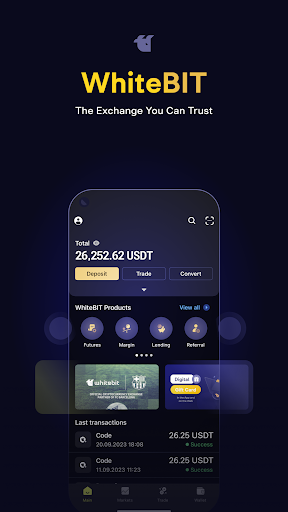

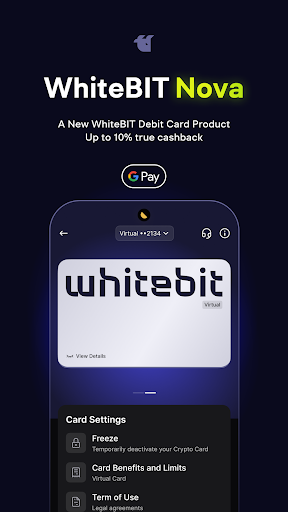
WhiteBIT is a centralized cryptocurrency exchange trusted by over 4 million users from more than 190 countries.
With us, you can trade Bitcoin (BTC), USD Coin (USDC), Ethereum (ETH), Ripple (XRP), Dogecoin (DOGE), and other assets. A convenient crypto wallet, profitable conditions for trading and staking, margin trading, WhiteBIT Codes, Trading competitions, and much more is waiting for you.
WhiteBIT is suitable for both experienced traders and beginners. This is a convenient trading platform where you can see the current rate of Bitcoin and other coins. Buy and sell cryptocurrency easily and securely with WhiteBIT.
Wallet and Exchange app modes
The app has a Wallet mode and an Exchange mode.
The Wallet mode is available only to registered users after authorization. This is your crypto wallet with all available assets.
The Exchange mode shows all available rates and an order book. We have 250+ coins and 450+ trading pairs. In this mode, you can analyze the market even without authorization.
Trading tools
Cryptocurrency trading is a process that requires attention and knowledge of various tools. In our application, you can find charts to analyze cryptocurrencies, place Market, Limit, and Conditional orders, and use various tools. So, you can trade crypto efficiently and profitably.
Secure trading
We keep 96% of your assets on cold wallets. The app has a whitelist function where you can enter addresses you trust and withdraw funds only to them. For additional protection during withdrawals, we send you a verification code by e-mail.
AML check
You can check directly in the app if the addresses are involved in money laundering. You will see the risk percentage and the signals from which it is formed. For example, the use of an address on the darknet or gambling business.
Fast authentication
Sign in instantly with Face ID and Touch ID. You can also activate 2FA to make sure no one else gets access to your account.
Automatic logout
Set an automatic logout time to protect your account even more.
Convenient KYC procedure
KYC verification allows you to additionally protect your funds and account. Verification is quite simple and takes a maximum of 24 hours.
Currency rate monitoring widget
Follow your favorite pairs without signing into the application. The widget allows you to always stay up to date in order to timely adjust strategies and increase profits.
Push notifications
Be always aware of changes in deposits and withdrawals, creation and modification of WhiteBIT Codes, and other changes. You can turn on different types of push notifications in the application settings.
Margin trading
We aspire to give our users a possibility to trade crypto with leverage, hence, reach considerably higher trading results. On our exchange platform, you can trade with up to 5x leverage, multiplying the potential income by many times. Now, Margin trading is available on the iOS app as well as on the Android crypto app.
WhiteBIT Codes
Welcome a unique tool of the exchange, which allows transferring fiat and crypto to other users of the exchange fee-free and use the funds on the Bitcoin Global P2P platform. The feature is available on the iOS app and on the Android crypto application.
Trading competition
On regular exchanges, you can simply buy and sell currency online. Our exchange platform offers a wide range of activities, enabling users to enjoy additional income in a fun and entertaining way. The users with the biggest trading volumes on a specific pair get to win rewards in crypto.
Support service 24/7
Contact us at any time, and we will resolve all issues related to the operation of the exchange or your account. Customer support is available in eight languages: English, Russian, Chinese, Simplified Chinese, Japanese, Ukrainian, Estonian, and Spanish.
Support Wear OS
Tampilkan Lebih banyak

1. Unduh dan instal MEmu APP

2. Menjalankan MEmu lalu buka Google Play di halaman

3. Cari WhiteBIT – buy & sell bitcoin di Google Play
Install
4. Unduh dan instal WhiteBIT – buy & sell bitcoin
5. Setelah insatl APP selesai,klik ikon untuk mulai

6. Nikmati bermain WhiteBIT – buy & sell bitcoin di PC dengan MEmu
MEmu Play adalah emulator Android gratis terbaik dan 50 Juta orang sudah menikmati pengalaman luar biasa dalam Aplikasi Android. Teknologi virtualisasi MEmu memberi kekuasaan untuk memainkan ribuan Aplikasi Android dengan lancar di PC anda, bahkan Aplikasi dengan grafis yang paling tinggi.
Layar lebih besar dengan grafis yang lebih baik; durasi panjang, tanpa batasan baterai atau data seluler.
Didukung penuh oleh Pemetaan tombol yang lengkap untuk keakuratan kontrol keyboard dan mouse maupun gamepad.
Membuka beberapa akun game atau tugas di waktu yang sama hanya pada satu PC, dengan Multi-Instance manager.
Use WhiteBIT – buy & sell bitcoin on PC by following steps: