GPS Essentials
Diupdate
Versi Saat Ini
1724617742
Ditawarkan Oleh

Hentilah khawatir tentang biaya berlebihan saat menggunakan GPS Essentials di ponsel Anda, bebaskan diri Anda dari layar kecil dan nikmati menggunakan aplikasi pada tampilan yang lebih besar. Mulai sekarang, dapatkan pengalaman full-screen di aplikasi Anda dengan keyboard dan mouse. MEmu menyediakan semua fitur mengejutkan yang Anda harapkan: cepat menginstal dan mudah menggunakan, kontrol intuitif, tidak ada lagi batasan baterai, data seluler dan panggilan yang mengganggu. MEmu 9 yang baru adalah pilihan terbaik untuk menggunakan GPS Essentials di komputer Anda. Bersandi dengan absorpsi kami, manajer multi-instance memungkinkan pembukaan 2 akun atau lebih pada saat yang bersamaan. Dan yang paling penting, mesin emulasi eksklusif kami dapat melepaskan potensi penuh PC Anda, menjadikan semuanya lancar dan menyenangkan.
Tampilkan Lebih banyak
Unduh GPS Essentials di PC dengan Emulator Android MEmu. Nikmati permainan pada layar yang besar. The most complete GPS tool available: Navigate, manage waypoints, tracks, routes, build your own dashboard from 45 widgets.
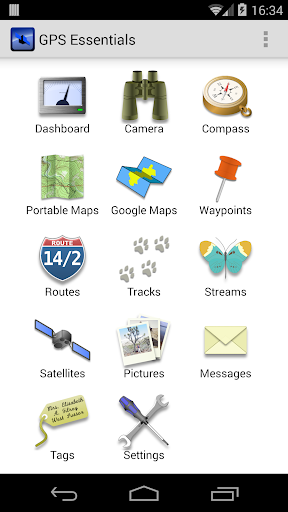
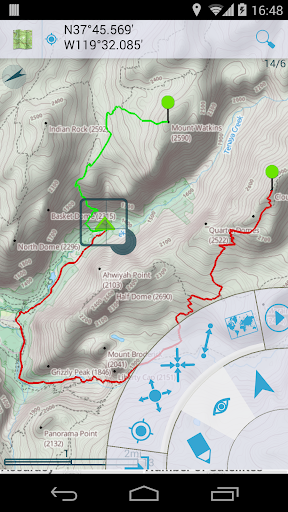
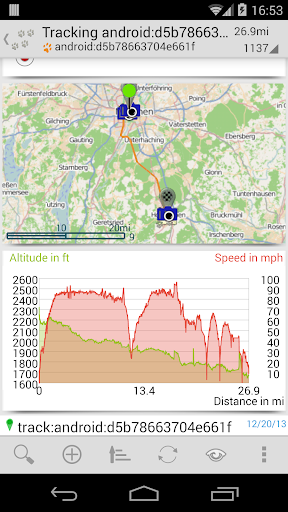
The most complete GPS tool available: Navigate, manage waypoints, tracks, routes, build your own dashboard from 45 widgets.
❧❧❧❧❧ Dashboard ❧❧❧❧❧
Shows navigation values such as: Accuracy, Altitude, Speed, Battery, Bearing, Climb, Course, Date, Declination, Distance, ETA, Latitude, Longitude, Max Speed, Min Speed, Actual Speed, True Speed, Sunrise, Sunset, Moonset, Moonrise, Moon Phase, Target, Time, TTG, Turn.
❧❧❧❧❧ Compass ❧❧❧❧❧
Show the orientation of the earth's magnetic field, shows an arbitrary tracking angle and the current target. Also a marine orienteering compass.
❧❧❧❧❧ Tracks ❧❧❧❧❧
Record tracks and view them on map. Export KML files and import into Google Maps, Google Earth and others.
❧❧❧❧❧ Routes ❧❧❧❧❧
Manage routes and view them on map. Import KML files from Google Maps, Google Earth and others. Create turn-by-turn instructions between waypoints.
❧❧❧❧❧ Camera ❧❧❧❧❧
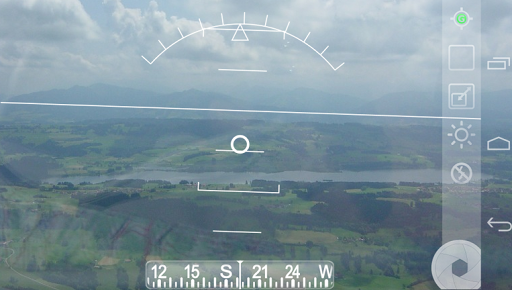
A camera HUD (heads-up display) view to show your waypoints, take pictures and share them.
❧❧❧❧❧ Map ❧❧❧❧❧
A map to show your waypoints. Convert mail addresses of your contacts to waypoint so that they can be used within the app.
Supports Google Maps, MapQuest, OpenStreetMap and others.
Supports Google Maps v2: Indoor Maps, Traffic, Buildings, Satellite and Terrain layers and map rotation.
❧❧❧❧❧ Waypoints ❧❧❧❧❧
A list of all your waypoints with export and import (KML, KMZ, GPX and LOC format).
❧❧❧❧❧ Satellites ❧❧❧❧❧
A sky view of the current positions that shows satellites in view.
❧❧❧❧❧ Features ❧❧❧❧❧
Supported position formats: UTM, MGRS, OSGB, Degree-Minute-Second, Degree-Minute-Fractions, Decimal, Mils. Supports over 230 datums.
Waypoints, routes and tracks can be exported as KML or GPX files and sent by email or uploaded to Google Docs or DropBox.
Please open the web page below for more info, send me emails for support. I CANNOT HELP IF YOU SIMPLY PLACE A COMMENT HERE.
Purchase the "GPS Essentials Donation Plugin" on Android Market if you want to support development.
The latest beta release is available on the Google Play Beta channel. Try out the latest features and help us improve GPS Essentials!
THIS APP WILL SHOW ADVERTISING. IF YOU DON'T LIKE THIS, PLEASE REFRAIN FROM INSTALLING/UPDATING.
GPS Essentials is not affiliated with any political party nor with any other organization mentioned in the ads, and it has no connection with any economic interests. If you don't like the ads, please contact AdMob.
WHAT ARE THE PERMISSIONS GOOD FOR?
✓ Coarse/Fine/Background location: To access network locations and GPS
✓ Full internet access: To read map tiles, send bug reports
✓ Modify/delete USB storage contents: To write waypoints, tracks and images onto the SD card
✓ Read phone state and identity: To tag pictures with the device ID (can be switched off in settings)
✓ Take pictures and videos: Camera HUD, take pictures
✓ Your accounts: Required to run Google Maps v2
Tampilkan Lebih banyak

1. Unduh dan instal MEmu APP

2. Menjalankan MEmu lalu buka Google Play di halaman

3. Cari GPS Essentials di Google Play
Install
4. Unduh dan instal GPS Essentials
5. Setelah insatl APP selesai,klik ikon untuk mulai

6. Nikmati bermain GPS Essentials di PC dengan MEmu
MEmu Play adalah emulator Android gratis terbaik dan 50 Juta orang sudah menikmati pengalaman luar biasa dalam Aplikasi Android. Teknologi virtualisasi MEmu memberi kekuasaan untuk memainkan ribuan Aplikasi Android dengan lancar di PC anda, bahkan Aplikasi dengan grafis yang paling tinggi.
Layar lebih besar dengan grafis yang lebih baik; durasi panjang, tanpa batasan baterai atau data seluler.
Didukung penuh oleh Pemetaan tombol yang lengkap untuk keakuratan kontrol keyboard dan mouse maupun gamepad.
Membuka beberapa akun game atau tugas di waktu yang sama hanya pada satu PC, dengan Multi-Instance manager.
Use GPS Essentials on PC by following steps: