GPS Speedometer & Odometer
Diupdate
Versi Saat Ini
17.0.0
Ditawarkan Oleh

Hentilah khawatir tentang biaya berlebihan saat menggunakan GPS Speedometer & Odometer di ponsel Anda, bebaskan diri Anda dari layar kecil dan nikmati menggunakan aplikasi pada tampilan yang lebih besar. Mulai sekarang, dapatkan pengalaman full-screen di aplikasi Anda dengan keyboard dan mouse. MEmu menyediakan semua fitur mengejutkan yang Anda harapkan: cepat menginstal dan mudah menggunakan, kontrol intuitif, tidak ada lagi batasan baterai, data seluler dan panggilan yang mengganggu. MEmu 9 yang baru adalah pilihan terbaik untuk menggunakan GPS Speedometer & Odometer di komputer Anda. Bersandi dengan absorpsi kami, manajer multi-instance memungkinkan pembukaan 2 akun atau lebih pada saat yang bersamaan. Dan yang paling penting, mesin emulasi eksklusif kami dapat melepaskan potensi penuh PC Anda, menjadikan semuanya lancar dan menyenangkan.
Tampilkan Lebih banyak
Unduh GPS Speedometer & Odometer di PC dengan Emulator Android MEmu. Nikmati permainan pada layar yang besar. GPS Speedometer & Odometer is the most accurate speedometer app for measuring the speed of a car, bike, or any other vehicle.
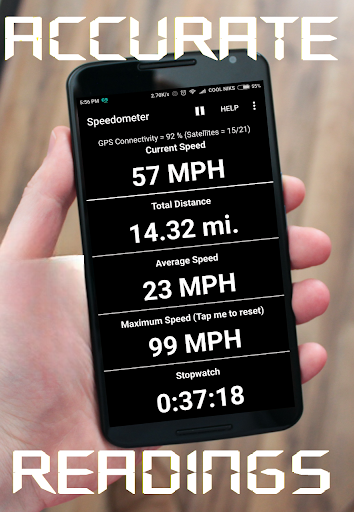
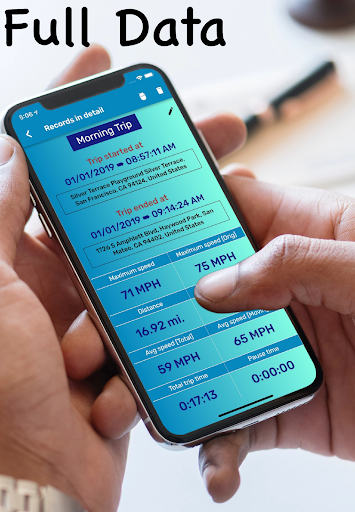
GPS Speedometer & Odometer is the most accurate speedometer app for measuring the speed of a car, bike, or any other vehicle. This speed tracker also tracks distance and provides speed limit alerts to help you avoid speeding tickets.
Why Our GPS Speedometer App Stands Out:
• Car speedometer helps you achieve 99% accuracy in tracking your speed, ensuring you never miss a beat.
• Instant connection with digital speedometer & odometer allows you to check your speed without delay, even in remote areas.
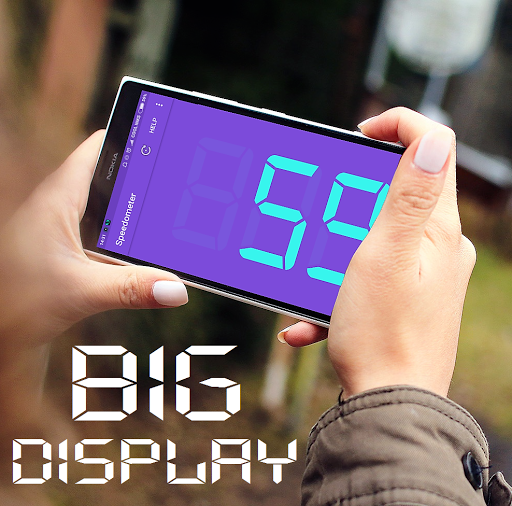
• Digital speed tracker projects your car's speed directly onto the windshield with a customizable Head-Up Display.
• Offline GPS speedometer tracks the real-time speed of your car, bike, bus, train, or even airplane when there is no internet connection.
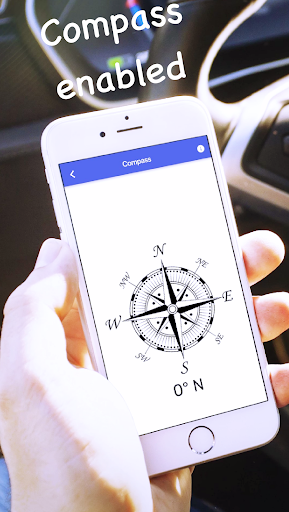
• Integrated compass in the speedometer lets you know your moving direction while tracking speed.
• GPS Speedometer odometer supports multiple speed units, including mph, km/h, m/s, and knots, to measure how fast you're going.
• Speed tracker GPS app provides speed alerts, allowing you to set speed limits and receive warnings with sirens and visual alerts.
• Track your current location with 2 decimal precision for exact data.
• GPS Speedometer comes with background tracking that lets you measure your speed even when the app is minimized.
• Set minimum and maximum speed limits with the speed tracker to ensure you always drive within your desired range.
Key Features:
• Real-time GPS speedometer & odometer tracks your current speed, average speed, and top speed while walking, jogging, running, cycling, driving, and more.
• Distance tracker keeps track of your trip distance with accurate readings.
• Get real-time weather conditions for your current location while tracking speed.
• Compact size makes this a powerful GPS speedometer app packed into just a 4MB app.
• Store all your data with detailed information in the speed tracker.
• Floating window in the GPS speedometer lets you view a small window that can float over other apps.
• The car speedometer provides latitude, longitude, and altitude at your current location in digital format.
Additional Benefits:
With this digital GPS Speedometer, you can:
• Replace a broken speedometer of your car.
• Test your speed on a bike with high accuracy, and use the app as a cyclemeter.
• Check your velocity with uninterrupted sessions in our ads-free mode.
• Track your daily mileage.
• Know the direction you are heading towards.
This digital speedometer app is perfect for drivers, cyclists, runners, and anyone who wants to know how fast they are doing without having to buy any special equipment.
Download the GPS Speedometer and Odometer now to measure your speed and track your location.
Tampilkan Lebih banyak

1. Unduh dan instal MEmu APP

2. Menjalankan MEmu lalu buka Google Play di halaman

3. Cari GPS Speedometer & Odometer di Google Play
Install
4. Unduh dan instal GPS Speedometer & Odometer
5. Setelah insatl APP selesai,klik ikon untuk mulai

6. Nikmati bermain GPS Speedometer & Odometer di PC dengan MEmu
MEmu Play adalah emulator Android gratis terbaik dan 50 Juta orang sudah menikmati pengalaman luar biasa dalam Aplikasi Android. Teknologi virtualisasi MEmu memberi kekuasaan untuk memainkan ribuan Aplikasi Android dengan lancar di PC anda, bahkan Aplikasi dengan grafis yang paling tinggi.
Layar lebih besar dengan grafis yang lebih baik; durasi panjang, tanpa batasan baterai atau data seluler.
Didukung penuh oleh Pemetaan tombol yang lengkap untuk keakuratan kontrol keyboard dan mouse maupun gamepad.
Membuka beberapa akun game atau tugas di waktu yang sama hanya pada satu PC, dengan Multi-Instance manager.
Use GPS Speedometer & Odometer on PC by following steps: