
KPNTunnel Revolution (Official
Diupdate
Versi Saat Ini
1.4 Stable
Ditawarkan Oleh

Hentilah khawatir tentang biaya berlebihan saat menggunakan KPNTunnel Revolution (Official di ponsel Anda, bebaskan diri Anda dari layar kecil dan nikmati menggunakan aplikasi pada tampilan yang lebih besar. Mulai sekarang, dapatkan pengalaman full-screen di aplikasi Anda dengan keyboard dan mouse. MEmu menyediakan semua fitur mengejutkan yang Anda harapkan: cepat menginstal dan mudah menggunakan, kontrol intuitif, tidak ada lagi batasan baterai, data seluler dan panggilan yang mengganggu. MEmu 9 yang baru adalah pilihan terbaik untuk menggunakan KPNTunnel Revolution (Official di komputer Anda. Bersandi dengan absorpsi kami, manajer multi-instance memungkinkan pembukaan 2 akun atau lebih pada saat yang bersamaan. Dan yang paling penting, mesin emulasi eksklusif kami dapat melepaskan potensi penuh PC Anda, menjadikan semuanya lancar dan menyenangkan.
Tampilkan Lebih banyak
Unduh KPNTunnel Revolution (Official di PC dengan Emulator Android MEmu. Nikmati permainan pada layar yang besar. What the "Revolution" project/series/edition of KPNTunnel ?
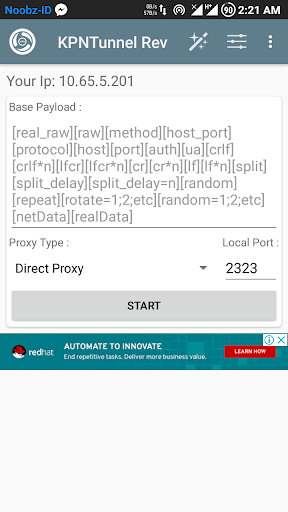
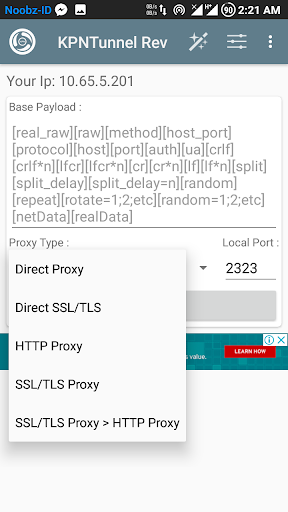
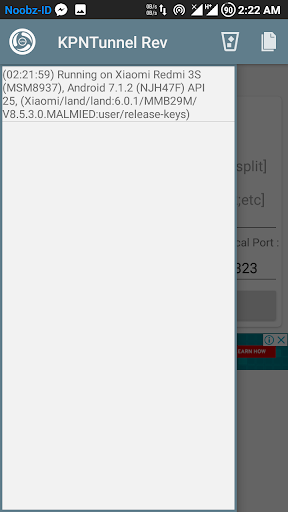
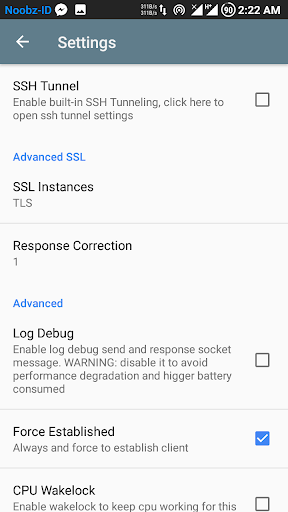
What the "Revolution" project/series/edition of KPNTunnel ???
> Continuously project with more experiment and new fresh lightweight style project for KPN Tunnel (Official).
> Pure write from zero for better performance core and better lightweight style.
> First App tunneling through built-in SSH Tunnel over SSL/TLS Connection. (why ? . i know SSH Tunneling is secure, but we feel it's not enough so we added more secure method with SSL/TLS connection). You can see how to use SSH Tunnel over SSL/TLS in "About" of this App.
* Features:
+ Direct Proxy. (Tunneling through SSH Tunnel Directly to SSH Server).
+ Direct SSL/TLS. (Tunneling through SSH Tunnel Directly to SSH Server over SSL/TLS Connection).
+ HTTP Proxy .(Tunneling through SSH Tunnel over HTTP Proxy)
+ SSL/TLS Proxy. (Tunneling through SSH Tunnel over SSL/TLS Proxy).
+ SSL/TLS Proxy > HTTP Proxy. (Tunneling through SSH Tunnel with TLS/SSL over HTTP Proxy).
+ many more...
Bugs/Issue ?
- Android 4.0 Only support TLSv1 and SSLv3 only (Android System), so your TLS/SSL server must be used/enabled TLSv1 and SSLv3.
- Android 4.1-4.2 TLSv1.1 and TLSv1.2 not enabled by System Default like Android 5.0+, so we add force enabling TLSv1.1 and TLSv1.2 for more secure update.
- If found other issue(s)/bug(s), please contact me. :)
* Need Rooted Device ?
> Some features is needed like:
+ VPN Tether (bypass all Hotspot Tether through Vpn Interface).
+ and soon we add more features.
* SSH+SSL Server Requiment:
+ If use TLS/SSL mode you must be install and setup the stunnel4 library. you can get the original stunnel4 library in http://stunnel.org.
+ You can search "how to setup/install stunnel4" in search engine like google, yahoo, bing, etc for your OS used by your Virtual Private Server (VPS).
+ In Proxy Type Mode "Direct TLS/SSL" & " TLS/SSL Proxy > HTTP Proxy" please setup stunnel to connect with ssh (dropbear/openssh) server port.
+ In Proxy Type Mode "TLS/SSL Proxy" please setup stunnel to connect with squid port.
+ We Recommended to enable all TLS and SSL protocol version for keep support with android 4.0 until newer, why ? See issue/bugs on above.
* TLS/SSL Client Side (KPNTunnel Revolution App):
+ We use method of TLS/SSL Socket using TrustAll Cert (X509 Certificate), so you don't need a client key & cert from SSL Server. I know this method is less secure, so in other version of update we can add support client key & cert for get better secure connection. :)
Tampilkan Lebih banyak

1. Unduh dan instal MEmu APP

2. Menjalankan MEmu lalu buka Google Play di halaman

3. Cari KPNTunnel Revolution (Official di Google Play
Install
4. Unduh dan instal KPNTunnel Revolution (Official
5. Setelah insatl APP selesai,klik ikon untuk mulai

6. Nikmati bermain KPNTunnel Revolution (Official di PC dengan MEmu
MEmu Play adalah emulator Android gratis terbaik dan 50 Juta orang sudah menikmati pengalaman luar biasa dalam Aplikasi Android. Teknologi virtualisasi MEmu memberi kekuasaan untuk memainkan ribuan Aplikasi Android dengan lancar di PC anda, bahkan Aplikasi dengan grafis yang paling tinggi.
Layar lebih besar dengan grafis yang lebih baik; durasi panjang, tanpa batasan baterai atau data seluler.
Didukung penuh oleh Pemetaan tombol yang lengkap untuk keakuratan kontrol keyboard dan mouse maupun gamepad.
Membuka beberapa akun game atau tugas di waktu yang sama hanya pada satu PC, dengan Multi-Instance manager.
Use KPNTunnel Revolution (Official on PC by following steps: