MomsBeyond: Connect with Moms
Diupdate
Versi Saat Ini
1.0.4
Ditawarkan Oleh

Hentilah khawatir tentang biaya berlebihan saat menggunakan MomsBeyond: Connect with Moms di ponsel Anda, bebaskan diri Anda dari layar kecil dan nikmati menggunakan aplikasi pada tampilan yang lebih besar. Mulai sekarang, dapatkan pengalaman full-screen di aplikasi Anda dengan keyboard dan mouse. MEmu menyediakan semua fitur mengejutkan yang Anda harapkan: cepat menginstal dan mudah menggunakan, kontrol intuitif, tidak ada lagi batasan baterai, data seluler dan panggilan yang mengganggu. MEmu 9 yang baru adalah pilihan terbaik untuk menggunakan MomsBeyond: Connect with Moms di komputer Anda. Bersandi dengan absorpsi kami, manajer multi-instance memungkinkan pembukaan 2 akun atau lebih pada saat yang bersamaan. Dan yang paling penting, mesin emulasi eksklusif kami dapat melepaskan potensi penuh PC Anda, menjadikan semuanya lancar dan menyenangkan.
Tampilkan Lebih banyak
Unduh MomsBeyond: Connect with Moms di PC dengan Emulator Android MEmu. Nikmati permainan pada layar yang besar. Welcome to MomsBeyond!


Welcome to MomsBeyond!
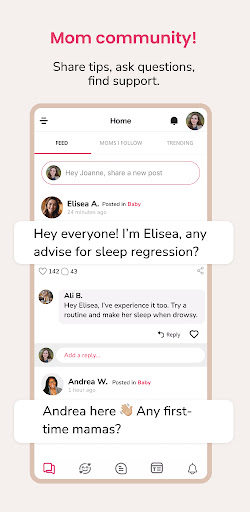
Looking for mom friends who just get it? MomsBeyond is here to help you find your tribe.
Whether you’re navigating pregnancy, diving into the joys (and chaos) of new motherhood, or embracing the seasoned mama life, we’ve got a vibrant community waiting for you.
Here’s what MomsBeyond has in store for you:
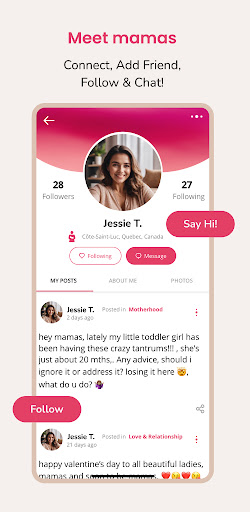
- Connect: Meet fellow mamas who share your journey—from pregnancy to toddler tantrums and beyond.
- Make Friends: Form meaningful friendships with moms who understand your experiences.
- Share: Post your cherished moments, from your bump to your baby’s first steps.
- Learn: Get advice, tips, and tricks from moms who’ve been there and done that.
- Chat: Engage in one-on-one discussions with moms from around the globe.
- Discover: Dive into real stories, practical mom hacks, and inspirational posts.
At MomsBeyond, you’ll find:
- A safe space to ask all your burning questions about pregnancy, postpartum recovery, and motherhood.
- A hub for exchanging heartfelt stories, laughter, and those “me too!” moments.
- A community that celebrates you as a mama—your struggles, your triumphs, and everything in between.
We believe moms are superheroes, and every mama deserves a squad that lifts her up.
So, grab a coffee, join the conversation, and let’s tackle this incredible motherhood journey together.
Download the MomsBeyond App now!
P.S. Got ideas to make the app even better? Share your feedback with us—your voice matters!
Tampilkan Lebih banyak

1. Unduh dan instal MEmu APP

2. Menjalankan MEmu lalu buka Google Play di halaman

3. Cari MomsBeyond: Connect with Moms di Google Play
Install
4. Unduh dan instal MomsBeyond: Connect with Moms
5. Setelah insatl APP selesai,klik ikon untuk mulai

6. Nikmati bermain MomsBeyond: Connect with Moms di PC dengan MEmu
MEmu Play adalah emulator Android gratis terbaik dan 50 Juta orang sudah menikmati pengalaman luar biasa dalam Aplikasi Android. Teknologi virtualisasi MEmu memberi kekuasaan untuk memainkan ribuan Aplikasi Android dengan lancar di PC anda, bahkan Aplikasi dengan grafis yang paling tinggi.
Layar lebih besar dengan grafis yang lebih baik; durasi panjang, tanpa batasan baterai atau data seluler.
Didukung penuh oleh Pemetaan tombol yang lengkap untuk keakuratan kontrol keyboard dan mouse maupun gamepad.
Membuka beberapa akun game atau tugas di waktu yang sama hanya pada satu PC, dengan Multi-Instance manager.
Use MomsBeyond: Connect with Moms on PC by following steps: