Nil Launcher - Theme, Folder
Diupdate
Versi Saat Ini
6.0
Ditawarkan Oleh

Hentilah khawatir tentang biaya berlebihan saat menggunakan Nil Launcher - Theme, Folder di ponsel Anda, bebaskan diri Anda dari layar kecil dan nikmati menggunakan aplikasi pada tampilan yang lebih besar. Mulai sekarang, dapatkan pengalaman full-screen di aplikasi Anda dengan keyboard dan mouse. MEmu menyediakan semua fitur mengejutkan yang Anda harapkan: cepat menginstal dan mudah menggunakan, kontrol intuitif, tidak ada lagi batasan baterai, data seluler dan panggilan yang mengganggu. MEmu 9 yang baru adalah pilihan terbaik untuk menggunakan Nil Launcher - Theme, Folder di komputer Anda. Bersandi dengan absorpsi kami, manajer multi-instance memungkinkan pembukaan 2 akun atau lebih pada saat yang bersamaan. Dan yang paling penting, mesin emulasi eksklusif kami dapat melepaskan potensi penuh PC Anda, menjadikan semuanya lancar dan menyenangkan.
Tampilkan Lebih banyak
Unduh Nil Launcher - Theme, Folder di PC dengan Emulator Android MEmu. Nikmati permainan pada layar yang besar. Introducing Nil Launcher, a powerful and user-friendly application that offers a range of features such as AppLock, HideApp, Hitech Wallpaper, Folder, and Themes.
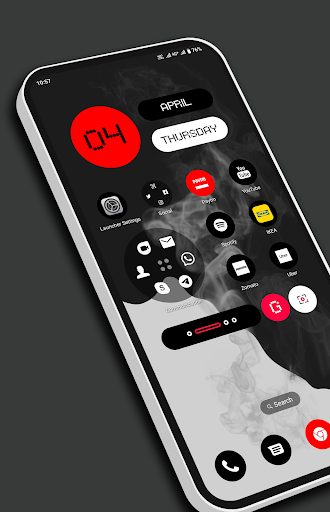
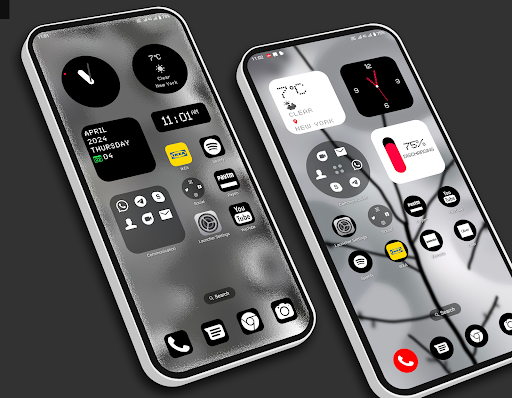
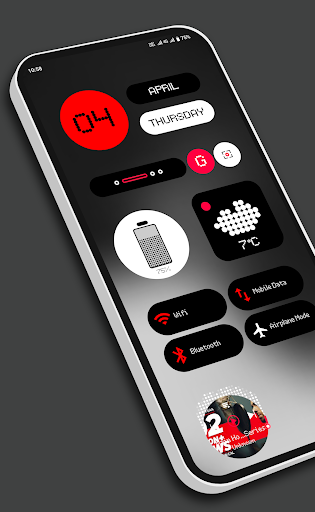
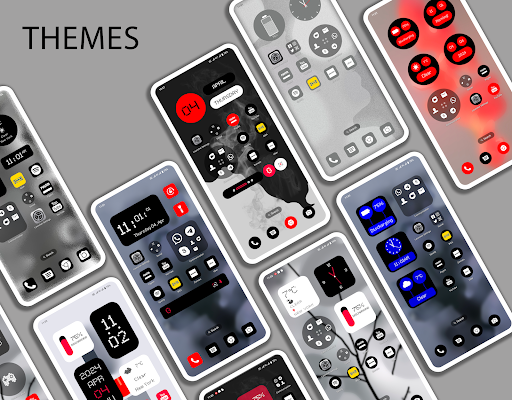
Introducing Nil Launcher, a powerful and user-friendly application that offers a range of features such as AppLock, HideApp, Hitech Wallpaper, Folder, and Themes. This app is designed to enhance the style of your Android phone, With its innovative vertical widget layout featuring calendar, battery, and clock widgets, Nil Launcher stands out, captivating users with its unique and visually appealing UI.
With its clean and perfect user interface design, Nil Launcher Or Nothing Launcher provides an easy and interactive control experience. It offers a wide array of wonderful and useful features, including a variety of themes that allow you to personalize your phone with different styles.
App Lock:
Now you can lock your apps with a password directly from Nil Launcher, eliminating the need for a separate app for app locking.
Hide App:
Using fingerprint authentication, you can hide specific apps from the app list.
Incredibly faster & smarter:
Nil Launcher provides users extremely fast and smarter handling experience with simple and smooth user interface.
Elegant look:
With its colorful and beautiful themes, Nil Launcher stands out as a stylish launcher. The themes are created with love and passion, allowing you to give your phone a new, fresh, ultimate, and virtual look.
Folder:
Effortlessly manage your apps using the folder feature in Nil Launcher. Simply drag one app icon to another to create folder.
Customizable folders:
Tailor the size of your folders to suit your needs, effortlessly minimizing or enlarging them with ease. Not just that, personalize the appearance of your folders with options ranging from square, circular, to cover styles.
Wallpaper:
Enjoy the 150+ vector wallaper, which can enahance your phone look. You can also apply wallpaer from gallery as well.
Personalization:
You can re-arrange icons and widgets according to your need. add more pages or add more folder by simply drag and drop.
Icon setting:
From icon settings user can do performe many opearions such as
1. You can change the icon size.
2. You can give padding to your icons.
Widgets:
Nil Launcher offers a variety of useful widgets, including Battery, digital clock, weather, analog clock, calender, music and memory widgets providing quick access to essential information.
Quick Search:
Access all your installed apps quickly by simply cliking on the main screen search, to open the quick search feature.
Icon Pack:
Choose from two different icon packs in Nil Launcher – a simple pack. You can also customize the color of the icon packs to match your preferences. You can also apply icon pack of your choice as well.
Elevate your Android device's appearance and functionality to new heights with Nil Launcher. Experience a UI that stands out from the crowd and attracts attention wherever you go. Download Nil Launcher now and embark on a journey of personalization and productivity like never before!
Download Nil Launcher and unlock the full potential of your Android device today.
Tampilkan Lebih banyak

1. Unduh dan instal MEmu APP

2. Menjalankan MEmu lalu buka Google Play di halaman

3. Cari Nil Launcher - Theme, Folder di Google Play
Install
4. Unduh dan instal Nil Launcher - Theme, Folder
5. Setelah insatl APP selesai,klik ikon untuk mulai

6. Nikmati bermain Nil Launcher - Theme, Folder di PC dengan MEmu
MEmu Play adalah emulator Android gratis terbaik dan 50 Juta orang sudah menikmati pengalaman luar biasa dalam Aplikasi Android. Teknologi virtualisasi MEmu memberi kekuasaan untuk memainkan ribuan Aplikasi Android dengan lancar di PC anda, bahkan Aplikasi dengan grafis yang paling tinggi.
Layar lebih besar dengan grafis yang lebih baik; durasi panjang, tanpa batasan baterai atau data seluler.
Didukung penuh oleh Pemetaan tombol yang lengkap untuk keakuratan kontrol keyboard dan mouse maupun gamepad.
Membuka beberapa akun game atau tugas di waktu yang sama hanya pada satu PC, dengan Multi-Instance manager.
Use Nil Launcher - Theme, Folder on PC by following steps: