
Slate Neo by Tastevin
Diupdate
Versi Saat Ini
300.1.14
Ditawarkan Oleh

Hentilah khawatir tentang biaya berlebihan saat menggunakan Slate Neo by Tastevin di ponsel Anda, bebaskan diri Anda dari layar kecil dan nikmati menggunakan aplikasi pada tampilan yang lebih besar. Mulai sekarang, dapatkan pengalaman full-screen di aplikasi Anda dengan keyboard dan mouse. MEmu menyediakan semua fitur mengejutkan yang Anda harapkan: cepat menginstal dan mudah menggunakan, kontrol intuitif, tidak ada lagi batasan baterai, data seluler dan panggilan yang mengganggu. MEmu 9 yang baru adalah pilihan terbaik untuk menggunakan Slate Neo by Tastevin di komputer Anda. Bersandi dengan absorpsi kami, manajer multi-instance memungkinkan pembukaan 2 akun atau lebih pada saat yang bersamaan. Dan yang paling penting, mesin emulasi eksklusif kami dapat melepaskan potensi penuh PC Anda, menjadikan semuanya lancar dan menyenangkan.
Tampilkan Lebih banyak
Unduh Slate Neo by Tastevin di PC dengan Emulator Android MEmu. Nikmati permainan pada layar yang besar. Never apologize for a sold out bottle ever again.
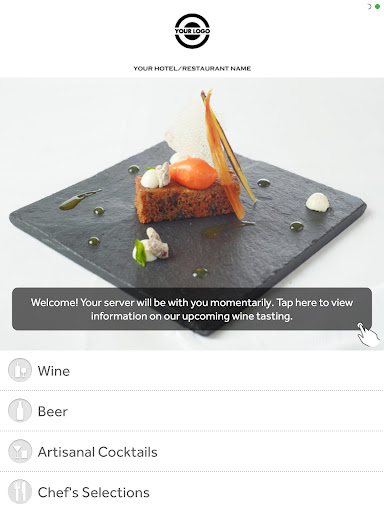

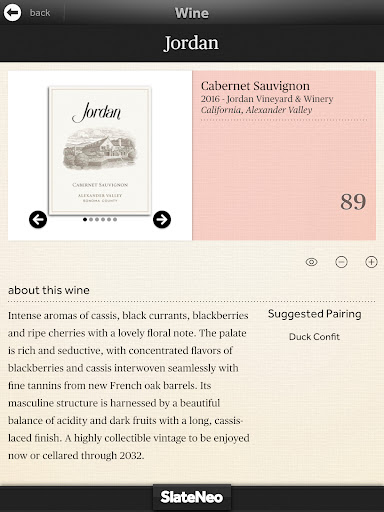

Never apologize for a sold out bottle ever again.
Supercharge your inventory management.
Nothing's more tedious than physical inventory. But as a top notch operator, you know how important it is to keep your counts up to date. With Tastevin, just grab any iPad, three finger swipe into inventory and enter your hard counts with the tap of a finger. Everything syncs securely up to the cloud. It couldn't be easier. Goodbye clipboards and spreadsheets. Adios double data entry. Hello, weekend.
Meet the missing sync.
POS, meet Tastevin.
Besides syncing accurate hard counts for inventory and generating pick lists by vendor based on par values you set, in nightclub settings with select POS vendors orders can even go straight from the guest to the bar for expedited service. Your VIP guests will get VIP service. Efficient, fast, reliable. That's smart syncing.
Bring something magical
to the table.
Stand out from the crowd with a new twist on drink service.
Printing wine lists wastes paper, ink and money. Plus nothing gives a diner more stress than a wine list full of names they can't pronounce from regions they've never heard of. Is it any wonder dusty old bottles stay dusty? Take the stress out of wine service by providing the information the diner needs, when they need it: at the point of sale. Your customers will love you for it, and so will your bottom line.
Tampilkan Lebih banyak

1. Unduh dan instal MEmu APP

2. Menjalankan MEmu lalu buka Google Play di halaman

3. Cari Slate Neo by Tastevin di Google Play
Install
4. Unduh dan instal Slate Neo by Tastevin
5. Setelah insatl APP selesai,klik ikon untuk mulai

6. Nikmati bermain Slate Neo by Tastevin di PC dengan MEmu
MEmu Play adalah emulator Android gratis terbaik dan 50 Juta orang sudah menikmati pengalaman luar biasa dalam Aplikasi Android. Teknologi virtualisasi MEmu memberi kekuasaan untuk memainkan ribuan Aplikasi Android dengan lancar di PC anda, bahkan Aplikasi dengan grafis yang paling tinggi.
Layar lebih besar dengan grafis yang lebih baik; durasi panjang, tanpa batasan baterai atau data seluler.
Didukung penuh oleh Pemetaan tombol yang lengkap untuk keakuratan kontrol keyboard dan mouse maupun gamepad.
Membuka beberapa akun game atau tugas di waktu yang sama hanya pada satu PC, dengan Multi-Instance manager.
Use Slate Neo by Tastevin on PC by following steps: