SZ Viewer: read DTC for Suzuki
Diupdate
Versi Saat Ini
1724634706
Ditawarkan Oleh

Hentilah khawatir tentang biaya berlebihan saat menggunakan SZ Viewer: read DTC for Suzuki di ponsel Anda, bebaskan diri Anda dari layar kecil dan nikmati menggunakan aplikasi pada tampilan yang lebih besar. Mulai sekarang, dapatkan pengalaman full-screen di aplikasi Anda dengan keyboard dan mouse. MEmu menyediakan semua fitur mengejutkan yang Anda harapkan: cepat menginstal dan mudah menggunakan, kontrol intuitif, tidak ada lagi batasan baterai, data seluler dan panggilan yang mengganggu. MEmu 9 yang baru adalah pilihan terbaik untuk menggunakan SZ Viewer: read DTC for Suzuki di komputer Anda. Bersandi dengan absorpsi kami, manajer multi-instance memungkinkan pembukaan 2 akun atau lebih pada saat yang bersamaan. Dan yang paling penting, mesin emulasi eksklusif kami dapat melepaskan potensi penuh PC Anda, menjadikan semuanya lancar dan menyenangkan.
Tampilkan Lebih banyak
Unduh SZ Viewer: read DTC for Suzuki di PC dengan Emulator Android MEmu. Nikmati permainan pada layar yang besar. Developed for Suzuki vehicles SZ Viewer A1 uses specific protocols (via K-Line and CAN bus) along with standard OBDII ones.
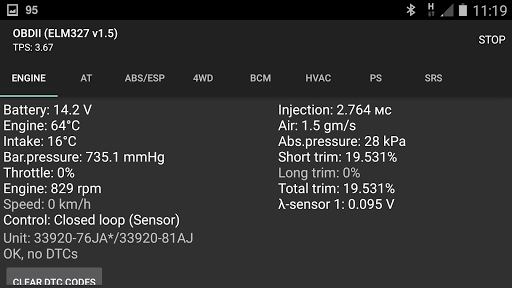
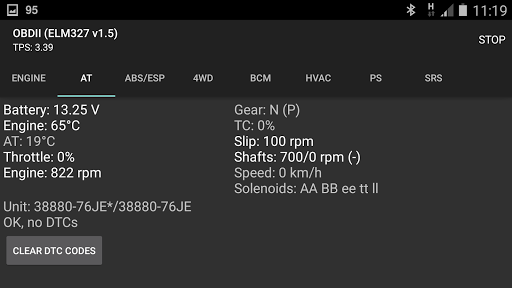
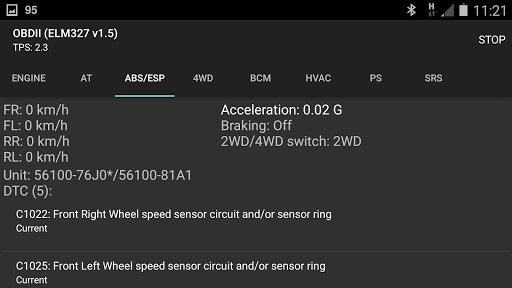
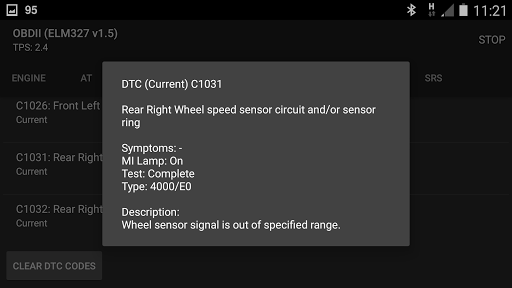
Developed for Suzuki vehicles SZ Viewer A1 uses specific protocols (via K-Line and CAN bus) along with standard OBDII ones. This application can read and reset DTC codes (including extended and historical codes) of many Suzuki control modules.
Japanese domestic market (JDM) Suzuki cars are also supported even if they do not support OBDII protocols.
An ELM327 adapter (Bluetooth or Wi-Fi) version 1.3 or later is required. Fake (so called v2.1 and some v1.5) ELM327 adapters are not suitable for use as they do not support the required ELM327 commands.
Older (pre-2000 model year) SDL protocol (5V levels, pin #9 of OBDII connector) is not supported because of physical incompatibility with ELM327.
This application allows you to view and reset DTC errors for various control modules: powertrain, engine, AT/CVT, ABS/ESP, SRS, AC/HVAC, BCM, PS, EMCD/4WD/AHL, TPMS, etc. However, not all modules may be present on a tested vehicle.
An HVAC module may display B1504 or B150A DTC due to insufficient illumination of a sunload sensor during a diagnostic procedure. This is not a symptom of a sunload sensor malfunction.
Tampilkan Lebih banyak

1. Unduh dan instal MEmu APP

2. Menjalankan MEmu lalu buka Google Play di halaman

3. Cari SZ Viewer: read DTC for Suzuki di Google Play
Install
4. Unduh dan instal SZ Viewer: read DTC for Suzuki
5. Setelah insatl APP selesai,klik ikon untuk mulai

6. Nikmati bermain SZ Viewer: read DTC for Suzuki di PC dengan MEmu
MEmu Play adalah emulator Android gratis terbaik dan 50 Juta orang sudah menikmati pengalaman luar biasa dalam Aplikasi Android. Teknologi virtualisasi MEmu memberi kekuasaan untuk memainkan ribuan Aplikasi Android dengan lancar di PC anda, bahkan Aplikasi dengan grafis yang paling tinggi.
Layar lebih besar dengan grafis yang lebih baik; durasi panjang, tanpa batasan baterai atau data seluler.
Didukung penuh oleh Pemetaan tombol yang lengkap untuk keakuratan kontrol keyboard dan mouse maupun gamepad.
Membuka beberapa akun game atau tugas di waktu yang sama hanya pada satu PC, dengan Multi-Instance manager.
Use SZ Viewer: read DTC for Suzuki on PC by following steps: