Text on Video & Video Editor
Diupdate
Versi Saat Ini
2.7.4
Ditawarkan Oleh

Hentilah khawatir tentang biaya berlebihan saat menggunakan Text on Video & Video Editor di ponsel Anda, bebaskan diri Anda dari layar kecil dan nikmati menggunakan aplikasi pada tampilan yang lebih besar. Mulai sekarang, dapatkan pengalaman full-screen di aplikasi Anda dengan keyboard dan mouse. MEmu menyediakan semua fitur mengejutkan yang Anda harapkan: cepat menginstal dan mudah menggunakan, kontrol intuitif, tidak ada lagi batasan baterai, data seluler dan panggilan yang mengganggu. MEmu 9 yang baru adalah pilihan terbaik untuk menggunakan Text on Video & Video Editor di komputer Anda. Bersandi dengan absorpsi kami, manajer multi-instance memungkinkan pembukaan 2 akun atau lebih pada saat yang bersamaan. Dan yang paling penting, mesin emulasi eksklusif kami dapat melepaskan potensi penuh PC Anda, menjadikan semuanya lancar dan menyenangkan.
Tampilkan Lebih banyak
Unduh Text on Video & Video Editor di PC dengan Emulator Android MEmu. Nikmati permainan pada layar yang besar. Meet our free & light Video Editor and Video Maker.
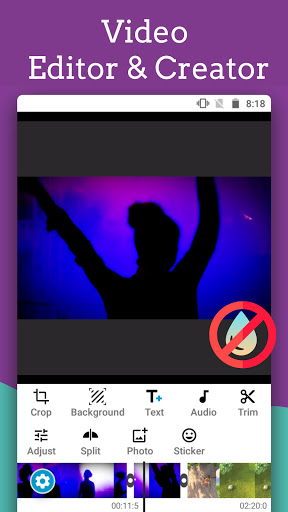


Meet our free & light Video Editor and Video Maker. Supports saving in background and without watermark. Rich video text editor with fonts, styles and title animations, 3D text, video blur background, filters. Slideshow maker with photos, text on photos, music & stunning effects.
Add text to existing videos or create videos from zero. Create your next art project with us - a quick in one video editor with animated text, photos and music, stickers and beautiful fonts. You can also add different styles in one text and create unique text stickers.
The detailed descriptions of the video editor and text on video are.
Video editing
* Video cutter and crop videos, split and remove unwanted parts, combine multiple videos.
* Photo video maker with music, text on photos, 40+ editable transitions & effects - Slideshows.
* Change video ratio, add custom ratio - depending where you upload your final video (YouTube, Instagram, TikTok, etc.)
* Add background for videos & photos - video blur, eyedrop color picker, gradients, photos with blur.
* Replace audio - Add music from your phone and/or directly extract audio from your videos, mute original audio.
* 60+ Video filters, adjust video exposure, saturation, etc., add vignette.
* Add text on videos like a pro. Lyric video maker with photo and text animations.
* Compress videos - Set custom bitrate.
* No Watermark!
* The text in videos and all your other video edits are saved in projects.
Overlays: Text, photos, etc.
* Intro and outro animations - zoom, rotate, slide, wipe.
* 600+ beautiful fonts. Upload custom fonts.
* Text animations, moving text, basic transitions, 30+ functions for text motion.
* Add text shadows with blur and color settings.
* Font format: size, bold, italic.
* Fill, stroke and background colors with alpha. Multiple colors in one text.
* Apply gradients and image textures on text.
* 3D text, 3D keyboard stickers.
* Perspective & Bend: Create curved text.
* Change distance between letters and lines.
* Color chooser & screen color picker.
* Styles: Save text as a style.
* Brush tool: Erase parts from text or photo.
* Add & edit photos (currently we support cropping).
We made it easy for beginners to create their first videos. A little dive into our video text editor will help you create professional looking videos.
Easily add quotes, animated subtitles and adjust their show time on your vlog videos. Easy to do quick video edits(like apply filters, square fit, music video maker) and share with friends.
Save and share
* Choose saving quality, adjust bitrate, and the video editor will save the videos in background. Easy share screen.
Our Video Editor & Maker offers many unique and pro editing tools despite of its small size, We are constantly adding new features and little by little it will become a full editor. We are also working on fixing bugs, if something doesn't work for you please report to our email, attach files if necessary.
Try us out!. And your feedback will be much appreciated.
Disclaimer:
Text on Video is not affiliated, associated, sponsored, endorsed by, or in any way officially connected with YouTube, Instagram, TikTok.
Tampilkan Lebih banyak

1. Unduh dan instal MEmu APP

2. Menjalankan MEmu lalu buka Google Play di halaman

3. Cari Text on Video & Video Editor di Google Play
Install
4. Unduh dan instal Text on Video & Video Editor
5. Setelah insatl APP selesai,klik ikon untuk mulai

6. Nikmati bermain Text on Video & Video Editor di PC dengan MEmu
MEmu Play adalah emulator Android gratis terbaik dan 50 Juta orang sudah menikmati pengalaman luar biasa dalam Aplikasi Android. Teknologi virtualisasi MEmu memberi kekuasaan untuk memainkan ribuan Aplikasi Android dengan lancar di PC anda, bahkan Aplikasi dengan grafis yang paling tinggi.
Layar lebih besar dengan grafis yang lebih baik; durasi panjang, tanpa batasan baterai atau data seluler.
Didukung penuh oleh Pemetaan tombol yang lengkap untuk keakuratan kontrol keyboard dan mouse maupun gamepad.
Membuka beberapa akun game atau tugas di waktu yang sama hanya pada satu PC, dengan Multi-Instance manager.
Use Text on Video & Video Editor on PC by following steps: