The Reporter for Android
Diupdate
Versi Saat Ini
10.0.30
Ditawarkan Oleh

Hentilah khawatir tentang biaya berlebihan saat menggunakan The Reporter for Android di ponsel Anda, bebaskan diri Anda dari layar kecil dan nikmati menggunakan aplikasi pada tampilan yang lebih besar. Mulai sekarang, dapatkan pengalaman full-screen di aplikasi Anda dengan keyboard dan mouse. MEmu menyediakan semua fitur mengejutkan yang Anda harapkan: cepat menginstal dan mudah menggunakan, kontrol intuitif, tidak ada lagi batasan baterai, data seluler dan panggilan yang mengganggu. MEmu 9 yang baru adalah pilihan terbaik untuk menggunakan The Reporter for Android di komputer Anda. Bersandi dengan absorpsi kami, manajer multi-instance memungkinkan pembukaan 2 akun atau lebih pada saat yang bersamaan. Dan yang paling penting, mesin emulasi eksklusif kami dapat melepaskan potensi penuh PC Anda, menjadikan semuanya lancar dan menyenangkan.
Tampilkan Lebih banyak
Unduh The Reporter for Android di PC dengan Emulator Android MEmu. Nikmati permainan pada layar yang besar. To continue enjoying our app, we kindly request that you log in again after this update.

To continue enjoying our app, we kindly request that you log in again after this update.
If you're a subscriber, please take a moment to restore your account to ensure uninterrupted access. You can find the “Restore Subscriptions“ button in Settings under Subscriptions.
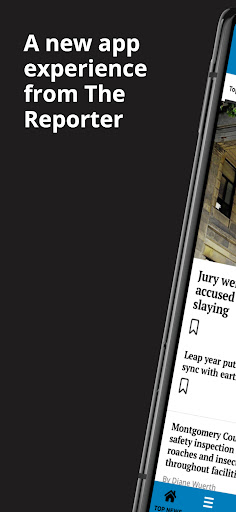
Welcome to a new app experience, we have optimized our app and given it a facelift! This faster native app now has the following new features:
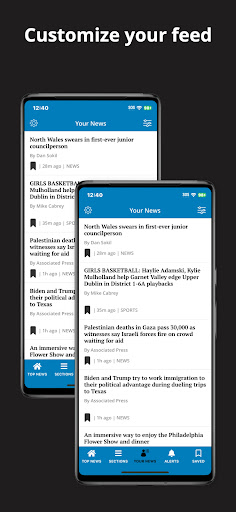
Your News:
Provide personalized recommendations for content based on user preferences. Users will be allowed to customize the content they want to engage with by selecting the topics they are truly interested in. By going to the “Your News” tab the user can bypass the noise of all that is published and home in on the content they want
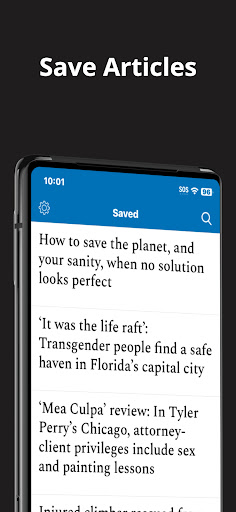
Saved Articles:
Save feature that allows users to save articles or other content they are interested in for later reading or reference.Push notifications will remind users to read their saved articles or suggest related content
Custom Push Notifications:
The user can select what topics they want to be notified about which makes for a much less intrusive experience.
Top Navigation Bar:
A top navigation bar lets the user switch between sections by swiping or tapping.
Enews in-app:
Desire the newspaper experience? No need to open a separate app! By simply going to Settings and selecting E-News the user can browse the Digital Replica of the day’s paper.
Offline Reading:
This feature allows users to enable offline reading from Settings. Offline “Reading Preferences” can also be customized for Settings.
Swipe Left:
Instead of going back to the main section to find more articles, users have the option to simply swipe, immediately opening other articles in the Section.
Follow Topics:
A user will be shown articles on topics they are following. To follow select “follow” at the article level and related articles will gain relevancy and be shown more frequently. Just as easily “Unfollow”
Terms of Use:
https://www.medianewsgroup.com/terms-of-use/
https://www.apple.com/legal/internet-services/itunes/dev/stdeula/
Tampilkan Lebih banyak

1. Unduh dan instal MEmu APP

2. Menjalankan MEmu lalu buka Google Play di halaman

3. Cari The Reporter for Android di Google Play
Install
4. Unduh dan instal The Reporter for Android
5. Setelah insatl APP selesai,klik ikon untuk mulai

6. Nikmati bermain The Reporter for Android di PC dengan MEmu
MEmu Play adalah emulator Android gratis terbaik dan 50 Juta orang sudah menikmati pengalaman luar biasa dalam Aplikasi Android. Teknologi virtualisasi MEmu memberi kekuasaan untuk memainkan ribuan Aplikasi Android dengan lancar di PC anda, bahkan Aplikasi dengan grafis yang paling tinggi.
Layar lebih besar dengan grafis yang lebih baik; durasi panjang, tanpa batasan baterai atau data seluler.
Didukung penuh oleh Pemetaan tombol yang lengkap untuk keakuratan kontrol keyboard dan mouse maupun gamepad.
Membuka beberapa akun game atau tugas di waktu yang sama hanya pada satu PC, dengan Multi-Instance manager.
Use The Reporter for Android on PC by following steps: