VSim - Verification SMS
Diupdate
Versi Saat Ini
1.6.6
Ditawarkan Oleh

Hentilah khawatir tentang biaya berlebihan saat menggunakan VSim - Verification SMS di ponsel Anda, bebaskan diri Anda dari layar kecil dan nikmati menggunakan aplikasi pada tampilan yang lebih besar. Mulai sekarang, dapatkan pengalaman full-screen di aplikasi Anda dengan keyboard dan mouse. MEmu menyediakan semua fitur mengejutkan yang Anda harapkan: cepat menginstal dan mudah menggunakan, kontrol intuitif, tidak ada lagi batasan baterai, data seluler dan panggilan yang mengganggu. MEmu 9 yang baru adalah pilihan terbaik untuk menggunakan VSim - Verification SMS di komputer Anda. Bersandi dengan absorpsi kami, manajer multi-instance memungkinkan pembukaan 2 akun atau lebih pada saat yang bersamaan. Dan yang paling penting, mesin emulasi eksklusif kami dapat melepaskan potensi penuh PC Anda, menjadikan semuanya lancar dan menyenangkan.
Tampilkan Lebih banyak
Unduh VSim - Verification SMS di PC dengan Emulator Android MEmu. Nikmati permainan pada layar yang besar. VSim - Virtual SMS Verification Service.
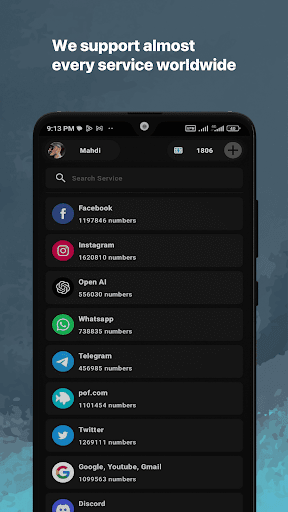
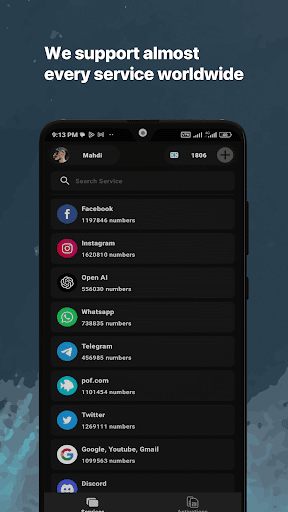
VSim - Virtual SMS Verification Service
We provide a robust platform for virtual SMS verification. As your privacy
shield, you can activate online services without revealing your personal phone number.
Our application is designed to provide you with a seamless,
anonymous way to verify your account, providing a second phone number at
your disposal. This 2nd number acts as a buffer, ensuring that your primary
contact stays private and free from unsolicited messages. This is perfect for
those who want a secure and anonymous way to receive SMS online.
Features:
Online SMS Verification: Get a unique, one-time number to receive SMS
verification codes from any online service. Our process is straightforward and user-friendly, allowing you to activate your accounts swiftly and securely.
Anonymous and Private: With VSim, you don't have to worry about your
privacy. Our service allows you to receive SMS online, shielding your real
number from potential spam and unsolicited calls.
Wide Range of Services: We cater to an extensive list of services. Whether you are setting up a social media account, online shopping, or subscribing to a newsletter, our virtual numbers have you covered.
Virtual SMS Verification: Our service enables straightforward online SMS
verification using unique, virtual numbers. Get your codes securely without
revealing your primary contact information.
Second Number at Your Disposal: Maintain your privacy with a 2nd number
that acts as a buffer between your personal contact and online platforms.
Receive SMS Online: Our virtual phone numbers are perfect for receiving SMS
online, keeping your real number safe from unsolicited messages.
Temporary Phone Number: Use a temporary phone number for a one-time
verification or account activation, ensuring your personal number's safety.
Fair and Transparent Pricing: Our service operates on a pay-per-use basis. If
you don't receive the SMS code within the designated time, we will
automatically refund the credit to your account.
Popular Services:
• Virtual Number for WhatsApp
• Virtual Number for Telegram
• Virtual Number for Facebook
• Virtual Number for Tinder
• Virtual Number for Google
• Virtual Number for Instagram
• Virtual Number for TikTok
• Virtual Number for pof.com
• Virtual Number for Uber
• Virtual Number for Snapchat
How to Use VSim:
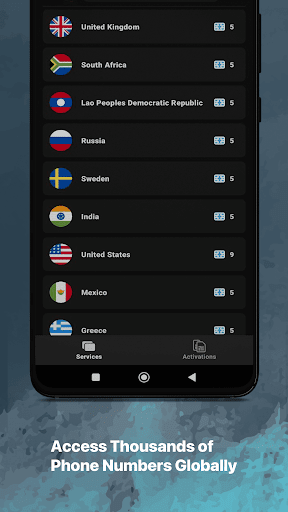
1- Select the country and service you require from our extensive list.
2- Copy the provided number and paste it into the service, website, or app of
your choice.
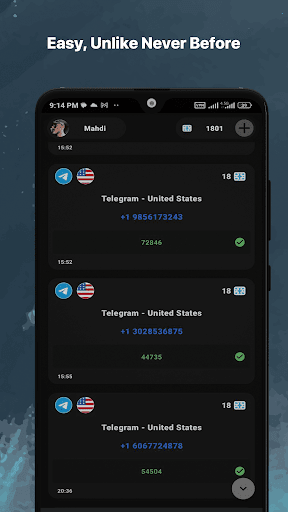
3- As soon as the service sends the SMS, it will appear in the VSim app.
Privacy Policy:
https://vsim.space/privacy-policy
Terms Of Use:
https://vsim.space/terms-of-use
Tampilkan Lebih banyak

1. Unduh dan instal MEmu APP

2. Menjalankan MEmu lalu buka Google Play di halaman

3. Cari VSim - Verification SMS di Google Play
Install
4. Unduh dan instal VSim - Verification SMS
5. Setelah insatl APP selesai,klik ikon untuk mulai

6. Nikmati bermain VSim - Verification SMS di PC dengan MEmu
MEmu Play adalah emulator Android gratis terbaik dan 50 Juta orang sudah menikmati pengalaman luar biasa dalam Aplikasi Android. Teknologi virtualisasi MEmu memberi kekuasaan untuk memainkan ribuan Aplikasi Android dengan lancar di PC anda, bahkan Aplikasi dengan grafis yang paling tinggi.
Layar lebih besar dengan grafis yang lebih baik; durasi panjang, tanpa batasan baterai atau data seluler.
Didukung penuh oleh Pemetaan tombol yang lengkap untuk keakuratan kontrol keyboard dan mouse maupun gamepad.
Membuka beberapa akun game atau tugas di waktu yang sama hanya pada satu PC, dengan Multi-Instance manager.
Use VSim - Verification SMS on PC by following steps: