Goose — For the boys
Aggiornata
Versione corrente
1.3.0
Offerta da

Vista tutta la passione dimostrata nel giocare a Goose — For the boys, le tue mani non dovrebbero essere limitate al minuscolo schermo di un telefono. Gioca come un professionista e ottieni il pieno controllo del gioco con tastiera e mouse. MEmu ti offre tutto ciò che ti aspetti. Scarica e gioca a Goose — For the boys su PC. Gioca quanto vuoi, niente più limitazioni di batteria, dati mobili e chiamate inquietanti. Il nuovissimo MEmu 9 è la scelta migliore per giocare a Goose — For the boys su PC. Realizzato sulla base della nostra esperienza, lo squisito sistema di mappatura dei tasti preimpostati rende Goose — For the boys un vero e proprio gioco per PC. MEmu è un gestore multi-instanza che permette di giocare con 2 o più account sullo stesso dispositivo. E la cosa più importante, il nostro esclusivo motore di emulazione può liberare tutto il potenziale del tuo PC, rendendo tutto fluido.
Mostra altro
Scarica Goose — For the boys su PC con MEmu Android Emulator. Divertiti giocando sul grande schermo. It blends dating, social life, and community into one living experience.


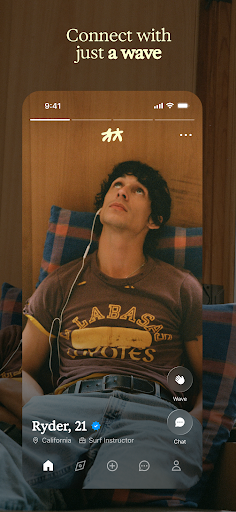
It blends dating, social life, and community into one living experience. Discover guys through shared places, interests, friends, and moments happening around you.
No Matches. Just Waves
Goose replaces matching with a simple wave. If two people wave at each other, they’re connected. It’s lighter, more natural, and removes pressure from the start.
No Labels, No Pressure
Goose doesn’t force users to define what they’re looking for upfront. No checkboxes, no intent filters. Connections evolve naturally, the way they do in real life.
Real-Life Context
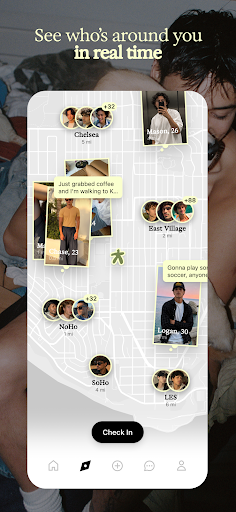
A live map shows where people are spending time at a neighborhood level. Users can discover who’s around them and see content tied to real places.
You Don’t Have to Wait to Talk
Users can message anyone. Waving signals interest, but conversation isn’t locked behind it.
Profiles That Feel Like People
Profiles are built through photos, videos, and ongoing updates, not static prompts. You get a real sense of someone before you ever meet.
Discovery That Flows
The first app to scroll to meet new people—then tap right to see more of them. Stories add a close-friends, in-the-moment layer.
Built for Privacy
Vanishing mode and screenshot protection are built for honest chats and real connection.
Curated Community
Application-based membership brings together a more intentional, diverse mix of guys.
Mostra altro

1. Scarica il programma di installazione di MEmu e completa l'installazione

2. Avvia il Memu e apri il Google Play sulla homepage

3. Cerca Goose — For the boys in Google Play
Install
4. Scarica e installa Goose — For the boys
5. Al termine dell'installazione, fai clic sull'icona per avviar

6. Divertiti giocando a Goose — For the boys su PC con MEmu
MEmu App Player è il miglior emulatore Android gratuito, utilizzato da 50 milioni di persone per ottenere un'esperienza di gioco Android superba. La tecnilogia di virtualizzazione MEmu ti permette di giocare a migliaia di giochi Android con semplicità sul tuo computer, anche i giochi con la grafica più esigente.
Schermo più grande con una grafica migliore; Lunga durata, senza limitazione di batteria o dati mobili.
Supporto completo per mappa di tastiera per un controllo preciso di tastiera e mouse o gamepad.
Multipli account di gioco o attività su un singolo PC contemporaneamente con il gestore di multi istanza.
Play Goose — For the boys on PC by following steps: