Goose — For the boys
Bijgewerkt
Huidige Versie
1.3.1
Aangeboden door

Met al je passie voor het spelen van Goose — For the boys, zouden je handen niet beperkt moeten zijn tot een klein scherm van je telefoon. Speel als een professional en krijg volledige controle over je spel met toetsenbord en muis. MEmu biedt je alles wat je verwacht. Download en speel Goose — For the boys op PC. Speel zo lang als je wilt, geen beperkingen meer van batterij, mobiele data en storende oproepen. De gloednieuwe MEmu 9 is de beste keuze om Goose — For the boys op PC te spelen. Voorbereid met onze expertise, maakt het uitmuntende vooraf ingestelde keymapping systeem van Goose — For the boys een echt PC-spel. MEmu multi-instance manager maakt het spelen van 2 of meer accounts op hetzelfde apparaat mogelijk. En het belangrijkste, onze exclusieve emulatie-engine kan het volledige potentieel van je PC benutten, waardoor alles soepel verloopt.
Meer tonen
Download Goose — For the boys op je pc met de MEmu Android-emulator. Geniet van spelen op een groot scherm. It blends dating, social life, and community into one living experience.


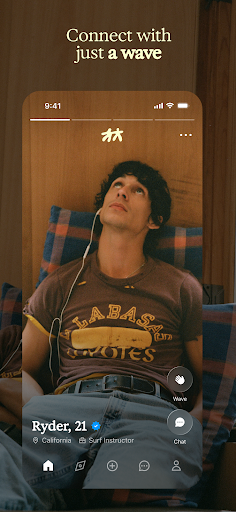
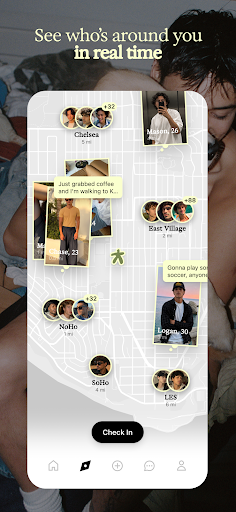
It blends dating, social life, and community into one living experience. Discover guys through shared places, interests, friends, and moments happening around you.
No Matches. Just Waves
Goose replaces matching with a simple wave. If two people wave at each other, they’re connected. It’s lighter, more natural, and removes pressure from the start.
No Labels, No Pressure
Goose doesn’t force users to define what they’re looking for upfront. No checkboxes, no intent filters. Connections evolve naturally, the way they do in real life.
Real-Life Context
A live map shows where people are spending time at a neighborhood level. Users can discover who’s around them and see content tied to real places.
You Don’t Have to Wait to Talk
Users can message anyone. Waving signals interest, but conversation isn’t locked behind it.
Profiles That Feel Like People
Profiles are built through photos, videos, and ongoing updates, not static prompts. You get a real sense of someone before you ever meet.
Discovery That Flows
The first app to scroll to meet new people—then tap right to see more of them. Stories add a close-friends, in-the-moment layer.
Built for Privacy
Vanishing mode and screenshot protection are built for honest chats and real connection.
Curated Community
Application-based membership brings together a more intentional, diverse mix of guys.
Meer tonen

1. Download de MEmu-installatie en voltooi de setup

2. Start MEmu en open vervolgens Google Play op het bureaublad

3. Zoek Goose — For the boys in Google Play
Install
4. Download en installeer Goose — For the boys
5. Klik op het icoon om te starten na het voltooien van de installatie

6. Geniet van het spelen van Goose — For the boys op PC met MEmu
MEmu Play is de beste Android Emulator en 100 miljoen mensen genieten al van de superieure Android-game-ervaring. De virtualisatietechnologie van MEmu stelt je in staat om duizenden Android-spellen soepel op je PC te spelen, zelfs de meest grafisch intensieve.
Groter scherm met betere graphics; Lange duur, zonder beperking van batterij of mobiele data.
Volledige Keymapping-ondersteuning voor nauwkeurige besturing van toetsenbord en muis of gamepad.
Meerdere game-accounts of taken op één PC tegelijk met Multi-Instance manager.
Speel Goose — For the boys op PC door de volgende stappen te volgen: