Jamables live social music app
Aggiornata
Versione corrente
1.6.2
Offerta da

Vista tutta la passione dimostrata nel giocare a Jamables live social music app, le tue mani non dovrebbero essere limitate al minuscolo schermo di un telefono. Gioca come un professionista e ottieni il pieno controllo del gioco con tastiera e mouse. MEmu ti offre tutto ciò che ti aspetti. Scarica e gioca a Jamables live social music app su PC. Gioca quanto vuoi, niente più limitazioni di batteria, dati mobili e chiamate inquietanti. Il nuovissimo MEmu 9 è la scelta migliore per giocare a Jamables live social music app su PC. Realizzato sulla base della nostra esperienza, lo squisito sistema di mappatura dei tasti preimpostati rende Jamables live social music app un vero e proprio gioco per PC. MEmu è un gestore multi-instanza che permette di giocare con 2 o più account sullo stesso dispositivo. E la cosa più importante, il nostro esclusivo motore di emulazione può liberare tutto il potenziale del tuo PC, rendendo tutto fluido.
Mostra altro
Scarica Jamables live social music app su PC con MEmu Android Emulator. Divertiti giocando sul grande schermo. Jamables is a new music game that lets you make your own live music with friends.
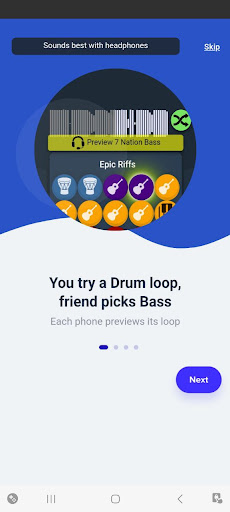
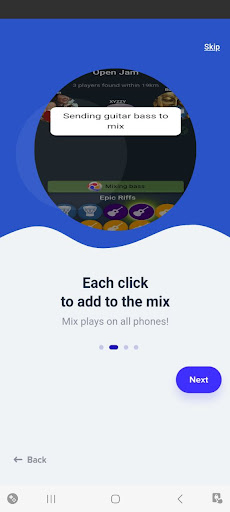
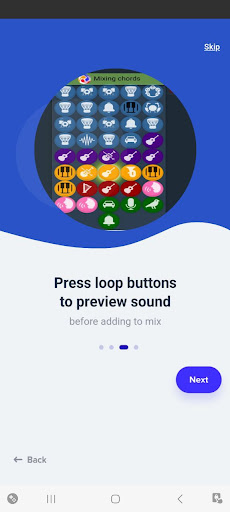
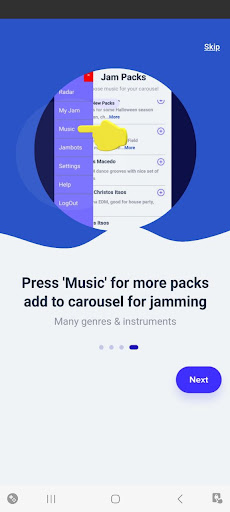
Jamables is a new music game that lets you make your own live music with friends. Jam together in real time using live looping. Create your own concert using the automated mixing station to create an epic mix as each player picks instrumental beats that fit the groove.
Click to preview drums, guitar loops, keyboard loops, rap beats, hip-hop beats, groove music, ambient, lo-fi, rock, jazz, classical loops and many other styles. Then just press JOIN to have the beat combiner mix your choices automatically - while keeping all players in synch!
All other music games and DJ apps let you generate beats to be recorded - then replayed later. No other music app lets you make live music, while keeping everyone in synch!
You can use Jamables as a crowd-sourced DJ mixer for your next party, to create beats for a rap game. You can use this music app as a live backing band, and sing vocals to make your own song. Try using it as a band app, for live interactive music production, then record the mix, just as any garage band would. Or you can simply play music-making games for fun - just by pressing buttons, on your next road trip or dinner together.
Jamables finds local players in the same room, in the same town - or anywhere around the world. Or, share your personal "jam link" with its “mixtape” of your favorite beats with distant friends, to remix live. Try sharing your jam link on social media or dating profiles, and see if you make beautiful music with someone new!
Jamables is a whole new way to enjoy music: by making it, live, with friends!
Jams are musical beats composed to be played by a group. Each player controls one beat, so the composer, performer, and audience are all the same people!
The music will sound better on headphones, or plugged into speakers.
Players using this music app all synchronize, so you could amplify each phone with its own car stereo and have a "traffic jam".
Try amplifying one phone, and now you have a crowd-sourced DJ for your next party, or maybe quiet ambient background music for studying with friends.
There's an interesting variety of music, all designed to be jammable, and we will be adding beats from popular artists soon.
It's crowd-sourced DJ app.
It's a musical game.
And it's really fun :-)
Please let us know how you like it!
Privacy policy:
Jamables only ever sees your current location and first name.
https://jamables.com/privacy.html
Mostra altro

1. Scarica il programma di installazione di MEmu e completa l'installazione

2. Avvia il Memu e apri il Google Play sulla homepage

3. Cerca Jamables live social music app in Google Play
Install
4. Scarica e installa Jamables live social music app
5. Al termine dell'installazione, fai clic sull'icona per avviar

6. Divertiti giocando a Jamables live social music app su PC con MEmu
MEmu App Player è il miglior emulatore Android gratuito, utilizzato da 50 milioni di persone per ottenere un'esperienza di gioco Android superba. La tecnilogia di virtualizzazione MEmu ti permette di giocare a migliaia di giochi Android con semplicità sul tuo computer, anche i giochi con la grafica più esigente.
Schermo più grande con una grafica migliore; Lunga durata, senza limitazione di batteria o dati mobili.
Supporto completo per mappa di tastiera per un controllo preciso di tastiera e mouse o gamepad.
Multipli account di gioco o attività su un singolo PC contemporaneamente con il gestore di multi istanza.
Play Jamables live social music app on PC by following steps: