Romance Club - Stories I Play
Aggiornata
Versione corrente
1734171602
Offerta da

Vista tutta la passione dimostrata nel giocare a Romance Club - Stories I Play, le tue mani non dovrebbero essere limitate al minuscolo schermo di un telefono. Gioca come un professionista e ottieni il pieno controllo del gioco con tastiera e mouse. MEmu ti offre tutto ciò che ti aspetti. Scarica e gioca a Romance Club - Stories I Play su PC. Gioca quanto vuoi, niente più limitazioni di batteria, dati mobili e chiamate inquietanti. Il nuovissimo MEmu 9 è la scelta migliore per giocare a Romance Club - Stories I Play su PC. Realizzato sulla base della nostra esperienza, lo squisito sistema di mappatura dei tasti preimpostati rende Romance Club - Stories I Play un vero e proprio gioco per PC. MEmu è un gestore multi-instanza che permette di giocare con 2 o più account sullo stesso dispositivo. E la cosa più importante, il nostro esclusivo motore di emulazione può liberare tutto il potenziale del tuo PC, rendendo tutto fluido.
Mostra altro
Scarica Romance Club - Stories I Play su PC con MEmu Android Emulator. Divertiti giocando sul grande schermo. Become a character in a story you’ll love!


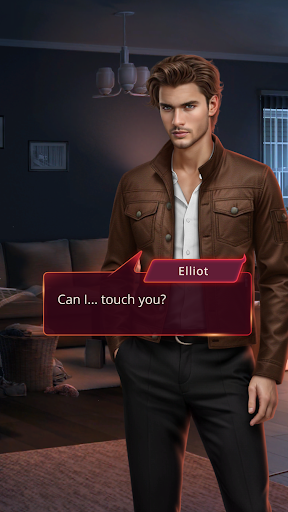
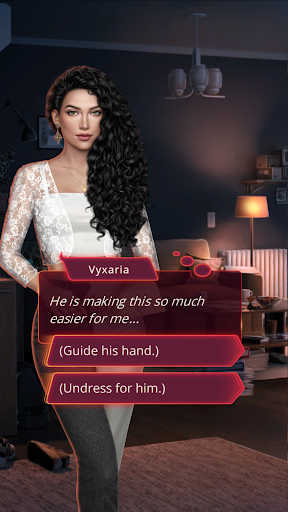
Become a character in a story you’ll love! The choice is yours:
✦ Pick your own look and style
✦ Romance: Cute or Sexy? Bold or Shy? Guy or Girl?
✦ What happens next? Every story has multiple endings!
✦ Fantasy, drama, supernatural, horror, adventure, and more
✦ Dozens of original stories with more to come
Which story will you try first?
❖ DRACULA: A LOVE STORY – Experience a whirlwind romance spanning centuries: palace secrets of the Ottoman Empire, love and loathing at the royal court, and friends and enemies whose lives span an eternity…
❖ HEAVEN'S SECRET – You died and went to... the Angels and Demons Academy? Devilish lecturers, angelic sweethearts, and the temptation to break Heaven's rules—what else awaits you in this dangerous, fantastical afterlife?
❖ CHASING YOU – When a routine family get-together becomes a murder scene, the race is on to find the culprit and stay out of jail!
❖ HEART OF TRESPIA – Today, you ascend the throne of Trespia. But all is not as it seems. Embark on a journey of danger, love, and betrayal, discover the truth, and save your kingdom!
❖ LEGEND OF THE WILLOW – On the eve of your initiation as a geisha, you discover a supernatural secret that changes everything. Now, you’re on the run, and not only from humans.
❖ GLADIATOR CHRONICLES – Forced into slavery by the intergalactic empire of New Rome, a young gladiator’s fate hangs in the balance. Can you rise to the challenge and make the empire bow before you?
...PLUS more new stories and episodes coming soon!
PRIVACY POLICY & TERMS OF SERVICE
- Please read our privacy policy at
http://yourstoryinteractive.com/privacy/
- By playing Romance Club, you agree to our terms of service
http://yourstoryinteractive.com/terms-of-use/
SHARE YOUR STORY
Like us on Facebook: https://goo.gl/TMkRZT
ABOUT US
Your Story Interactive is an independent game studio located in Chisinau, the capital of Moldova. Stories are our passion and storytelling is what we do. Our games are free! If you like romantic stories with choices, graphic novels, and cute characters, you'll love our games!
Mostra altro

1. Scarica il programma di installazione di MEmu e completa l'installazione

2. Avvia il Memu e apri il Google Play sulla homepage

3. Cerca Romance Club - Stories I Play in Google Play
Install
4. Scarica e installa Romance Club - Stories I Play
5. Al termine dell'installazione, fai clic sull'icona per avviar

6. Divertiti giocando a Romance Club - Stories I Play su PC con MEmu
MEmu App Player è il miglior emulatore Android gratuito, utilizzato da 50 milioni di persone per ottenere un'esperienza di gioco Android superba. La tecnilogia di virtualizzazione MEmu ti permette di giocare a migliaia di giochi Android con semplicità sul tuo computer, anche i giochi con la grafica più esigente.
Schermo più grande con una grafica migliore; Lunga durata, senza limitazione di batteria o dati mobili.
Supporto completo per mappa di tastiera per un controllo preciso di tastiera e mouse o gamepad.
Multipli account di gioco o attività su un singolo PC contemporaneamente con il gestore di multi istanza.
Play Romance Club - Stories I Play on PC by following steps: