
Romance Club - Stories I Play
Bijgewerkt
Huidige Versie
1732382956
Aangeboden door

Met al je passie voor het spelen van Romance Club - Stories I Play, zouden je handen niet beperkt moeten zijn tot een klein scherm van je telefoon. Speel als een professional en krijg volledige controle over je spel met toetsenbord en muis. MEmu biedt je alles wat je verwacht. Download en speel Romance Club - Stories I Play op PC. Speel zo lang als je wilt, geen beperkingen meer van batterij, mobiele data en storende oproepen. De gloednieuwe MEmu 9 is de beste keuze om Romance Club - Stories I Play op PC te spelen. Voorbereid met onze expertise, maakt het uitmuntende vooraf ingestelde keymapping systeem van Romance Club - Stories I Play een echt PC-spel. MEmu multi-instance manager maakt het spelen van 2 of meer accounts op hetzelfde apparaat mogelijk. En het belangrijkste, onze exclusieve emulatie-engine kan het volledige potentieel van je PC benutten, waardoor alles soepel verloopt.
Meer tonen
Download Romance Club - Stories I Play on PC with MEmu Android Emulator. Enjoy playing on big screen. Become a character in a story you’ll love!


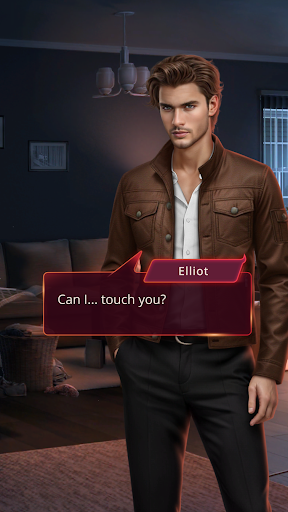
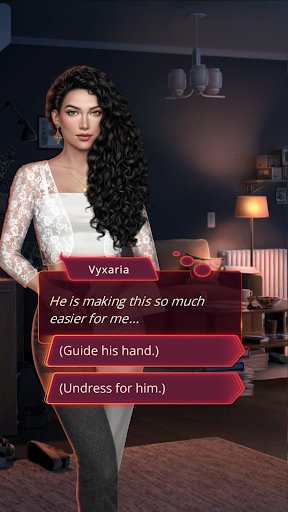
Become a character in a story you’ll love! The choice is yours:
✦ Pick your own look and style
✦ Romance: Cute or Sexy? Bold or Shy? Guy or Girl?
✦ What happens next? Every story has multiple endings!
✦ Fantasy, drama, supernatural, horror, adventure, and more
✦ Dozens of original stories with more to come
Which story will you try first?
❖ DRACULA: A LOVE STORY – Experience a whirlwind romance spanning centuries: palace secrets of the Ottoman Empire, love and loathing at the royal court, and friends and enemies whose lives span an eternity…
❖ HEAVEN'S SECRET – You died and went to... the Angels and Demons Academy? Devilish lecturers, angelic sweethearts, and the temptation to break Heaven's rules—what else awaits you in this dangerous, fantastical afterlife?
❖ CHASING YOU – When a routine family get-together becomes a murder scene, the race is on to find the culprit and stay out of jail!
❖ HEART OF TRESPIA – Today, you ascend the throne of Trespia. But all is not as it seems. Embark on a journey of danger, love, and betrayal, discover the truth, and save your kingdom!
❖ LEGEND OF THE WILLOW – On the eve of your initiation as a geisha, you discover a supernatural secret that changes everything. Now, you’re on the run, and not only from humans.
❖ GLADIATOR CHRONICLES – Forced into slavery by the intergalactic empire of New Rome, a young gladiator’s fate hangs in the balance. Can you rise to the challenge and make the empire bow before you?
...PLUS more new stories and episodes coming soon!
PRIVACY POLICY & TERMS OF SERVICE
- Please read our privacy policy at
http://yourstoryinteractive.com/privacy/
- By playing Romance Club, you agree to our terms of service
http://yourstoryinteractive.com/terms-of-use/
SHARE YOUR STORY
Like us on Facebook: https://goo.gl/TMkRZT
ABOUT US
Your Story Interactive is an independent game studio located in Chisinau, the capital of Moldova. Stories are our passion and storytelling is what we do. Our games are free! If you like romantic stories with choices, graphic novels, and cute characters, you'll love our games!
Meer tonen

1. Download de MEmu-installatie en voltooi de setup

2. Start MEmu en open vervolgens Google Play op het bureaublad

3. Zoek Romance Club - Stories I Play in Google Play
Install
4. Download en installeer Romance Club - Stories I Play
5. Klik op het icoon om te starten na het voltooien van de installatie

6. Geniet van het spelen van Romance Club - Stories I Play op PC met MEmu
MEmu Play is de beste Android Emulator en 100 miljoen mensen genieten al van de superieure Android-game-ervaring. De virtualisatietechnologie van MEmu stelt je in staat om duizenden Android-spellen soepel op je PC te spelen, zelfs de meest grafisch intensieve.
Groter scherm met betere graphics; Lange duur, zonder beperking van batterij of mobiele data.
Volledige Keymapping-ondersteuning voor nauwkeurige besturing van toetsenbord en muis of gamepad.
Meerdere game-accounts of taken op één PC tegelijk met Multi-Instance manager.
Speel Romance Club - Stories I Play op PC door de volgende stappen te volgen: