Who's Your Daddy?!
Aggiornata
Versione corrente
1.0.1
Offerta da

Vista tutta la passione dimostrata nel giocare a Who's Your Daddy?!, le tue mani non dovrebbero essere limitate al minuscolo schermo di un telefono. Gioca come un professionista e ottieni il pieno controllo del gioco con tastiera e mouse. MEmu ti offre tutto ciò che ti aspetti. Scarica e gioca a Who's Your Daddy?! su PC. Gioca quanto vuoi, niente più limitazioni di batteria, dati mobili e chiamate inquietanti. Il nuovissimo MEmu 9 è la scelta migliore per giocare a Who's Your Daddy?! su PC. Realizzato sulla base della nostra esperienza, lo squisito sistema di mappatura dei tasti preimpostati rende Who's Your Daddy?! un vero e proprio gioco per PC. MEmu è un gestore multi-instanza che permette di giocare con 2 o più account sullo stesso dispositivo. E la cosa più importante, il nostro esclusivo motore di emulazione può liberare tutto il potenziale del tuo PC, rendendo tutto fluido.
Mostra altro
Scarica Who's Your Daddy?! su PC con MEmu Android Emulator. Divertiti giocando sul grande schermo. Who's Your Daddy is a casual multiplayer game featuring clueless Daddies attempting to prevent Babies from certain death.
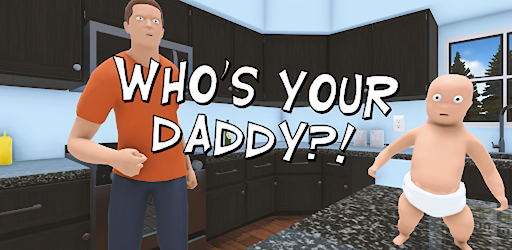
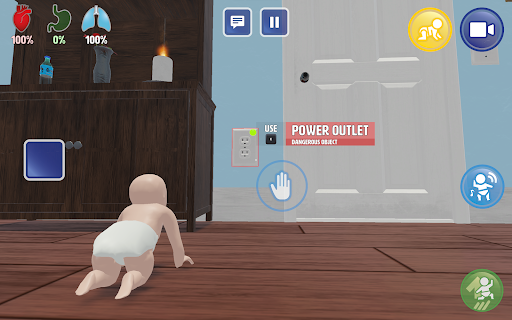

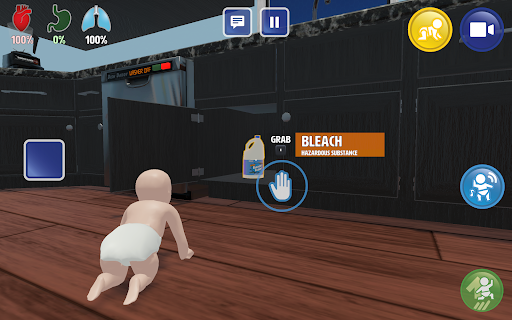
Who's Your Daddy is a casual multiplayer game featuring clueless Daddies attempting to prevent Babies from certain death. Play with up to 7 of your friends, and test your parenting skills in a competitive setup with wacky physics and over 69 potentially ominous household items.
Are you ready to become a parent?
As Daddy, you must prevent your baby from getting hurt through methods such as locking the cabinets and placing dangerous objects out of harm’s way. As Baby, you may attempt to overcome daddies attempts to protect the baby in various ways, including drinking bleach and sticking forks in electrical outlets.
Many household objects threaten your baby’s life
Play around in your two-story house and garden packed with potentially dangerous items such as:
- Power outlets: Capable of conducting lethal amounts of electricity
- Nail gun: Keep away from babies!
- Flour Jar: It’s never been easier to make daddy blind to your misbehavior!
- Sinks: A flooding hazard in the hands of a sentient baby!
- Woodchipper: It works on more than just wood!
- Fudge the dog: A loyal rideable beast with an appetite for anything
- The Oven: Careful not to burn anything!
- The Swimming Pool: Get fit, but do not drown!
- The Blender: If you can blend it, you can drink it!
- The Car: It turns out there is an age where you can learn too early
And much more...
Key Features
A beautiful two-story home and garden for you to watch over your son in
Over 67 everyday items with more or less ominous potential
Wacky physics for you to play around with
Customizable game modes, play the way you want to!
Two unique characters with customizable skins and perks
Randomized locations of crucial items, every game is different!
Dynamic music and sound for maximum immersion
Play with up to 7 of your friends online or locally
Controller support
Privacy Policy: https://eviltortillagames.com/terms-of-service
Mostra altro

1. Scarica il programma di installazione di MEmu e completa l'installazione

2. Avvia il Memu e apri il Google Play sulla homepage

3. Cerca Who's Your Daddy?! in Google Play
Install
4. Scarica e installa Who's Your Daddy?!
5. Al termine dell'installazione, fai clic sull'icona per avviar

6. Divertiti giocando a Who's Your Daddy?! su PC con MEmu
MEmu App Player è il miglior emulatore Android gratuito, utilizzato da 50 milioni di persone per ottenere un'esperienza di gioco Android superba. La tecnilogia di virtualizzazione MEmu ti permette di giocare a migliaia di giochi Android con semplicità sul tuo computer, anche i giochi con la grafica più esigente.
Schermo più grande con una grafica migliore; Lunga durata, senza limitazione di batteria o dati mobili.
Supporto completo per mappa di tastiera per un controllo preciso di tastiera e mouse o gamepad.
Multipli account di gioco o attività su un singolo PC contemporaneamente con il gestore di multi istanza.
Play Who's Your Daddy?! on PC by following steps: