
AirMate
Aggiornata
Versione corrente
1.7.3
Offerta da

Non devi più preoccuparti dei sovraccarichi durante l'utilizzo di AirMate sul tuo cellulare, liberati dal piccolo schermo e goditi dell'App su uno schermo molto più grande. D'ora in poi, sperimenta la tua App a schermo intero con tastiera e mouse. MEmu ti offre tutte le sorprendenti funzioni che ti aspettavi: installazione rapida e impostazione semplice, controlli intuitivi, niente più limitazioni di batteria, dati mobili e chiamate fastidiose. Il MEmu 9 nuovo di zecca è la prima scelta per utilizzare AirMate sul tuo computer. Codificato con il nostro assorbimento, il gestore multi-istanza consente di aprire 2 o più account contemporaneamente. E soprattutto, il nostro esclusivo motore di emulazione può sbloccare il pieno potenziale del tuo PC, rendendo tutto liscio e piacevole.
Mostra altro
Scarica AirMate su PC con MEmu Android Emulator. Divertiti giocando sul grande schermo. Airmate is a free and easy to use application for pilots, providing help for flight planning and navigation, and including many social sharing features.
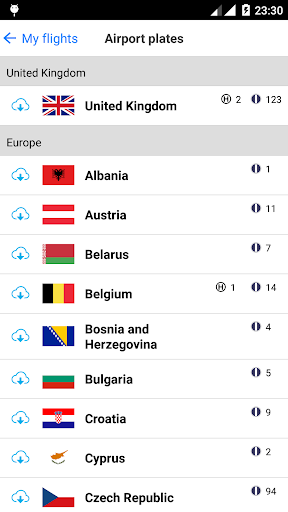
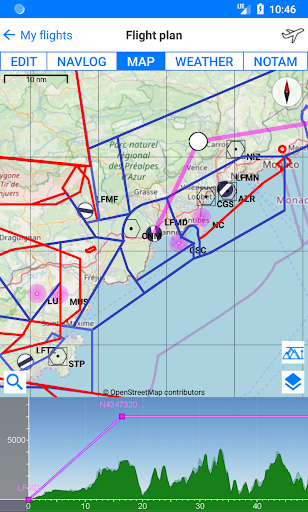
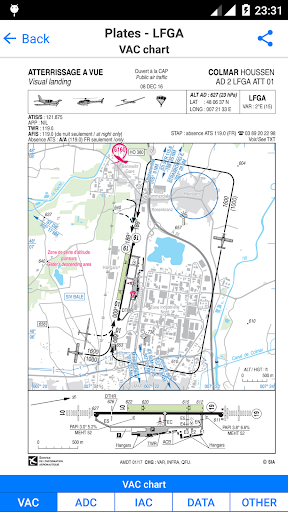
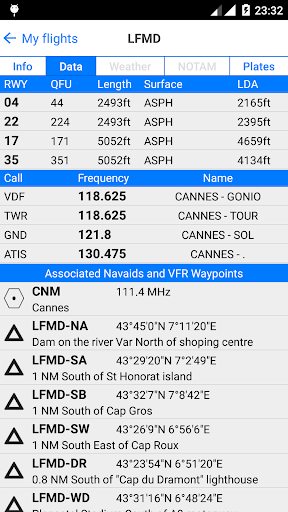
Airmate is a free and easy to use application for pilots, providing help for flight planning and navigation, and including many social sharing features.
Thanks to Airmate flight planning tools, you will get instant access to airport data and aviation maps worldwide and up to date weather and NOTAMs.
IFR and VFR airport plates are freely available in US (FAA charts), all Europe, and more than 200 other countries. Many of them are georeferenced and could be overlaid on the aviation chart. A powerful Plate Manager allows to download in advance all airport plates in a country, they could be easily printed and viewed.
During the flight, the moving map will display the aircraft location along the route, show airports and aeronautical data details. A profile view is available to display terrain elevation across the route. Airmate can also display a backup aircraft attitude indicator and flight parameters in an EFIS-like view using the device internal sensors.
Airmate includes a worldwide aeronautical database updated free of charge with airports, navigation beacons, waypoints, airways, regulated and restricted areas. Topographic maps and elevation data for most countries may be downloaded free of charge, as well as additional aviation map overlays such US Sectionals.
Airmate will also record your flights and allow to replay them later or export the flight path in gpx format.
A Satellite map display mode in flight planning or replay mode allows to familiarize with significant landmarks.
Airmate will save planned and flown flights, user waypoints and user aircrafts in the cloud and sync them between your devices.
Airmate brings numerous social features to the community. Pilots may leave ratings, tips and comments to share their experience with fellow pilots, and report fuel prices and landing fees. They could find friends, instructors, flight schools, aviation events and aircraft to rent near their home airport or any visited airport.
Airmate may be connected to most flight simulators to keep flying skills sharp.
Mostra altro

1. Scarica il programma di installazione di MEmu e completa l'installazione

2. Avvia il Memu e apri il Google Play sulla homepage

3. Cerca AirMate in Google Play
Install
4. Scarica e installa AirMate
5. Al termine dell'installazione, fai clic sull'icona per avviar

6. Divertiti giocando a AirMate su PC con MEmu
MEmu App Player è il miglior emulatore Android gratuito, utilizzato da 50 milioni di persone per ottenere un'esperienza di gioco Android superba. La tecnilogia di virtualizzazione MEmu ti permette di giocare a migliaia di giochi Android con semplicità sul tuo computer, anche i giochi con la grafica più esigente.
Schermo più grande con una grafica migliore; Lunga durata, senza limitazione di batteria o dati mobili.
Supporto completo per mappa di tastiera per un controllo preciso di tastiera e mouse o gamepad.
Multipli account di gioco o attività su un singolo PC contemporaneamente con il gestore di multi istanza.
Use AirMate on PC by following steps: