Bonjour RATP PC

Scarica Bonjour RATP su PC

Bonjour RATP PC
  • Aggiornata

  • Versione corrente

    8.17.1

  • Offerta da

    Bonjour RATP PC

Caratteristiche di Bonjour RATP su PC

Non devi più preoccuparti dei sovraccarichi durante l'utilizzo di Bonjour RATP sul tuo cellulare, liberati dal piccolo schermo e goditi dell'App su uno schermo molto più grande. D'ora in poi, sperimenta la tua App a schermo intero con tastiera e mouse. MEmu ti offre tutte le sorprendenti funzioni che ti aspettavi: installazione rapida e impostazione semplice, controlli intuitivi, niente più limitazioni di batteria, dati mobili e chiamate fastidiose. Il MEmu 9 nuovo di zecca è la prima scelta per utilizzare Bonjour RATP sul tuo computer. Codificato con il nostro assorbimento, il gestore multi-istanza consente di aprire 2 o più account contemporaneamente. E soprattutto, il nostro esclusivo motore di emulazione può sbloccare il pieno potenziale del tuo PC, rendendo tutto liscio e piacevole.

Mostra altro

Screenshot & video del PC Bonjour RATP

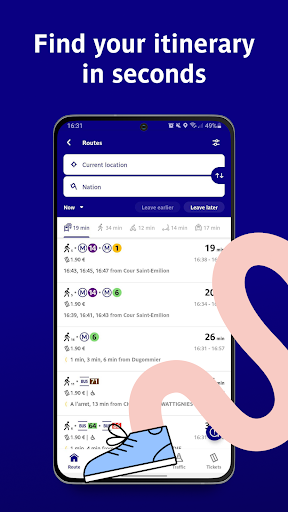
Scarica Bonjour RATP su PC con MEmu Android Emulator. Divertiti giocando sul grande schermo. DISCOVER BONJOUR RATP - Moving in Paris and its suburbs .
Informazioni del gioco

DISCOVER BONJOUR RATP - Moving in Paris and its suburbs


Bonjour RATP is your travel app that boosts your experience and makes travelling simple!

TRANSPORT ROUTES AT YOUR FINGERTIPS


All your journeys in Paris and its suburbs at your fingertips: Bus, Subway, Tube, RER train, Tram, suburban train, Velib' bike-share, LIME bike-share and DOTT bike-share, LIME scooters and DOTT scooters or Noctilien night bus and Orlyval airport shuttle.
For all transport modes, find bus, subway, tube, and train timetables in real time, Subway and RER train maps, routes, disruption alerts for the whole RATP network and many other services.

NAVIGATE THE ENTIRE PARIS AND ILE DE FRANCE NETWORK


Select all transportation types : Bus, Subway, RER train, Tram, suburban train, Vélib' bike-share, all Paris scooters and bike-sharing (LIME & DOTT)

Check timetables in real time and save your favourites,

Plan journeys and calculate travel time,

Filter routes accessible to people with reduced mobility in the search tab,

Receive alerts in case of disruptions on your lines.

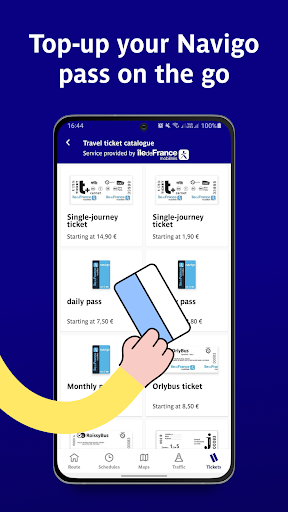
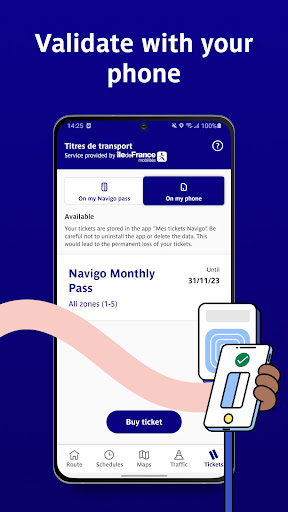
BUY TICKETS & NAVIGO PASS USING THE BONJOUR RATP APP


Reload your Navigo pass from your mobile phone using RFID technology,

Buy a t+ ticket at a preferential rate,

Pay for tickets and season tickets using Samsung Pay !

ALL PARISIANS SCOOTERS INCLUDE ON YOUR APP


Find and unlock your LIME and DOTT scooters directly in Bonjour RATP app' when you are in Paris !

You also can find DOTT and LIME bike-sharing services included in Bonjour.

RENT YOUR VELIB' BICYCLE IN A FEW CLICKS


Get access to green mobility modes, find the nearest available vélib' bicycle on the BONJOUR RATP app and take a Velib' directly!
It's quick and easy!

VIEW TRAFFIC IN REAL TIME


Get live traffic information on RER trains, Subway, tube, Bus, Tram and suburban trains.

TRAVEL PEACEFULLY


Check how busy your route is with the collaborative traffic indicator.

Our new GPS is ready to use for all your bikes and walk journey.

CREATE A SINGLE ACCOUNT TO MANAGE ALL TRIPS AND FAVOURITES


Save your favourite stations and timetables to receive real-time alerts on traffic conditions

Access a single account to book and pay for all trips at any time, from any smartphone

Register to get personalised offers and contribute to improving our services (test features in advance, give us feedback... all this thanks to your single account)

ACCESS OFFICIAL RATP AND ÎLE-DE-FRANCE MOBILITÉ MAPS OFFLINE


Metro,

RER trains,

Buses and Trams,

Noctilien night buses,

Suburban trains.

AND MUCH MORE


Find out suggestions for going out locally and to get away from the daily routine and take advantage of exclusive offers that we are currently working on
For more information on our services, please contact us by email at clients@bonjour-ratp.fr

Mostra altro

Come scaricare Bonjour RATP su PC

  • Bonjour RATP PC

    1. Scarica il programma di installazione di MEmu e completa l'installazione

  • Bonjour RATP PC

    2. Avvia il Memu e apri il Google Play sulla homepage

  • Bonjour RATP PC

    3. Cerca Bonjour RATP in Google Play

  • Bonjour RATP PC Install

    4. Scarica e installa Bonjour RATP

  • Bonjour RATP PC

    5. Al termine dell'installazione, fai clic sull'icona per avviar

  • Bonjour RATP PC
    Bonjour RATP PC Bonjour RATP PC

    6. Divertiti giocando a Bonjour RATP su PC con MEmu

Perché Usare MEmu per Bonjour RATP

MEmu App Player è il miglior emulatore Android gratuito, utilizzato da 50 milioni di persone per ottenere un'esperienza di gioco Android superba. La tecnilogia di virtualizzazione MEmu ti permette di giocare a migliaia di giochi Android con semplicità sul tuo computer, anche i giochi con la grafica più esigente.

  • Schermo più grande con una grafica migliore; Lunga durata, senza limitazione di batteria o dati mobili.

  • Supporto completo per mappa di tastiera per un controllo preciso di tastiera e mouse o gamepad.

  • Multipli account di gioco o attività su un singolo PC contemporaneamente con il gestore di multi istanza.

Pronto per giocare?

argomenti più seguiti

Bonjour RATP - FAQs

  • Come si usa Bonjour RATP su PC?

    Use Bonjour RATP on PC by following steps:

    • Download MEmu, then install and launch it
    • Login to Google Play Store, install the app
    • Enjoy using the app on PC with MEmu
  • Quali sono i requisiti minimi di sistema per eseguire Bonjour RATP su PC?
    • Intel or AMD Processor
    • Microsoft Windows 7 and above
    • 2GB of memory
    • 5GB of free disk space
    • Hardware Virtualization Technology