Bonjour RATP PC

Bonjour RATP auf dem PC herunterlanden

Bonjour RATP PC
  • Aktualisiert

  • Aktuelle Version

    8.17.1

  • Angeboten von

    Bonjour RATP PC

Eigenschaften von Bonjour RATP auf dem PC

Machen Sie sich keine Sorgen mehr über überhöhte Gebühren, wenn Sie Bonjour RATP auf Ihrem Mobiltelefon verwenden, befreien Sie sich von dem winzigen Bildschirm und genießen Sie die Nutzung der App auf einem viel größeren Display. Von nun an können Sie Ihre App mit Tastatur und Maus im Vollbildmodus nutzen. MEmu bietet Ihnen all die überraschenden Funktionen, die Sie erwartet haben: schnelle Installation und einfache Einrichtung, intuitive Steuerung, keine Einschränkungen mehr durch Batterie, mobile Daten und störende Anrufe. Der brandneue MEmu 9 ist die beste Wahl für die Nutzung von Bonjour RATP auf Ihrem Computer. Mit unserer Absorption kodiert, ermöglicht der Multi-Instanz-Manager die Eröffnung von 2 oder mehr Konten zur gleichen Zeit. Und das Wichtigste, unsere exklusive Emulations-Engine kann das volle Potenzial Ihres PCs freisetzen und alles reibungslos und angenehm gestalten.

Mehr anzeigen

Bilder & Videos von Bonjour RATP auf dem PC

Laden Sie Play Bonjour RATP auf dem PC mit MEmu Android Emulator. Viel Spaß beim Spielen auf großmundieren. DISCOVER BONJOUR RATP - Moving in Paris and its suburbs .
App-Informationen

DISCOVER BONJOUR RATP - Moving in Paris and its suburbs


Bonjour RATP is your travel app that boosts your experience and makes travelling simple!

TRANSPORT ROUTES AT YOUR FINGERTIPS


All your journeys in Paris and its suburbs at your fingertips: Bus, Subway, Tube, RER train, Tram, suburban train, Velib' bike-share, LIME bike-share and DOTT bike-share, LIME scooters and DOTT scooters or Noctilien night bus and Orlyval airport shuttle.
For all transport modes, find bus, subway, tube, and train timetables in real time, Subway and RER train maps, routes, disruption alerts for the whole RATP network and many other services.

NAVIGATE THE ENTIRE PARIS AND ILE DE FRANCE NETWORK


Select all transportation types : Bus, Subway, RER train, Tram, suburban train, Vélib' bike-share, all Paris scooters and bike-sharing (LIME & DOTT)

Check timetables in real time and save your favourites,

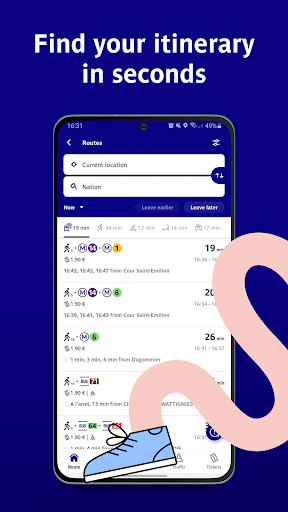
Plan journeys and calculate travel time,

Filter routes accessible to people with reduced mobility in the search tab,

Receive alerts in case of disruptions on your lines.

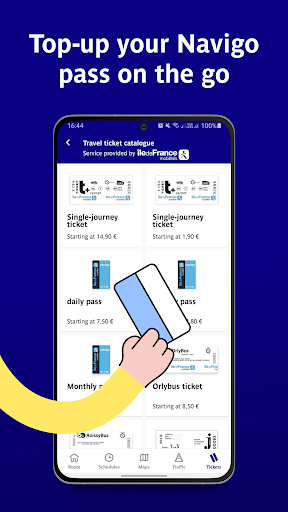
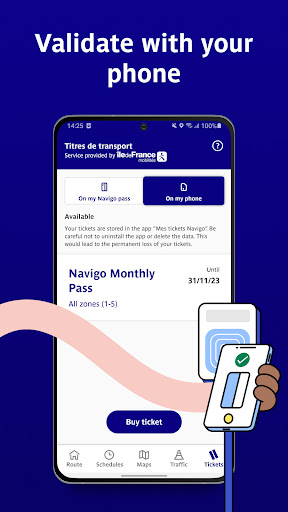
BUY TICKETS & NAVIGO PASS USING THE BONJOUR RATP APP


Reload your Navigo pass from your mobile phone using RFID technology,

Buy a t+ ticket at a preferential rate,

Pay for tickets and season tickets using Samsung Pay !

ALL PARISIANS SCOOTERS INCLUDE ON YOUR APP


Find and unlock your LIME and DOTT scooters directly in Bonjour RATP app' when you are in Paris !

You also can find DOTT and LIME bike-sharing services included in Bonjour.

RENT YOUR VELIB' BICYCLE IN A FEW CLICKS


Get access to green mobility modes, find the nearest available vélib' bicycle on the BONJOUR RATP app and take a Velib' directly!
It's quick and easy!

VIEW TRAFFIC IN REAL TIME


Get live traffic information on RER trains, Subway, tube, Bus, Tram and suburban trains.

TRAVEL PEACEFULLY


Check how busy your route is with the collaborative traffic indicator.

Our new GPS is ready to use for all your bikes and walk journey.

CREATE A SINGLE ACCOUNT TO MANAGE ALL TRIPS AND FAVOURITES


Save your favourite stations and timetables to receive real-time alerts on traffic conditions

Access a single account to book and pay for all trips at any time, from any smartphone

Register to get personalised offers and contribute to improving our services (test features in advance, give us feedback... all this thanks to your single account)

ACCESS OFFICIAL RATP AND ÎLE-DE-FRANCE MOBILITÉ MAPS OFFLINE


Metro,

RER trains,

Buses and Trams,

Noctilien night buses,

Suburban trains.

AND MUCH MORE


Find out suggestions for going out locally and to get away from the daily routine and take advantage of exclusive offers that we are currently working on
For more information on our services, please contact us by email at clients@bonjour-ratp.fr

Mehr anzeigen

So installierst du Bonjour RATP auf dem PC

  • Bonjour RATP PC

    1. Laden das MEmu-Installationsprogramm herunter und beenden die Installation

  • Bonjour RATP PC

    2. MEmu starten und Google Play auf der Homepage öffnen

  • Bonjour RATP PC

    3. Suchen Bonjour RATP in Google Play

  • Bonjour RATP PC Install

    4. Herunterladen und Installieren Bonjour RATP

  • Bonjour RATP PC

    5. Klicken nach Abschluss der Installation auf das Symbol, um es zu starten

  • Bonjour RATP PC
    Bonjour RATP PC Bonjour RATP PC

    6. Verwenden Sie MEmu, um Bonjour RATP auf Ihrem PC zu nutzen

Warum MEmu für Bonjour RATP nutzen

MEmu Play ist aktuell der beste kostenlose Android-Emulator und bietet 50 Millionen Nutzern ein überragendes Android-App-Erlebnis. Dank der Virtualisierungstechnologie von MEmu können Sie Tausende von Android-Apps problemlos auf Ihrem Computer nutzen, selbst solche mit hohen Grafikanforderungen.

  • BGrößeres Bild mit besserer Grafik; Keine unterbrechungen, keine sorgen um Akku

  • Komplette Tastenbelegung unterstützt mit Maus und Tastatur oder Controller

  • Mit dem „Multi-Instance-Manager“ können Sie mehrere Spielkonten oder Spiele gleichzeitig auf einem PC ausführen.

Bereit es zu benutzen?

Heiße Themen

Bonjour RATP - FAQs

  • Wie verwende ich Bonjour RATP auf dem PC?

    Use Bonjour RATP on PC by following steps:

    • Download MEmu, then install and launch it
    • Login to Google Play Store, install the app
    • Enjoy using the app on PC with MEmu
  • Was sind die Mindestsystemanforderungen, um Bonjour RATP auf dem PC auszuführen?
    • Intel or AMD Processor
    • Microsoft Windows 7 and above
    • 2GB of memory
    • 5GB of free disk space
    • Hardware Virtualization Technology