
CINEHAX: Movies & TV Shows
Aggiornata
Versione corrente
1.0.4
Offerta da

Non devi più preoccuparti dei sovraccarichi durante l'utilizzo di CINEHAX: Movies & TV Shows sul tuo cellulare, liberati dal piccolo schermo e goditi dell'App su uno schermo molto più grande. D'ora in poi, sperimenta la tua App a schermo intero con tastiera e mouse. MEmu ti offre tutte le sorprendenti funzioni che ti aspettavi: installazione rapida e impostazione semplice, controlli intuitivi, niente più limitazioni di batteria, dati mobili e chiamate fastidiose. Il MEmu 9 nuovo di zecca è la prima scelta per utilizzare CINEHAX: Movies & TV Shows sul tuo computer. Codificato con il nostro assorbimento, il gestore multi-istanza consente di aprire 2 o più account contemporaneamente. E soprattutto, il nostro esclusivo motore di emulazione può sbloccare il pieno potenziale del tuo PC, rendendo tutto liscio e piacevole.
Mostra altro
Goditi un'esperienza straordinaria con CINEHAX: Movies & TV Shows su PC con MEmu Play. È un potente emulatore Android gratuito che ti offre migliaia di app Android per la versione desktop. Divertiti a connetterti con gli amici e a perfezionare il tuo lavoro con maggiore efficienza! Discover movies and TV shows with CINEHAX.


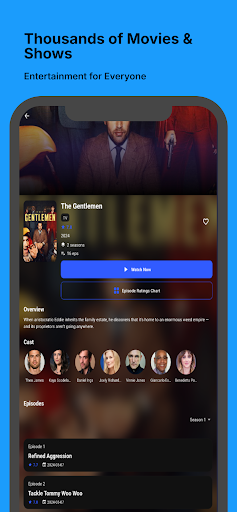

Discover movies and TV shows with CINEHAX.
Explore popular entertainment, find trending titles, check movie details and discover TV series from different genres and years. CINEHAX brings useful movie and television information together so you can quickly learn more about the titles that interest you.
FIND MOVIES
Browse movies across action, comedy, drama, horror, romance, thriller, animation, fantasy, science fiction and many other genres.
Explore popular movies, recent releases and titles from previous years. If you already know what you're looking for, search by name and jump directly to the available movie information.
EXPLORE TV SHOWS
Discover TV shows and series alongside movies.
Check available information about a series, including its story, genres, ratings, cast, seasons, episodes and release details.
Whether you're interested in a new TV series or looking up something you've heard about, CINEHAX makes the information easy to explore.
SEE WHAT'S TRENDING
Looking for ideas?
Browse trending movies and TV shows to discover titles currently getting attention. Move from popular entertainment to recent releases or explore something outside your usual genres.
There's always another title to uncover.
MOVIE DETAILS IN ONE PLACE
Want to know more about a movie before saving it?
Available information may include:
• Synopsis
• Movie ratings
• Genres
• Release date
• Runtime
• Cast and crew
• Trailers
• Related movies
Information varies depending on the title and available data.
TV SERIES DETAILS
Explore television beyond the title.
For supported TV shows, you can browse available seasons and episode information alongside ratings, cast details, genres and story summaries.
This makes CINEHAX useful whether you're researching a movie or exploring a longer television series.
BROWSE BY GENRE
Sometimes you don't have a title in mind.
Start with a genre instead.
Browse action movies, comedy, horror, drama, romance, thriller, animation, science fiction, fantasy and more. Genre exploration can help you uncover movies and TV shows you wouldn't have searched for directly.
RATINGS, CAST & TRAILERS
Go beyond the poster.
Check available ratings to get another perspective on a title, explore cast and crew information, and find trailer details when available.
Recognizing an actor or director can also lead you toward another interesting movie or TV series.
SAVE INTERESTING TITLES
Found something worth remembering?
Keep interesting movies and TV shows together so they're easier to return to later.
Save recent discoveries, recommendations, upcoming releases or titles that simply caught your attention.
SEARCH. EXPLORE. DISCOVER.
Search for a movie you already know.
Explore TV shows when you want something different.
Browse trending titles when you need inspiration.
CINEHAX gives you multiple ways to discover movies and television while keeping the information you need within easy reach.
DISCLAIMER
CINEHAX is an independent movie and TV information and discovery application. It does not host, stream, broadcast, download, sell, rent or distribute movies, television shows, episodes or live TV channels.
Information displayed in CINEHAX may be supplied by third-party data providers and is intended for informational and discovery purposes.
CINEHAX is not affiliated with, sponsored by or endorsed by movie studios, television networks, production companies, streaming platforms or other entertainment services unless explicitly stated.
Movie and television titles, trademarks, posters, artwork, logos, trailers and other intellectual property belong to their respective owners. Ratings, cast information, release dates, episode details and other metadata may vary according to title, region and data provider.
Mostra altro

1. Scarica il programma di installazione di MEmu e completa l'installazione

2. Avvia il Memu e apri il Google Play sulla homepage

3. Cerca CINEHAX: Movies & TV Shows in Google Play
Install
4. Scarica e installa CINEHAX: Movies & TV Shows
5. Al termine dell'installazione, fai clic sull'icona per avviar

6. Divertiti giocando a CINEHAX: Movies & TV Shows su PC con MEmu
MEmu App Player è il miglior emulatore Android gratuito, utilizzato da 50 milioni di persone per ottenere un'esperienza di gioco Android superba. La tecnilogia di virtualizzazione MEmu ti permette di giocare a migliaia di giochi Android con semplicità sul tuo computer, anche i giochi con la grafica più esigente.
Schermo più grande con una grafica migliore; Lunga durata, senza limitazione di batteria o dati mobili.
Supporto completo per mappa di tastiera per un controllo preciso di tastiera e mouse o gamepad.
Multipli account di gioco o attività su un singolo PC contemporaneamente con il gestore di multi istanza.
Use CINEHAX: Movies & TV Shows on PC by following steps: